Hi all,
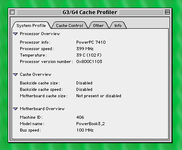
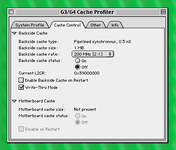
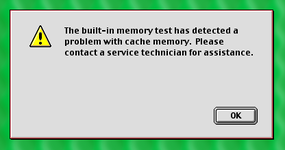
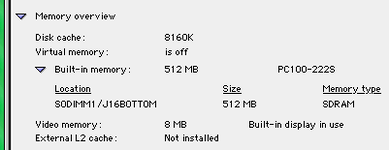
I have a PowerBook G4 Titanium 400 MHz with failed L2 cache. When I try to boot into Mac OS 9, I get an error message to this effect. I can't remember the exact message, and I have taken the machine apart now so I can't easily find out, but I don't think it's important in itself. Apple System Profiler shows the machine as not having L2 cache (it should show as 1 MB).
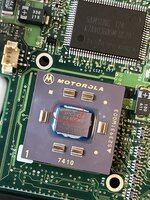
On trying to install Mac OS X Tiger, the installation fails due to some cache-related error, so I am pretty sure that the problem is to do with the cache. The only other thing I could think of was that the cache interface on the 7410 CPU has failed, but I feel that this is less likely.
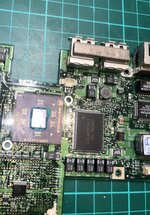
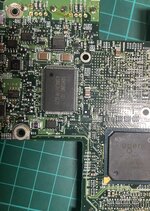
Examining the logic board I can see that the cache is implemented by two Samsung K7A403600M-QC20 chips. It runs at 200 MHz which makes sense for the speed grade used here. I have included a datasheet for these chips (although it only mentions older, slower speed grades). The IS61LPS12836A-200TQLI, which is currently available new from Mouser at a reasonable price, seems to be totally compatible. I have also included its datasheet in case anyone else wants to take a look.
I have been considering replacing the cache chips to see if this will fix the issue. I appreciate that the 400 MHz model is the worst of the bunch, but getting hold of any TiBook at all in the UK is difficult/expensive now.
Before I take the risk of moving forward with this project (I am pretty confident with hot air rework but any project of this nature has risks!), I have a few questions:
Ivan
I have a PowerBook G4 Titanium 400 MHz with failed L2 cache. When I try to boot into Mac OS 9, I get an error message to this effect. I can't remember the exact message, and I have taken the machine apart now so I can't easily find out, but I don't think it's important in itself. Apple System Profiler shows the machine as not having L2 cache (it should show as 1 MB).
On trying to install Mac OS X Tiger, the installation fails due to some cache-related error, so I am pretty sure that the problem is to do with the cache. The only other thing I could think of was that the cache interface on the 7410 CPU has failed, but I feel that this is less likely.
Examining the logic board I can see that the cache is implemented by two Samsung K7A403600M-QC20 chips. It runs at 200 MHz which makes sense for the speed grade used here. I have included a datasheet for these chips (although it only mentions older, slower speed grades). The IS61LPS12836A-200TQLI, which is currently available new from Mouser at a reasonable price, seems to be totally compatible. I have also included its datasheet in case anyone else wants to take a look.
I have been considering replacing the cache chips to see if this will fix the issue. I appreciate that the 400 MHz model is the worst of the bunch, but getting hold of any TiBook at all in the UK is difficult/expensive now.
Before I take the risk of moving forward with this project (I am pretty confident with hot air rework but any project of this nature has risks!), I have a few questions:
- Will the machine care if the SRAM chips are of a different brand (I assume not)?
- Is it possible/likely that the SRAM chips would fail?
- Is there any possible advantage to installing the 250 MHz version of the ISSI chips?
Ivan