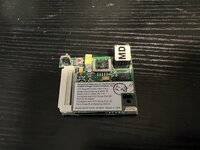
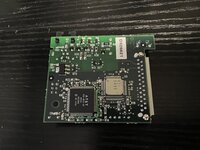
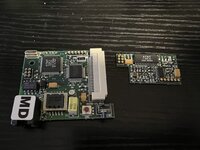
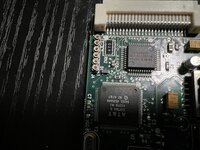
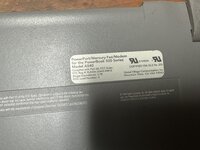
Bumping this thread with some more info.
Mapped out the pin functions this morning. I'm reasonably confident in the table below with a couple of caveats:
- I haven't been able to determine whether or not pins 22, 25, 30, and 38 are connected
- I'm not sure of the functionality of pins 10, 18, 27, and 43. Pin 10 is pulled down and the rest are pulled up to +5V_MODEM
If you're looking at the connector on the modem, pin 1 is the rightmost pin on the bottom edge. Odd-numbered pins are on the bottom edge; even-numbered pins are on the top. Pin numbers ascend from right to left.
Markdown (GitHub flavored):
Pin | Name          | Type         | Description
----+---------------+--------------+-------------
  1 | `IRQ`         | Output       | Modem interrupt request.
  2 | `/RESET`      | Input        | Modem reset.
  3 | `GND`         | Ground       | Digital ground.
  4 | `A4`          | Input        | Modem address bus.
  5 | `DIR`         | Input        | Data bus direction. When high, the modem drives the data bus; when low, the host drives the data bus.
  6 | `/RBDVR`      | Open coll.   | Relay B Driver from modem card to modem adapter card (DAA) in expansion device - MiniDock or Duo Dock.
  7 | `A3`          | Input        | Modem address bus.
  8 | `+5V_US`      | Power        | Unswitched +5 V. Always on.
  9 | `A2`          | Input        | Modem address bus.
 10 | `PD0`         | Output       | Pulled down via a 4.7k resistor.
 11 | `A1`          | Input        | Modem address bus.
 12 | `/CS`         | Input        | Modem chip select.
 13 | `A0`          | Input        | Modem address bus.
 14 | `MDMSOUND`    | Output       | Phone line monitor. Analog signal.
 15 |               |              |
 16 | `GND`         | Ground       | Digital ground.
 17 | `/WRITE`      | Input        | Modem write strobe.
 18 | `PU0`         | Output       | Pulled up to `+5V_MODEM` via a 100k resistor.
 19 | `/READ`       | Input        | Modem read strobe.
 20 | `/MDMPWR`     | Input        | Power control signal for `+5V_MODEM`. When asserted (low), +5 V appears on the `+5V_MODEM` pins.
 21 | `RAW_10V`     | Power        | Unregulated +10 V. It is on when the CPU is awake (maximum current 25mA).
 22 |               |              |
 23 | `D6`          | Input/Output | Modem data bus.
 24 | `D3`          | Input/Output | Modem data bus.
 25 |               |              |
 26 | `D7`          | Input/Output | Modem data bus.
 27 | `GND`         | Ground       | Digital ground.
 28 | `D2`          | Input/Output | Modem data bus.
 29 | `D4`          | Input/Output | Modem data bus.
 30 |               |              |
 31 | `D5`          | Input/Output | Modem data bus.
 32 | `D1`          | Input/Output | Modem data bus.
 33 | `/RADVR`      | Open coll.   | Relay A driver from the data pump.
 34 | `D0`          | Input/Output | Modem data bus.
 35 | `GND`         | Ground       | Digital ground.
 36 | `/RINGDET`    | Input        | Ring detect signal from an expansion device’s adapter card (DAA).
 37 | `J3`          | Output       | Pulled up to `+5V_MODEM` via a 100k resistor. Connected to ground if J3 is closed.
 38 |               |              |
 39 | `+5V_MODEM`   | Power        | +5 V modem power. On when `/MDMPWR` is asserted.
 40 | `+5V_MODEM`   | Power        | +5 V modem power. On when `/MDMPWR` is asserted.
 41 | `+5V_MODEM`   | Power        | +5 V modem power. On when `/MDMPWR` is asserted.
 42 | `SERVEE`      | Power        | -5 V power. On when CPU is awake.
 43 | `J3`          | Output       | Pulled up to `+5V_MODEM` via a 100k resistor. Connected to ground if J3 is closed.
 44 | `DAA_GND`     | Ground       | Analog ground.
 45 | `DAA_GND`     | Ground       | Analog ground.
 46 | `LINE_T/R`    | Input/Output | Voice-band analog signal to or from an expansion device’s modem adapter card (DAA).
 47 | `KEYSCANX[5]` | Output       | Keyscan line to the Power Manager, for power-on button.
 48 | `DAA_GND`     | Ground       | Analog ground.
 49 | `KEYSCANX[0]` | Output       | Keyscan line to the Power Manager, for power-on button.
 50 | `ON/OFF_OUT`  | Output       | CPU on/off control signal to Power Manager.
A basic schematic for the digital bits of the factory modem is attached.
I haven't gotten as far with the code that drives the bus. The bus is connected to the power manager IC, so all I'm certain of is that all interaction with the modem must go through the OS Power Manager. The SuperMario sources have been a great source of info about the _PMgrOp trap:
I plan to experiment with using the trap to try to send some commands to a modem. The information above and the RCV144DPL datasheet are probably enough to puzzle out the structure of the relevant commands.
Currently working on reversing bits of the INIT and DRVR resources in the PowerBook Setup control panel for some better end-to-end info.
All told, the simplicity of the interfaces--both software and hardware--seem promising as far as the ability to install arbitrary hardware in the modem port goes. It seems like it might be possible to hang a uC off the bus behind some glue logic that copies what's on the factory board, then access the bus using the power manager commands (e.g. modemWriteReg, modemReadReg, modemWriteData, modemReadFIFOData). That would open up a pretty wide range of possibilities, which is especially exciting given that whatever is installed in that slot has access to the space that would otherwise be occupied by the RJ11 connector.
I'm not sure what the bandwidth of the modem slot is, but I'm guessing that it's fairly low. Can't imagine that a 14.4kpbs modem demanded that much. The overhead of accessing the bus via the SPI-attached power manager also won't help. It'll be interesting to see what's possible!