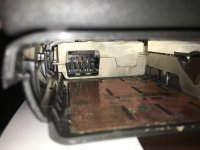
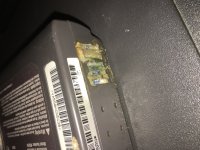
Hey MattB, my PB190 had the same problem. I ended up stripping down the laptop to the logic board and soaking the corroded contacts in vinegar for a few hours, as well as soaking the battery connector terminal in vinegar also, and then finished off with a toothbrush. The copper contacts cleaned up very nicely!, however one of the contact springs had been eaten right through, and simply broke off, so I re-soldered the broken tiny piece back onto the lower spring part of the copper finger which was still intact on the board.
I pulled apart the battery pack and the 12x NiMH "AA" batteries had all leaked (their leaky electrolyte is mainly Sodium Hydroxide NaOH, which converts the Copper to Copper Hydroxide (Cu(OH)2) which is that beautiful sky blue coloured corrosion that you get on all the copper components). Being a fairly alkaline compound (the Copper Hydroxide) it readily dissociates with acids (such as Vinegar, (acetic acid and the acetate anion) to form soluble copper compounds, and this is why using an acid helps to remove the corrosion and return the lustrous copper underneath the corrosion easily.
Cu(OH)2 + 2CH3COOH => Cu(CH3COO)2 + 2H2O
This new compound, Copper Acetate, is water soluble so it dissolves and is also a dark sky-blue colour. The reaction will will give off carbon dioxide gas as it neutralises if there is Copper Carbonate also formed along with the Copper Hydroxide, so don't worry if you see any light gassing or bubbles appearing, it will only be dissolving the corrosion, and not attacking the underneath copper.
After soaking the contacts for a few hours, simply wash them under running water with a toothbrush (light scrubbing or else you might break something) and they will return to glory once again!.
I'm currently in the process of re-packing new AA NiMH cells into the original PB190 battery case. I'm using 3Ah cells, so i'm hoping for a 5 hour run time, just because. ^_^