• Hello MLAers! We've re-enabled auto-approval for accounts. If you are still waiting on account approval, please check this thread for more information.

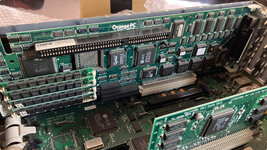
OrangePC Card on IIfx

So the sound for Hoyle Classic can only be heard through the IIfx’s internal speaker for some reason and only when the volume on the game’s controller is set to max. It’s horrendous to say the least. Color is still pooched. I wonder if I downloaded a bum copy of the game?
 
If you haven't changed the video driver it'll be 640 x 480 16 colours - see Windows Setup. It definitely will be slow with 256 colours but find the OrangePC pulls out some tricks to make it tolerable.

The sound issue maybe adjust the SB mixer setting under DOS before loading Windows.
 
If you haven't changed the video driver it'll be 640 x 480 16 colours - see Windows Setup.
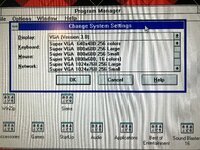
Tried messing around with the video drivers currently installed in 3.1. The only one that works reliably and doesn't leave a garbled mess is VGA (Version 3.0). Hoyle was designed to run on 256 colors (first Sierra title to do so).
The sound issue maybe adjust the SB mixer setting under DOS before loading Windows.
Adjust to what specifically?
 
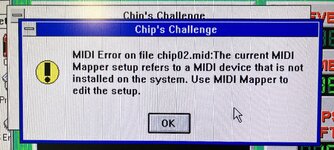
Running into another sound issue in Win 3.1, this time it’s with Chip’s Challenge in the Best of Entertainment Pack:
IMG_1323.jpeg
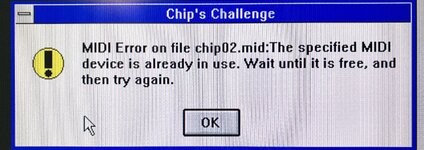
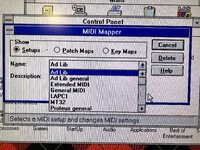
When I open MIDI Mapper in the Win 3.1 Control Panel, I get this error in Chip’s Challenge:
IMG_1324.jpeg
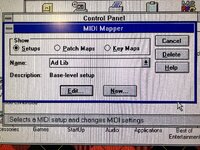
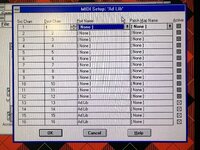
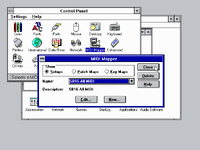
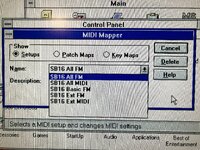
Not sure what is going on here. I really don’t want to mess with the MIDI settings and create more havoc. Here’s what the Mapper looks like at the moment:
IMG_1326.jpeg
IMG_1325.jpeg
Thoughts?
 
Used the install.exe file in the SB16 folder to reinstall the SB-2770 drivers in Win 3.1. All is good now:
IMG_1335.jpeg
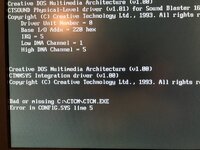
I did notice on startup that there is a line about a corrupt CTCM file. Not sure what that is about:
IMG_1336.jpeg
Still need to find a proper 256 color driver that won’t hang Win 3.1 and fix the color issues in Hoyle Classic. At least the sound for that program is coming out of the SB-2770 and not the IIfx’s internal speaker. Any thoughts on which driver to install?
 
Tried a bunch of different Super VGA drivers for Win 3.1 and none of them worked (monitor would be blank, garbled, or would hang at the Win 3.1 splash screen).
IMG_1338.jpeg
I’m still unsure if this is an 8.24 GC issue or if my particular OrangePC card is simply incompatible with different VGA drivers (as mentioned in previous posts, the only driver that works is VGA Version 3.0 - no explanation why - it’s been like this since I obtained this card some years back).
 
Got a copy of Microsoft MS-DOS 6.22 Upgrade. Still loads into the IBM DOS 6.1 shell when I start the OrangePC app (I guess this 6.22 upgrade doesn’t entirely replace a previous version of DOS).

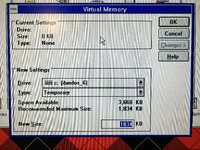
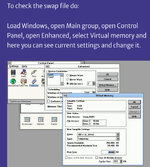
I’m now down to 3 MB of usable space in my 50 MB partition with the install of 6.22. I was reading about the swap file on a Vogons thread. My Virtual Memory window seems to be excluding some options as compared to the window in the Vogons thread:
IMG_1385.jpeg
IMG_1386.jpeg
Thoughts?
 
Windows 3.11 for Workgroups has both settings for 32-bit File and Disk Access, see link below you can try to enable 32-bit Disk Access by editing SYSTEM.INI (if it doesn't work put it back).

Mate, it's 2025 and it's painful seeing you work in a 50MB partition; Windows doesn't really like tiny swap files or very limited disk space. I'd reinstall everything on a nice large partition, proper drivers, video drivers and enjoy more that way.

CONFIG.SYS is possibly referring to the CTCM. EXE file being in the wrong location, you can remove the reference to this file. CTCM.EXE I think is used just for enabling plug and plug settings on the card.

 
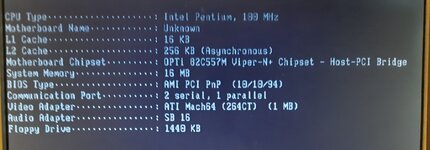
They show components, motherboard, cpu specs, graphic and sound card models, storage and so on.
Some can do benchmarks, dump bios rom and more.

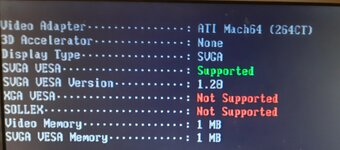
That's what Aida16 shows on the summary and video/graphic pages for the Apple 12" PCI DOS compatibility card:
20250720_110452.jpg20250720_110320.jpg
 
Last edited:
Back
Top