• Hello MLAers! We've re-enabled auto-approval for accounts. If you are still waiting on account approval, please check this thread for more information.

No sound on Macintosh SE

mloret

6502
Good morning. I am fairly new to vintage Macs, and I recently picked up a decent SE. It has some issues I think I can tackle (HD doesn't work, floppy doesn't eject) but I'm stumped by one in particular. I've got no sound going to the speaker but sound coming out of headphones. In terms of trouble shooting, where should I start? The pins on the little two-pin connector that runs from the logic board to the speaker itself seems a little bent up. I'm finding the SE much more difficult to work on that my old 128k. Any suggestions are appreciated.
 
Congrats on your SE. I fixed one up ~4 years ago, and I'm quite fond of it.

Good call on checking the speaker itself, OP do you have a multi meter on hand?
 
Yes, check the speaker. Another thing to check is the switch embedded in the back of the headphone socket that turns the speaker off: I've seen that get wedged before and stop the speaker working.
 
Congrats on your SE. I fixed one up ~4 years ago, and I'm quite fond of it.

Good call on checking the speaker itself, OP do you have a multi meter on hand?
Thank you! I do have a multimeter. What do I connect the leads to? One to the speaker and the other to...?
 
Yes, check the speaker. Another thing to check is the switch embedded in the back of the headphone socket that turns the speaker off: I've seen that get wedged before and stop the speaker working.
I will look to see if I can find a switch. I didn't inspect the headphone socket well, though I can tell you that it works.
 
Thank you! I do have a multimeter. What do I connect the leads to? One to the speaker and the other to...?
Unplug the speaker, then test the resistance. See https://www.sweetwater.com/sweetcare/articles/how-to-test-a-speaker/ (skip the battery part, since you have a meter). The important part:

"You can touch the positive and negative leads to either terminal when reading resistance. If you have a 4 ohm (impedance) speaker, it could measure the resistance on the multimeter between 2 and 3.4 ohms, an 8 ohms speaker could measure between 5 to 7 ohms, and a 16 ohms speaker might measure between 12 to 14 ohms. If a speaker measures very low or no resistance, then it is bad. This means there is a short inside the speaker. If the speaker measures a very high resistance, it is also bad. This means there is a broken connection in the speaker. Either way, the speaker will need to be replaced."
 
The speaker is hard to get to. I need to take the analog board out don't I?
Nope, just the logic board. Overall it's pretty easy if you just need to get to the plug. Open the case, discharge the CRT, unplug power, SCSI, and floppy. The logic board should come right out, I usually remove the speaker plug at this point because it's hard to get to with the logic board still in.
 
Nope, just the logic board. Overall it's pretty easy if you just need to get to the plug. Open the case, discharge the CRT, unplug power, SCSI, and floppy. The logic board should come right out, I usually remove the speaker plug at this point because it's hard to get to with the logic board still in.
Are you sure?
Nope, just the logic board. Overall it's pretty easy if you just need to get to the plug. Open the case, discharge the CRT, unplug power, SCSI, and floppy. The logic board should come right out, I usually remove the speaker plug at this point because it's hard to get to with the logic board still in.
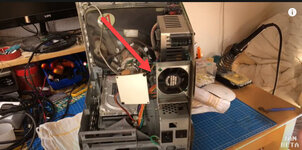
Are you sure? Here's what my setup looks like. Not sure how to get to the speaker with the analog board in place. Btw, I do have the drives and logic board out.
SE.jpg
 
Ah, sorry, I thought you were just trying to get to the plug for the speaker, not the speaker itself. I'm not sure of an easier way to get to it, I think you're right that the analog board has to come out.
 
It's OK, just disconnect it, set your multi meter to ohms/resistance, and try to get each probe to touch a pin in the connector. It doesn't matter which probe to which pin.
 
Back
Top