



I received a Macintosh 128K that was missing several parts (screws, shields, etc) due to whomever opened it last. One specific piece that was missing is a metal clip that goes over the edge of the analog PCB and provides solid grounding contact with the chassis. I believe this is part #805-0576.
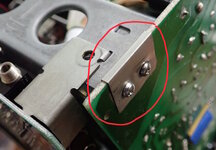
It occurred to me that it is approximately the shape and thickness of a floppy disk shutter. Most of us have some spare floppies that won't format anymore. Use one of them, or a virgin System 0.1 disk. Avoid disks with plastic/coated shutters. The grounding clip needs to be electrically conductive on its surface.
For this next step, it helps if you can borrow a grounding clip from another Mac to act as a template. However, the dimensions aren't critical, so you can just rough out a 23 mm x 19 mm rectangle and use the PCB to determine the location of the screw holes.
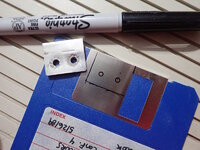
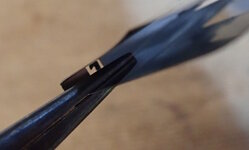
Get angry with the floppy disk to pop off the shutter. Then use needle-nose flat jaw pliers to bend down the internal protrusions, such as the hook where the spring attached.
Below: Insert a 0.1" thick piece of scrap material to hold the shutter during machining. Not only will this act as a convenient handle, but prevents the sheet metal from deforming. In the image below, note a short cut where I tried to use snips and it really warps the metal. We will not be using this method going forward.
Drill the holes using a 1/8" bit.
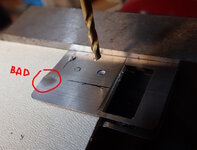
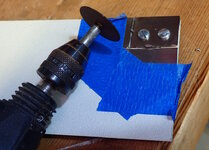
Insert screws (with nuts on the opposite side) into the holes to securely hold the clip to the scrap material. This results in a cleaner cut and avoids personal injury from the clip flying off. Apply tape on the portion being removed. Then, using a Dremel with a cut-off wheel, cut along the lines you traced earlier.
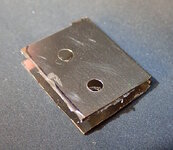
Although the shape is now correct, I was disappointed in the scuffing due to my unsteady hand. Perhaps place masking tape over the primary clip portion to protect it? There are also a lot of burrs.
Use a metal file, grinding wheel, or sandpaper to smooth the edges. If I were to cut it again, I would have rounded the corners as well.
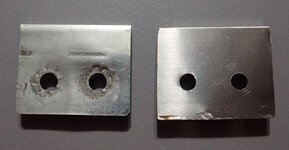
Left: Original clip. Right replacement made from floppy shutter. Although not pretty, the replacement ground clip is functional.
I'll be interested in hearing if anyone has a more effective or efficient technique.
- David
It occurred to me that it is approximately the shape and thickness of a floppy disk shutter. Most of us have some spare floppies that won't format anymore. Use one of them, or a virgin System 0.1 disk. Avoid disks with plastic/coated shutters. The grounding clip needs to be electrically conductive on its surface.
For this next step, it helps if you can borrow a grounding clip from another Mac to act as a template. However, the dimensions aren't critical, so you can just rough out a 23 mm x 19 mm rectangle and use the PCB to determine the location of the screw holes.
Get angry with the floppy disk to pop off the shutter. Then use needle-nose flat jaw pliers to bend down the internal protrusions, such as the hook where the spring attached.
Below: Insert a 0.1" thick piece of scrap material to hold the shutter during machining. Not only will this act as a convenient handle, but prevents the sheet metal from deforming. In the image below, note a short cut where I tried to use snips and it really warps the metal. We will not be using this method going forward.
Drill the holes using a 1/8" bit.
Insert screws (with nuts on the opposite side) into the holes to securely hold the clip to the scrap material. This results in a cleaner cut and avoids personal injury from the clip flying off. Apply tape on the portion being removed. Then, using a Dremel with a cut-off wheel, cut along the lines you traced earlier.
Although the shape is now correct, I was disappointed in the scuffing due to my unsteady hand. Perhaps place masking tape over the primary clip portion to protect it? There are also a lot of burrs.
Use a metal file, grinding wheel, or sandpaper to smooth the edges. If I were to cut it again, I would have rounded the corners as well.
Left: Original clip. Right replacement made from floppy shutter. Although not pretty, the replacement ground clip is functional.
I'll be interested in hearing if anyone has a more effective or efficient technique.
- David


