• Hello MLAers! We've re-enabled auto-approval for accounts. If you are still waiting on account approval, please check this thread for more information.

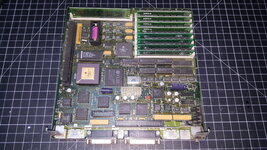
Macintosh SE/30 M5119 - Restoration

Did the later MFD-75W-01G 'Superdrive', also require an eject gear replacement?
yes, they use the same gears which also go to mush just like the earlier drives.

I never saw caps like these in my SE/30s. May be that yours was recapped before, but was not cleaned very well or leaked again?
No, those can style caps with gold strip are the originals; they used them a bit earlier on. Later production models have ones that look slightly different without the gold strip. I've seen these original electrolytic caps with gold strip in other models like IIcx and IIci as well.
 
yes, they use the same gears which also go to mush just like the earlier drives.


No, those can style caps with gold strip are the originals; they used them a bit earlier on. Later production models have ones that look slightly different without the gold strip. I've seen these original electrolytic caps with gold strip in other models like IIcx and IIci as well.

Thanks for the info, wasn't certain how much different or improved things were from the SE model.

Thanks too for letting me know those are the factory caps, I thought they had to be.

I also thought that this SE/30 had not been opened before, but I see now that this was the 4Mb RAM, 80Mb HDD model, that looks to have (4) different RAM sticks in SIM 3 and 4, added later. Can anyone confirm that?
20241218_122526.jpg
 
I never saw caps like these in my SE/30s. May be that yours was recapped before, but was not cleaned very well or leaked again?
If I got a SE/30 that looks like yours, I would have switched it on to check if it boots...
Those caps with the yellow heat shrink bands are original. I've encountered them on early boards, which the socketed CPU confirms this to be. They should twist off easily.

Edit: Oops, I didn't see this had already been answered by joshc on page 2. Well, double confirmed then.
 
Last edited:
Edit: Oops, I didn't see this had already been answered by joshc on page 2. Well, double confirmed then.
You also made a good point though - another sign this is an earlier board is that it's got the socketed CPU which is a nice bonus. Means @GreenBar0n could put a socketed accelerator in there if they wanted to.
 
The earlier boards with the darker solder mask like this one clean up really nicely in my experience. They don't seem to get the cap juice creeping under the solder mask and rotting out traces and vias nearly as badly as my later board did.
 
You also made a good point though - another sign this is an earlier board is that it's got the socketed CPU which is a nice bonus. Means @GreenBar0n could put a socketed accelerator in there if they wanted to.

The earlier boards with the darker solder mask like this one clean up really nicely in my experience. They don't seem to get the cap juice creeping under the solder mask and rotting out traces and vias nearly as badly as my later board did.

You both just made my day, thanks for the info! I'll twist those old caps off, and get the board cleaned up this evening.
 
MemoryMasters RAM is good. 128MB RAM is overrated - 64MB is more than enough, an SE/30 takes too long to boot (in my opinion) with 128MB.

I run my SE/30 with a stock ROM, it fits better in the original ROM socket and you can use Mode32 to enable 32-bit addressing with the stock ROM. The most common one, if you really want one, is https://www.bigmessowires.com/mac-rom-inator-ii/
 
MemoryMasters RAM is good. 128MB RAM is overrated - 64MB is more than enough, an SE/30 takes too long to boot (in my opinion) with 128MB.

I run my SE/30 with a stock ROM, it fits better in the original ROM socket and you can use Mode32 to enable 32-bit addressing with the stock ROM. The most common one, if you really want one, is https://www.bigmessowires.com/mac-rom-inator-ii/
32MB is probably the sweet spot (as regards waiting for the memory test to complete) when running with a stock ROM.
 
Personally I think the memory test is a good thing, it is there for a reason and RAM can fail. But yeah, 128MB with the test is a slow boot (3-4 mins IIRC).
 
If you want to get really fancy there is this so you can have 256MB RAM in your SE/30... 😅


developed by @ymk
 
Which is the best 32-bit clean ROM, and 128Mb RAM kit, available for the SE/30 today?

Here is a video that describes different ROMs and what features to keep in mind when picking one:

I very recently bought one that came out after this video - Garrett’s Workshop GW4402B - for the following reasons:
  1. It has stock boot logo and stock boot chime - I wanted a closer to stock experience, instead of the "Pirate" logo/chime the ROM-inator uses.
  2. Both the ROM-inator and the Garrett’s Workshop GW4402B were made a little thicker to alleviate the ROM socket fitment issues. Details here: https://www.facebook.com/share/p/15eYMuuRBD/ and here https://www.bigmessowires.com/2020/09/29/mac-rom-inator-ii-the-thickening/
  3. The GW4402B comes with ROM SIMM fitment clips (3D printed) in case you need them. I did not - the GW4402B was actually a few hundredths of a MM thicker than my stock ROM SIMM when measured with my digital calipers!
  4. It has TWO 8MB flash chips on it, programmable with two images (with programmer sold by CayMac Vintage) and selectable with DIP switches. From the factory it came with a System 6.0.8 ROM drive and a System 7.1.1 ROM drive full of software that was very helpful in troubleshooting my system (initially only 6.0.8 would boot because of a RAM problem). The ROM-inator II Atom is only one 2MB flash module.
  5. It has a System Control Panel to configure various features on the ROM SIMM
  6. Despite all the added features, it was cheaper than ROM-inator II Atom - https://www.tindie.com/products/garrettswrkshp/gw4402b-8mb-rom-simm-for-mac-ii-series-and-se30/
  7. Its open source hardware and software: https://github.com/garrettsworkshop/MacIIROMSIMM
Documentation here so you can read all about the Garrett’s Workshop GW4402B: https://garrettsworkshop.github.io/MacIIROMSIMM/Documentation/GW4402BManual.pdf

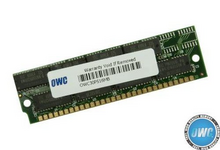
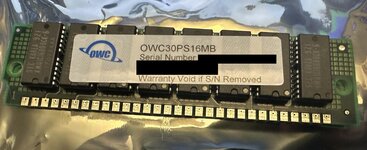
I have 4x256KB RAM in bank A (the RAM my SE/30 came with) and 4x16MB modules from OWC in Bank B for a total 65MB RAM. It was only a few dollars more to get 4x16MB from OWC versus 4x4MB from other sources. Also, OWC has a lifetime warranty. The OWC modules have 8 chips on them - most other modern replacements have 2 chips. I'd read some other forum posts claiming the 8 chip SIMMs are more compatible than 2 chip SIMMs - don't have enough experience to know if true or not.

That said, a few people on this forum have reported OWC modules didn't physically fit in their system - they were too tall, but I haven't had any issues, plus Bank B has more room above it. The modules I was sent the chips were laid out vertically - a row of 8. I noticed the image on their website shows 8 chips mounted horizontally - two rows of four, which seems to me that layout would be taller. Its possible thats why mine fit, the layout is different. I did email them before ordering to confirm fitment in SE/30. See photo on product listing here versus what I received:

https://eshop.macsales.com/item/OWC/30PS16MB/

1734701476908.png

Picture of RAM I received:

OWC SE30 RAM.jpg
 
Last edited:
I never saw caps like these in my SE/30s. May be that yours was recapped before, but was not cleaned very well or leaked again?
If I got a SE/30 that looks like yours, I would have switched it on to check if it boots...
Those caps are original with gold band. All my se/30’s had them too
 
Which is the best 32-bit clean ROM

You need to decide whether you are doing this for fun, or in order to make the machine reliable and useful. Most of the stuff you will see on youtube about these is marketing, rather than engineering, and should be treated with the scepticism one should always have for a marketing person telling you that they've got a good idea that involves giving their mates money.

A non-stock ROM is usually not actually an upgrade unless you really want to boot from ROM. Get one for the fun of it, but it's pretty unnecessary: it harms compatibility, especially with other upgrades that aren't perhaps entirely well-behaved (cough some accelerators cough). Modern ROM PCBs are not the right thickness, so you are more likely to get issues with your ROM socket. And removing the RAM test isn't really a feature; modern RAM is more variable in quality than old RAM, because it's not as mass market and even from manufacturers who aren't trying to pull a fast one by doing things like overvolting 3.3V DRAM chips, their QC process will not be anywhere near as good as from a big manufacturer back in the day.

If you want 32-bit compatibility you can use MODE32 and either a CMOS battery or Force32, depending on what you want to achieve.

128Mb RAM kit, available for the SE/30 today?

As others have said upthread, 128MB is kind of pessimal: it's relatively expensive and realistically you probably won't use it. You will run out of CPU long before you run out of RAM. If you want the Biggest And Best RAM For The SE/30 purely in order to have the biggest and best, then as @joshc correctly notes above, the right answer is probably @ymk's Synchr030/S card, which, with care, will basically give you 256MB of RAM that works at L2 cache speeds.

If you are absolutely sure you want lots of RAM that is modern-manufactured, you should bear in mind my comments above about quality control in manufacturing, and the same comments about PCB thickness also apply - accessible manufacturing for modern PCBs is 1.2mm thick, but the 30 pin SIMM specification calls for 1.27mm.

I have some 16MB SIMMs from MemoryMasters which have been fine for me, but I know other people have had more dubious luck with these, so I hesitate to recommend them wholeheartedly. But even with these, I never put more than 64MB in an SE/30, there's simply no point, even if you're running A/UX.

 
Thank you all so much for laying out all of the current upgrade options for the SE/30, it's very helpful and I'll keep re-reading this in order to make a final decision. I'll wait to decide on the ROM/RAM, until this one is recapped and 100% working, before adding anything new.

All of the new caps are supposed to be here tomorrow, Sunday, I guess FedEx is working on the weekends for the holidays. The Noctua fan already made it here, hoping to get this all going tomorrow.

Thanks again!
 
Back
Top