• Hello MLAers! We've re-enabled auto-approval for accounts. If you are still waiting on account approval, please check this thread for more information.

Macintosh Portable Video Adapter

Or I could have just simply looked here. LOL


Anyways, the data can be captured and double-buffered into either a single SRAM IC thats large enough for 2 frames, or two independent SRAM ICs. Draw a frame, swap the buffer and while the portable is drawing into 1 RAM IC, your reading out the other in a different "way" to drive a different type of display. Sure your going to lag 1 frame behind but I doubt youll notice it. The refresh rate would remain the same. as on each V-Sync Period, both scans would need to finish and the buffers "swap". This is if you want to drive a different type of LCD panel that is configured differently. 

Otherwise,

You could drive a VGA CRT with this using the same exact concepts as the SE/30 does. using an LS166 serializer. CL1 is your horizontal sync, FLM is your vertical sync. CL2 is your latch clock for the LS166, and your shift clock is the CL2 * 8, which should approximately be the same as the 16Mhz video clock. (like the SE/30). Unless you pull a clock line out of the portable, you will need a PLL/VCO with div8 in the loop feedback to obtain the shift clock. 

 
Last edited by a moderator:
Techknight, do you know of any good primers on how to interface with LCDs.   I guess there may be such a variety of methods that it doesn't lend itself to a summary.   But maybe they all have enough in common that it does.   If I knew, I wouldn't need to ask.  :-)

 
Its easy (from a programming standpoint). The easiest way obviously is to get an LCD controller. (like an SED1335 or T6963 for black and white LCDs) But I have interfaced to controller-less LCDs with things like the raspberry pi, and microcontrollers themselves. 

Problem with the Pi is the low memory bandwidth. timing critical situations like this will cause flickering when linux is doing things in the background. Which is why the beaglebone black shines because of the shared-memory attached PRU CPUs which I dont have any experience with unfortunately. 

With a microcontroller, you just assign some framebuffer in memory, and run a timer interrupt sequenced routine which reads the buffer, clocks out the data, latches it in and moves onto the next line. timer hits again, you increment the pointer, and run the routine all over again. this repeats indefinitely. the LCD will then display what is in the allocated memory. 

The memory gets updated and switched with a non-interrupt based routine. 

 
Last edited by a moderator:
Thank you, techknight.   

I have several hundred little LCD displays (probably unused Pager stock) in the attic that have a chip-on-glass controller that looks like one of the standard Epson ones, maybe  a 1335.   I have the datasheet on an old drive at home that would tell me which controller I deduced it was.   And an embedded flat flex cable to the controller.    My (very old) plan has been to trace out the cable connections to the chip bumps with a microscope and then experiment to get it working.   I can afford to blow a few in the process.  :-)    On the other hand, I haven't started any projects that require a bunch of displays, so little motivation, what with all the life and procrastination going on.

Kind of silly of me to buy the displays in the first place, but it was one of those Ebay lots one used to see (not so common any more) where it's something like 648 LCD displays; current bid $10.83.    Heck, one might find a use for them some day, right?  

 
Last edited by a moderator:
When reverse engineering, I have learned the better option is to have the original equipment. You can then use an analyzer to work out the drive signals to figure out exactly what controller it was. 

Without that, you dont know whats ground, whats VCC, what is clock, latch, data, any of that. 

 
Last edited by a moderator:
I was looking through some old notes the other night and found excerpts from some email I was sent by a company called DynaMac.

According to them they offered a larger, lower power hard drive for the Portable, and an external case into which one could install the original hard drive from the portable.   They also had RAM upgrades in 1 MB increments up to the maximum for the backlit and non-backlit models.

The most interesting part of the email, though, was that they claimed they were working on a CPU upgrade and a Video output system for the Portable.

This would have been back around ~1995 - 1997.

 
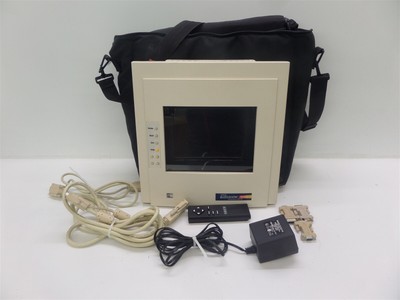
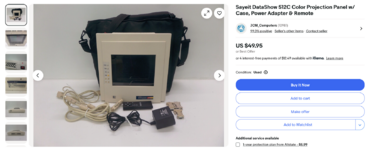
The model for the Portable is the DataShow HR/MP. The DataShow 512C is a 512 color model that probably takes standard VGA.
Finding a DataShow (or one of those PowerBook video out cards) would be interesting to see how a contemporary implementation looks like
 
Finding a DataShow (or one of those PowerBook video out cards) would be interesting to see how a contemporary implementation looks like
If they didn't use the signal to drive the LCD directly they likely just converted it to VGA since their panels already supported it. I doubt they would have invested in any custom ASIC for this since the conversion to VGA can be done with 74-series logic.
 
You say the conversion can be done with 74-series logic chips, I presume Androda's adapter uses a RP2040 instead because of price/simplicity?
Not sure if the video signal needs crazy buffering or signal generation
 
You say the conversion can be done with 74-series logic chips, I presume Androda's adapter uses a RP2040 instead because of price/simplicity?
Not sure if the video signal needs crazy buffering or signal generation
It's definitely much more versatile to use the RP2040 since it's a full microcontroller, you can easily generate other resolutions and even other output formats, or make changes/additions to the image before outputting it.

Microcontrollers in 1990 weren't fast enough to bit-bang out VGA signals, at least not without high cost. There was no reason to use a complex video processor when you could just use a shift register and counters, similar to how the Macintosh Plus output video for example.
 
So, naturally, I've been researching ways to do this. There's a US$600 plug in card that can output to an external display.

Reading a lot of tales of woe and attempted repairs, I learned that lines in the LCD are due to the zebra connectors around the edge of the display. Any attempt to repair it usually result in making the problem worse. Not even thinking of trying that!😱

I'm more interested in building (and selling...) a simple circuit that plugs into the same LCD connector on the logic board, and lets you replace the existing LCD display board with a cheap modern 10" TFT LCD display.

And now...it can be done! I found details on the LCD interface on the Mac Portable, which is mirrored on the external video connector, which is key to this project. Section 5.4 in this document details *everything* about the interface.

Portable - apple-mac-portable-dev-note-1989.pdf


I'm guessing I could build and sell these conversion kits for around US$100. And having that, it's a straightforward path to converting the external video connector to something friendly like VGA.

Wish me luck!
 
Back
Top