• Hello MLAers! We've re-enabled auto-approval for accounts. If you are still waiting on account approval, please check this thread for more information.

LC 475 Project - Upgrades - Mods

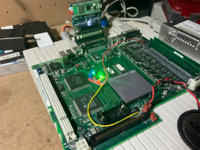
Well, let's say that 90% of all LC-PDS cards are NICs anyway. I managed to get - at a very high price - a Weitek Power9000 based LC-PDS video card, called the Micron Xceed Color Fusion, and they are incredibly rare, like 0,1% of all cards. The rest of the cards available are split among other assorted and more or less rare cards, like various model-specific accelerators and the IIe card. If there's something else, like NI GPIB cards, it must be rarer than hen's teeth,

 
I have a BlueSCSI 2 Wifi. While I haven't tried the WiFi part yet, the storage part works well. Using the RPi over the earlier Atmel is a big step up and shouldn't have hardware compatibility issues. The BlueSCSI 2 is available in both DB-25 plug-in external and internal models as well.
 
Wow, thanks for the tips! Hope this helps someone else in the future!

Questions...

The RAM: What's the maximum size? I keep seeing conflicting claims. 32, 64 128. Which is it?

260 MB, but to get that you need a SIMMSaver and the lid won't close. So, in practice, maximum is 132 MB; 128MB SIMM + 4MB on motherboard.
 
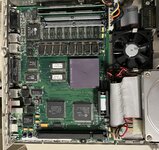
LC475 full 040 running at 41Mhz with Spicy O'Clock. Got the full 040 off ebay from that chinese rare chip seller dude bro for $50. I used thermal tape and put a 6100 heat sink on it. Need to swap out out the clock chip to get Appletalk and TCP/IP working. Otherwise solid.


1718959205721.png
 
40MHz can be achieved with way less hassle, Spicy-O-Something or external oscillators aren’t needed.
Swap the resistors on the back of the board for the 40MHz setting, lift pin 11 on U16 and connect the lifted pin to ground.
That way you’ll run 33MHz memory timings while the clock generator will get told to output 40MHz.
 
40MHz can be achieved with way less hassle, Spicy-O-Something or external oscillators aren’t needed.
Swap the resistors on the back of the board for the 40MHz setting, lift pin 11 on U16 and connect the lifted pin to ground.
That way you’ll run 33MHz memory timings while the clock generator will get told to output 40MHz.
Bolle, would this also work for the 575 that is built using the same architecture? I dont have the LB in front of me, but I believe there should be a resistor network that is similar
 
LC475 full 040 running at 41Mhz with Spicy O'Clock. Got the full 040 off ebay from that chinese rare chip seller dude bro for $50. I used thermal tape and put a 6100 heat sink on it. Need to swap out out the clock chip to get Appletalk and TCP/IP working. Otherwise solid.
Are you able to post a foto with CPU and clockchip replaced? (Maybe prior adding the heat-sink as well)
Did you swap in a 68040RC25 and overclock it to 41Mhz?
 
Some people have taken their 475/605s up to 50+ MHz too. Getting rid of that loooooooooong ram check made me check my board again. Nope, still no ROM slot.

I don't know if an accelerated video card would be necessary. With max vram, you can get 8-bit 1180x870 that's pretty quick in my opinion.

A RaspPI paired as a wifi-to-ethernet bridge sort of gets you wifi. Ive found it pretty stable and useful. That's an option.
 
I'm not sure what I'd be looking for... It there a model number or something? Or it's just called "PDS Ethernet Card"?
There were many made by different companies but you need to be careful to buy an LC PDS card, not just any PDS card. PDS was not standardised between models, Apple changed the spec of PDS for each model/series of Macs. So you specifically want the ones meant for the LC series. The common ones were made by Farallon, Asante and Apple also made their own.
 
Getting rid of that loooooooooong ram check made me check my board again. Nope, still no ROM slot.
There is a place for ROM Slot in every 475/605. If no socket soldered in (the devices of kamshaft and falecore have the socket already) it can be ordered with the ROM SIMM from the seller mentioned above.
 

Attachments

  • 475_605 ROM Slot.jpg
    475_605 ROM Slot.jpg
    29.9 KB · Views: 17
Last edited:
40MHz can be achieved with way less hassle, Spicy-O-Something or external oscillators aren’t needed.
Swap the resistors on the back of the board for the 40MHz setting, lift pin 11 on U16 and connect the lifted pin to ground.
That way you’ll run 33MHz memory timings while the clock generator will get told to output 40MHz.
This is news to me, I have the 33MHz mod, I thought 40MHz caused issues, doing this mix of the two speeds is interesting. I'd like to see benchmarks of the 33+40 for a comparison to my 33 system
 
Are you able to post a foto with CPU and clockchip replaced? (Maybe prior adding the heat-sink as well)
Did you swap in a 68040RC25 and overclock it to 41Mhz?
I am so burnt. I was thinking of the 575 I also modded. I pulled a 25mhz 040 from a quadra 660AV for this 475, and yoinked the heatsink/fan combo from a Newer Mac Clip Jr.. Still it runs at 41mhz, just no networking until I swap out clock chip. Or you can just do what Bolle says. I just wasnt aware of that until after I got the Spicy O Clock.
 
This is news to me, I have the 33MHz mod, I thought 40MHz caused issues, doing this mix of the two speeds is interesting. I'd like to see benchmarks of the 33+40 for a comparison to my 33 system
I should have been more clear, the memory system will run at 40MHz too that way but it will use the timings that are intended for 33MHz operation.
They add more waitstates compared to the 25MHz settings.
U16 is used to read the state of the configuration resistors onto the data bus. The ROM holds tables for several memory speed configurations and the initialization code sets the appropriate values for each speed configuration.
What happens is that you set the 40MHz configuration through the resistors which will tell the clock generator chip to output a 20MHz clock to the CPU clock generator resulting in 40MHz bus and CPU speed.
The problem is that there is no entry in the ROM table for the 40MHz setting hence it fails to post with that setting.

By lifting pin 11 on U16 and connecting it to ground the machine ID will be set to 33MHz and the appropriate memory timings will be used. The memory (both VRAM and RAM) will still be overclocked slightly that way.

If someone of the ROM wizards could modify that table to recognize the 40MHz setting and add the values that we know from the memory controller datasheet no further hardware modification would be necessary.
 
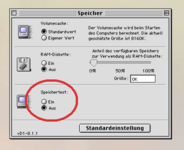
Getting rid of that loooooooooong ram check made me check my board again.
Just depress option-cmd while opening the control panel »memory«. You will get an additional pair of radio buttons to choose wether to perfom a RAM check upon startup or not (see attached screenshot).
CP_memory_option-command.png
 
Back
Top