• Hello MLAers! We've re-enabled auto-approval for accounts. If you are still waiting on account approval, please check this thread for more information.

iBook G3 SE - No RAM detected?

Hi All,

I’m attempting to fix a 466mhz iBook G3 SE Graphite I recently bought and would appreciate some guidance on what to look for next.

On booting the iBook chimes and then beeps 3 times (no good banks) I get nothing on the display. HD and DVD drive appear to be functioning, and I’m able to reset the SMC(?) by holding down the power button until I get a single beep.

I removed the single ram chip in the user upgradable slot and the 3 beeps remained. Opening the keyboard I could smell a slight burning smell. I could also see a lot of debris and hair in the laptop so decided to strip it down and give it a good clean.

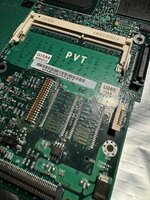
I’ve stripped it down completely to the logic board and throughly cleaned it with a soft brush and electrical contact cleaner. Overall the condition was ok, lots of hair (grim) some slimy bits which I suspect was from the thermal pads, and some orange residue in the areas of the ram chip and PCI connector.

I plugged it back it with just the speaker and dc board attached, and I get the same 3 beeps. No more burning smell.

I’m trying to pin point what the issue is exactly, it appears to be the link between ram and the northbridge?

I’ve throughly inspected the board and can’t see any obviously damaged components, and I’ve checked power to all the soldered ram chips, they are all getting 3.3 volts.

I’d appreciate some guidance on what to check next, I can’t find any schematics for this board online, my current thinking is either something was spilled and something has blown, or the residue is a red herring and perhaps there’s an issue with the northbridge, hence the lack of display on boot also.

Any thoughts appreciated!
 
IMG_1842.png
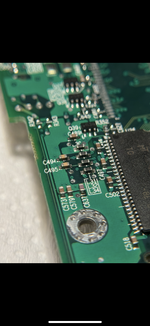
After some more investigating this evening I found this row of capacitors which looks like it could have burned out. Can’t see any others that look this dark so assuming they are the source of the burning smell! They are next to the ram chip and appear to be en route to the cpu/northchip. Will have to see if I can source some replacements!
 
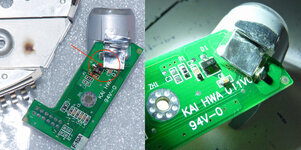
First thing I would check is if diode D1 on the small powerboard was shorted and is blown ( due to the stupid aluminium foil on the socket)

IMG_4278.jpeg
 
View attachment 77076
After some more investigating this evening I found this row of capacitors which looks like it could have burned out. Can’t see any others that look this dark so assuming they are the source of the burning smell! They are next to the ram chip and appear to be en route to the cpu/northchip. Will have to see if I can source some replacements!
The components labelled L30-34 are inductors rather than capacitors and are meant to be black. You can check if they’re good by seeing if there’s continuity across them (there should be).
 
@MacUp72 Thanks for the advice, It looks to be ok and I’ve tested it, 0.760 in one direction and infinite resistance in the other which I think is normal?

@croissantking right you are I have tested them and they all have continuity. Incidentally I then found this useful link with scans of clamshell logic boards:
https://davidigreen.com/blog/ibook-g3-clamshell-logic-board-scans
Which also shows they are grey and marked L not C!
The scans show a board that looks pretty similar to mine, I’m assuming the Philips 343s0451 chip is the northbridge for which I can’t find any datasheets.
 
if you plug in your charger and it shows green or orange(?) light, the board is ok (but its a good idea to wrap up this aluminium foil in clear tape so it cant physially make contact to the diode).
maybe the old battery is causing boot probs, when you remove it and clear the SMC and PRAM, does anything change?
 
Yeah I'd be inspecting all the pins on the onboard RAM next. I don't like the sound on removing the onboard RAM, but it might be a step to consider.
 
@MacUp72 It lights up green so sounds like it’s ok, I’m just running the logic board with charger and speaker attached so no battery. Have tried smc and pram multiple times but no luck

I had thought perhaps a dead ram chip could be the problem. I just had another good look at all the pins and gave all the chips a blast with contact cleaner but still have 3 beeps.

If I put good ram in the single slot would it be expected to still to give the 3 beeps? Does one bad chip bring down all ram soldered and non-soldered? I don’t know if the 128MB stick I have is good or not but it makes no difference if I leave it in or out.

I guess I will look at removing the chips next, is an air gun with a fine nozzle and flux the best method?

Looks like it has been tried before:
https://discussions.apple.com/thread/2707408?sortBy=rank
 
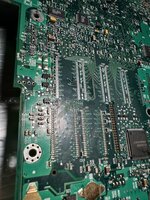
Update from this evening, I went ahead and removed the soldered ram chips. Was fairly straightforward with a heat gun and seem to have got away with not damaging too much!

Unfortunately it doesn’t seem to have changed things, after I removed the first two I no longer got a chime but got the 3 beeps. I then removed the second two chips and again I just get the 3 beeps. The stick of ram I have makes no difference if I install or not. Might try and clean up the contacts in case there is a short but still unsure on what I’m dealing with ! IMG_1859.jpegIMG_1868.jpeg
 
you will likely always get 3 beeps if you remove onboard RAM, since the BootROM is hard coded to look for it and try and test it

its the same as if you take the RAM chips off a SODIMM and install it into a Mac it will beep 3 beeps no good banks, rather then a single beep of no RAM, since the SPD EEPROM of the now empty SODIMM will be telling the Mac that there should be RAM present

so your best bet here is to replace the onboard RAM chips with known good replacements
 
I’ve been staring at this board all week, it’s still beeping at me ! I decided to try replacing the ram chips using ones from the sodimm that came with the laptop. Original chips were MT48LC8M16A2TC-8E-B and the replacements are NEC D45128163G5-A80-9JF. Datasheets seem to match from what I can tell. I’m not 100% sure they are good chips but I decided to risk it, unfortunately no luck and 3 beeps still.

Either my soldering is bad (possible), the chips are bad (maybe), or the original issue is still there and the original chips were fine (also possible and my current hypothesis). I’m not sure how to proceed with checking data lines etc on the board without a schematic.
I’m also wondering if it’s possible to modify the bootrom and disable the onboard ram, then I don’t have to chase this unknown issue. I know it’s possible on a pc by flashing the bios and I’m sure in principle could be done here but not sure if it’s ever been attempted and if it’s worth risking my bootrom!
 
Thought I’d update on the status of this iBook, I managed to find another identical 466mhz Graphite SE untested on eBay for only £75. Plugged it in and it booted straight into Mac OS 9.0.4! Also had a 256mb sodimm and an airport card in it! It had some cosmetic issues and the dvd drive was suspect and the keyboard had some damage.
So I have salvaged the best parts from both machines to create one very nice condition machine that’s fully working (with original box!) and a full set of spares, bar the still nonfunctional logic board of course.

I’ve got a couple of iBook G4 12 inch models which I might try and borrow a screen from for an XGA mod, apparently it requires the LG cable so I need to see if either of the clamshell displays I have are LG.

I may look at the existing board to see if I could remove the ram again and edit the SPD but would involve some ROM flashing and not sure if I’ll get round to it ! Also there’s likely another underlying issue with it.
Thanks for the help and suggestions!
 
Back
Top