

• Hello MLAers! We've re-enabled auto-approval for accounts. If you are still waiting on account approval, please check this thread for more information.

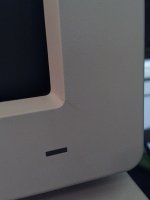
How should I fix and strengthen this cracked monitor bezel?

I have a Macintosh Portrait Display that is in perfect condition other than this crack and another identical crack in the top corner.  I've been unable to locate a replacement bezel as these monitors are pretty darn rare.  What's best practice to repair this guy?
IMG_2489.jpg

I was thinking of spreading some epoxy on the inside to strengthen the corner.  I would hide the crack with some simple hot glue or maybe even some wax.   Interested in what everyone's take on the repair should be?

 
Thanks for the suggestion, I'll look into it.

On another note, I would like to tweak the display a bit while I have the cover off.  I found the service manual for the Portrait Display easily enough online. It references using the "Display Service Utility".  Found a few links to the Apple software archive that Apple since has removed from their webpage.  Anyone know where I can find it?

 
I was able to locate the utility on a Japanese website, so I'll be giving this a go over the weekend.  Looking over the service manual, I see there is an internal fan on these guys.  I can't hear any whirring coming from the case, so I assume the fan has died.  I wonder if I have something that will fit.  I hope its a standard 80x80.  I have several low noise versions.

 
Given the time period it comes from, I doubt the fan is anything like today's standards.

 
Last edited by a moderator:
I would like to tweak the display a bit while I have the cover off.
There's not a whole heck of a lot you can adjust in a monochrome monitor unless the tube is so weak you need to do a brightness/contrast boost.

If you're pulling it apart I'd just apply epoxy over the crack in the inside of the bezel and call it good. My preference is JB Weld.

Anything you apply to the exterior will be noticeable and frankly, that's a tiny crack and wouldn't care for it. It won't get larger or become a serious problem unless you really abuse the monitor.

 
Last edited by a moderator:
I wouldn't be terribly surprised if said fan is AC line voltage rather than 12vdc. I encountered a failing cooling fan in a CRT monitor ages ago and it was a 120vac unit connected just past the AC power switch.

 
Back
Top

