• Hello MLAers! We've re-enabled auto-approval for accounts. If you are still waiting on account approval, please check this thread for more information.

HDI-20 to IDC-20 adapter for use with Floppy Emu

Hi all,

I cannibalised an HDI-20 floppy drive and created an adapter for my Floppy Emu using an IDC-20 breakout board. Here's a photo:
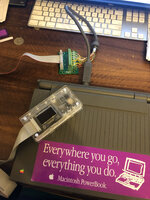
IMG_6325.jpg

I'm having the weirdest problem though: it can only mount the 800kb and 400kb disk images, not the 1.44mb images. The HD20 hard drive image mounts fine, but 1.44mb floppy images it claims are unreadable and wants to format. Bizarre. I've had issues with this Powerbook 100 reading floppies before and I just assumed that my two HDI-20 floppy drives were both damaged. I never had an 800kb floppy to test...

I also don't have another Powerbook 100 or Duo with an HDI-20 floppy port to test.

I feel like these Powerbooks and these disk drives used to be able to use 1.44mb floppies so I feel like it might be this particular Powerbook - which is a pity as I have recapped it, made a new lithium battery for it and even replaced the fluorescent bulb in the screen. Maybe I need to get hold of another logic board, or catch up with someone who has a Duo or another Powerbook 100 to test this with.

Anyway, if anyone else wants to do what I did it's really easy. All the HDI-20 pinout diagrams online are backwards which is annoying. This is an accurate diagram. In case it's not clear the dark spots are where the missing pins on the HDI-20 plug are. They correspond to the pins on the IDC-20 which are evidently not needed for the HDI-20 drive: -12V, +12V and PWM. You don't use the IDC-20 pin numbers, you go 1-10 down the left side and then 11-20 down the right side. The dark spots for the missing pins should make this clear.
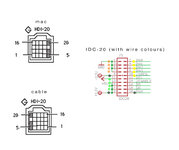
hdi20 to idc.jpg

Here is the pinout info which can be compared to the diagram above:
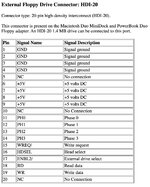
Screen Shot 2022-02-17 at 11.45.00 pm.jpg
 
Last edited:
Nice!

I fiddled with the idea of using the connector inside the HDI-20, but I think I couldn't figure out the correct pin pitch for the connector so I never fnished this. I also attempted another design to use thin pins and put the vias to the PCB to match the pitch of the HDI-20 connector but that didn't work either.
 

Attachments

  • floppy_idea.jpg
    floppy_idea.jpg
    645 KB · Views: 62
I've done the exact same thing and have not had a problem, is it possible you swapped a pin or something?
No because it works with 800k floppy images. I think maybe it's a fault with the logic board somewhere because it had issues with physical floppies too - which I had attributed to the floppy drives or the floppies themselves being too old. Perhaps I need to check over my recapping job.
 
Maybe the logic board needs another wash, maybe something more aggressive this time. Last time just used alcohol and a toothbrush. Tempted to use the dishwasher this time followed by an isopropanol soak. I suspect the whole logic board would fit in my dehydrator...

Do you know how to identify the swim?
 
Hi all,

I cannibalised an HDI-20 floppy drive and created an adapter for my Floppy Emu using an IDC-20 breakout board. Here's a photo:

View attachment 38537

I'm having the weirdest problem though: it can only mount the 800kb and 400kb disk images, not the 1.44mb images. The HD20 hard drive image mounts fine, but 1.44mb floppy images it claims are unreadable and wants to format. Bizarre. I've had issues with this Powerbook 100 reading floppies before and I just assumed that my two HDI-20 floppy drives were both damaged. I never had an 800kb floppy to test...

I also don't have another Powerbook 100 or Duo with an HDI-20 floppy port to test.

I feel like these Powerbooks and these disk drives used to be able to use 1.44mb floppies so I feel like it might be this particular Powerbook - which is a pity as I have recapped it, made a new lithium battery for it and even replaced the fluorescent bulb in the screen. Maybe I need to get hold of another logic board, or catch up with someone who has a Duo or another Powerbook 100 to test this with.

Anyway, if anyone else wants to do what I did it's really easy. All the HDI-20 pinout diagrams online are backwards which is annoying. This is an accurate diagram. In case it's not clear the dark spots are where the missing pins on the HDI-20 plug are. They correspond to the pins on the IDC-20 which are evidently not needed for the HDI-20 drive: -12V, +12V and PWM. You don't use the IDC-20 pin numbers, you go 1-10 down the left side and then 11-20 down the right side. The dark spots for the missing pins should make this clear.
View attachment 38539

Here is the pinout info which can be compared to the diagram above:

View attachment 38540
Hi,
have you ever solved the 1.44 issue? I have the exact same problem.
Thanks!
 
The pinout for 1.44 MB floppy drives is identical to 800K drives. If your cable works for 800K but not 1.44MB, it's probably because the wiring is not so great. 1.44 MB disks have data signals with shorter pulses and 2x the data rate as 800K disks, so they're less forgiving of poor wiring.
 
This is an old thread, but I can't get it to work with a powerbook duo 2300c. With this model specifically it throws "disk initialization failed, disk is locked" and just loops the error while the system locks up until you unplug the drive. I can replicate it with 2 different 2300c's and I have found a few instances online of other people encountering the same exact issue with the 2300c. My guess is maybe something with the firmware is incompatible.
 
I made such a cable many years ago! It works flawlessly with my PB100s (I have 3 of them) and floppy emu in every modes (400k/800k/1.4M/HD20).
hdi-20_diy.jpg

This is an old thread, but I can't get it to work with a powerbook duo 2300c. With this model specifically it throws "disk initialization failed, disk is locked" and just loops the error while the system locks up until you unplug the drive. I can replicate it with 2 different 2300c's and I have found a few instances online of other people encountering the same exact issue with the 2300c. My guess is maybe something with the firmware is incompatible.
I have the exact same problem with my 2300c. Even connected internally in the duodock it gives the same error. Sadly I don't own any 68k duo to try it out... As you said It's most likely a floppy emu compatibility issue with the PPC duo but I don't care so much since I barely never use this mac 😂

 
Last edited:
I made such a cable many years ago! It works flawlessly with my PB100s (I have 3 of them) and floppy emu in every modes (400k/800k/1.4M/HD20).
View attachment 79552


I have the exact same problem with my 2300c. Even connected internally in the duodock it gives the same error. Sadly I don't own any 68k duo to try it out... As you said It's most likely a floppy emu compatibility issue with the PPC duo but I don't care so much since I barely never use this mac 😂

Yeah, I believe this is a firmware issue with the FloppyEMU. Your video is one of the videos I saw, I saw 2 other people having the same issue. I have attempted many different methods to try to eliminate any possible variables, and I'm positive it is the FloppyEMU is not compatible for whatever reason. I have seen reports of 68K powerbooks working with the FloppyEMU, so you could be right. This could be an issue with PPC. I would have to look to see if there are any reports of 68k macs with PPC accelerator cards having issues with the FloppyEMU. Seems it is a small group of us so sadly I don't think there is any interest in getting it to work.
 
Back
Top