



I bought a ZuluSCSI Laptop Blaster not too long ago because my 160 needed a hard drive emulator. I noticed that there wasn't any info about a carrier or caddy to fit it to the PowerBook's drive cage, but I assumed I could figure it out. This might have been a bit naive on my part.
I received a Rev 2025a Laptop Blaster. It fits in the drive area, but it just kind of floats there. I intend to use my PowerBook as a portable computer, at least sometimes, and I think the PCB would short quite easily if it weren't securely mounted. (I learned later, when I looked at my 145B, that the hard drive is supposed to slot onto pegs to help hold it in place. These are completely broken off on my 160, but ideally the ZuluSCSI's holes align with these pegs. That's not enough to hold it place but it is better.) I contacted the seller, Alex, who said that he didn't have a caddy design, so I quickly designed one for 3D printing. This looked pretty good:
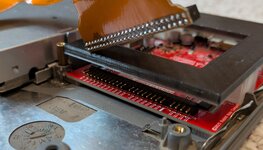
It's hard to see, but the ZuluSCSI is sitting on a 3D-printed holder. The top of the caddy sits on top, and receives pegs that come up through the ZuluSCSI's holes from the bottom. Some mounting feet push into clear areas on the PCB to spread out the pressure. The bottom part is also there because my board had a thick flash chip for the RP2350 mounted on the underside, which made the board wobble unless mounted better.
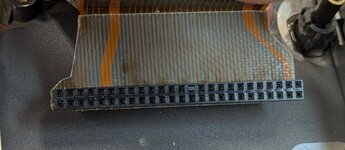
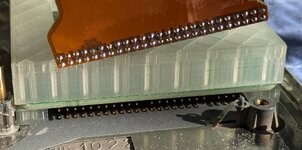
I was pretty happy with this, but then I went to install the drive cage with the SCSI cable connected. (If you've worked with these machines, you probably know where this is going.) In the 16x/180 models, the SCSI cable has a rigid end made out of FR-4 or something, presumably for strength. If this is pushed upward from where it was designed to sit, the metal drive cage won't fit in place. I didn't even think about this until I was putting the drive cage back, and it caught on the angled side of the connector. I ended up cutting away some of the FR-4 (right near a trace, but not close enough to damage it):
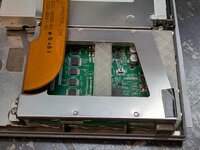
This made space for the drive cage to actually reach the standoffs:
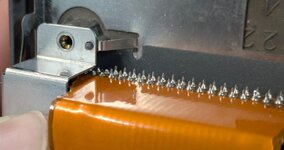
You can see in the picture above that I also trimmed the legs of the SCSI connector where I feared they might bump the drive cage and short out, and it's not visible but there's also electrical tape on the inside of that surface.
I put the whole computer back together...and it didn't fit. The case had a large and quite concerning bulge at the bottom where the FR-4 of the SCSI cable was sitting too high and bending the chassis outward. I didn't even consider this but it's obvious in retrospect.
I came to the conclusion that the issue was with the ZuluSCSI design. A real hard drive fits, and has its connector at the bottom of the chassis (this is also how the BlueSCSI PowerBook model is designed):
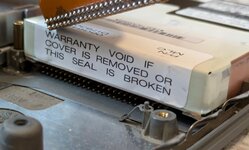
Notice the significant height difference between this and the ZuluSCSI. I replied back to Alex with all this info, and after some back and forth with testing a thinner caddy bottom, filing down the ZuluSCSI connector's pins on the bottom, and even pulling off the underside flash chip, it still didn't fit. I felt it was quite obvious that the board needed to be redesigned with the SCSI connector on the bottom, and I told him as much.
I didn't hear from him for a few days, until he sent me a picture of a new ZuluSCSI revision with the SCSI connector mounted on the bottom! He even sent me a new unit for free, so I redesigned my caddy around the new board and using proper parametric CAD. The new board fits:
The bottom of the caddy is sized so that it is just tall enough to fit the ZuluSCSI's SCSI connector, and now the cable fits and the PowerBook closes as intended. The ZuluSCSI doesn't rattle or move even if I put a fair amount of force on the computer, and I'm certain it won't short out. I tested it on the 145B, which still has one of its two pegs, and I added cutouts for those.
Long story short: the Rev 2026a ZuluSCSI has fixes to fit every PowerBook, and my caddy fits around it to fill the hard drive area and physically secure the ZuluSCSI in the 100-series non-Sony models. It might fit Duos, 520/540s, and the 100 too, but I don't have any to test. You can get the caddy on Printables.
I received a Rev 2025a Laptop Blaster. It fits in the drive area, but it just kind of floats there. I intend to use my PowerBook as a portable computer, at least sometimes, and I think the PCB would short quite easily if it weren't securely mounted. (I learned later, when I looked at my 145B, that the hard drive is supposed to slot onto pegs to help hold it in place. These are completely broken off on my 160, but ideally the ZuluSCSI's holes align with these pegs. That's not enough to hold it place but it is better.) I contacted the seller, Alex, who said that he didn't have a caddy design, so I quickly designed one for 3D printing. This looked pretty good:
It's hard to see, but the ZuluSCSI is sitting on a 3D-printed holder. The top of the caddy sits on top, and receives pegs that come up through the ZuluSCSI's holes from the bottom. Some mounting feet push into clear areas on the PCB to spread out the pressure. The bottom part is also there because my board had a thick flash chip for the RP2350 mounted on the underside, which made the board wobble unless mounted better.
I was pretty happy with this, but then I went to install the drive cage with the SCSI cable connected. (If you've worked with these machines, you probably know where this is going.) In the 16x/180 models, the SCSI cable has a rigid end made out of FR-4 or something, presumably for strength. If this is pushed upward from where it was designed to sit, the metal drive cage won't fit in place. I didn't even think about this until I was putting the drive cage back, and it caught on the angled side of the connector. I ended up cutting away some of the FR-4 (right near a trace, but not close enough to damage it):
This made space for the drive cage to actually reach the standoffs:
You can see in the picture above that I also trimmed the legs of the SCSI connector where I feared they might bump the drive cage and short out, and it's not visible but there's also electrical tape on the inside of that surface.
I put the whole computer back together...and it didn't fit. The case had a large and quite concerning bulge at the bottom where the FR-4 of the SCSI cable was sitting too high and bending the chassis outward. I didn't even consider this but it's obvious in retrospect.
I came to the conclusion that the issue was with the ZuluSCSI design. A real hard drive fits, and has its connector at the bottom of the chassis (this is also how the BlueSCSI PowerBook model is designed):
Notice the significant height difference between this and the ZuluSCSI. I replied back to Alex with all this info, and after some back and forth with testing a thinner caddy bottom, filing down the ZuluSCSI connector's pins on the bottom, and even pulling off the underside flash chip, it still didn't fit. I felt it was quite obvious that the board needed to be redesigned with the SCSI connector on the bottom, and I told him as much.
I didn't hear from him for a few days, until he sent me a picture of a new ZuluSCSI revision with the SCSI connector mounted on the bottom! He even sent me a new unit for free, so I redesigned my caddy around the new board and using proper parametric CAD. The new board fits:
The bottom of the caddy is sized so that it is just tall enough to fit the ZuluSCSI's SCSI connector, and now the cable fits and the PowerBook closes as intended. The ZuluSCSI doesn't rattle or move even if I put a fair amount of force on the computer, and I'm certain it won't short out. I tested it on the 145B, which still has one of its two pegs, and I added cutouts for those.
Long story short: the Rev 2026a ZuluSCSI has fixes to fit every PowerBook, and my caddy fits around it to fill the hard drive area and physically secure the ZuluSCSI in the 100-series non-Sony models. It might fit Duos, 520/540s, and the 100 too, but I don't have any to test. You can get the caddy on Printables.


