• Hello MLAers! We've re-enabled auto-approval for accounts. If you are still waiting on account approval, please check this thread for more information.

Early Macintosh home brew 4MB memory upgrade board development

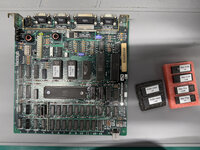
Mmm... so, those ROMs you have installed—342-0220-B and 342-0221-B—are 64KB ROMs. We haven't tested the RAM Card with the Mac 128K/512K ROMs yet.
I have the original ROM from my other 512k board that now has a ROM-inator. Probably similar to the other board.

it has similar
Hi - 342-0220-A
Lo - 342-0221-A

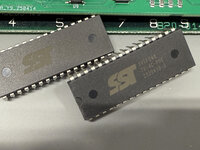
I also am putting together a BOMW ROM-inator board that I had made recently from JLCPCB and have several of the recommended ROM's for that board

SST39SF040-70-4C-PHE

I can program with the standard ROM or just update to the new file to work with the expansion card.

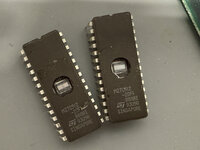
I also have some ST M27C512, but I have had those for a while...

What ever you think would work best.
 

Attachments

  • IMG_3364.jpg
    IMG_3364.jpg
    1.8 MB · Views: 24
  • IMG_3360.jpg
    IMG_3360.jpg
    1.1 MB · Views: 7
The SST39SF040-70-4C-PHE are 32 pin which will only work with the ROM-inator PCB, but the ST M27c512 is 28 pin and is 512kb that matches the current ROM socket. Or I can pick up what ever you recommend that works with the RAM expansion card.
 

Attachments

  • IMG_3367.jpg
    IMG_3367.jpg
    748.4 KB · Views: 12
I have the original ROM from my other 512k board that now has a ROM-inator. Probably similar to the other board.

it has similar
Hi - 342-0220-A
Lo - 342-0221-A

I also am putting together a BOMW ROM-inator board that I had made recently from JLCPCB and have several of the recommended ROM's for that board

SST39SF040-70-4C-PHE

I can program with the standard ROM or just update to the new file to work with the expansion card.

I also have some ST M27C512, but I have had those for a while...

What ever you think would work best.
That's great you already have those 27C512 chips! Those are perfect for recreating the stock Mac Plus ROMs. It sounds like you're familiar with the process of programing them, but just in case, here's a helpful guide.

Since you have two 512K Macs in their original state, having at least one set of the stock 128KB ROMs would likely be useful.

But right now, I believe the most important thing is to check if the RAM card works. To do this, simply install the ROM-inator with the RAM card and no patches. It should pass the initial memory check (about 30 seconds for 4MB of RAM) and reach the floppy icon with the question mark (or begin booting and eventually freeze after the welcome screen if you have a floppy drive emulator attached).

If you reach that point, you can be assured that your RAM card is fully functional!
 
I'm also curious if it would work without the 'Plus' ROMS or rominator, so with -B or even -A ROMs
I also received the PCB's =)
 
I'm also curious if it would work without the 'Plus' ROMS or rominator, so with -B or even -A ROMs
I also received the PCB's =)
It would indeed be interesting to investigate. Nevertheless, the 128KB ROM was a pivotal upgrade. The larger contiguous memory space it provided was essential for effectively utilizing most RAM expansions on the early Macs. Moreover, the addition of the SCSI interface to the ROM is a fundamental improvement

Golden Potato made some assessments regarding the contiguous memory space in this post:
https://68kmla.org/bb/index.php?thr...y-upgrade-board-development.47308/post-544697
 
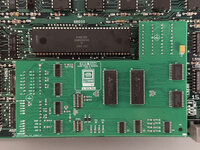
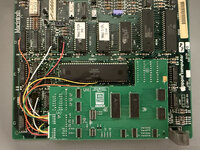
Test fit. Very nice fitment!

I just need to place headers on the board and then run jumper wires.
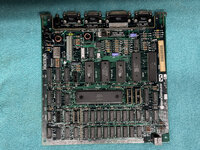
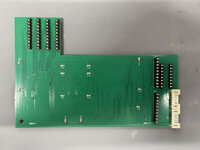
I'm just curious, what option did you use to connect the RAM card to the logic board? Could you post a picture of the LB (logic board) without the RAM card attached, and also a picture of the back side of the RAM card?
 
also interested..
i am thinking of using dove macsnap clips (do they call these 'killy' also?) but i only have 1 dove macsnap and 10 ordered pcbs' ;)
 
also interested..
i am thinking of using dove macsnap clips (do they call these 'killy' also?) but i only have 1 dove macsnap and 10 ordered pcbs' ;)
Should be easy for someone with experience in 3D CAD modeling and access to a 3D printer to clone those 'snap-in' sockets from the MacSnap board.
 
I'm just curious, what option did you use to connect the RAM card to the logic board? Could you post a picture of the LB (logic board) without the RAM card attached, and also a picture of the back side of the RAM card?
I was wondering a bit how this was done.

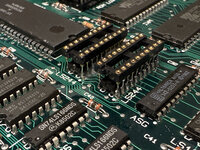
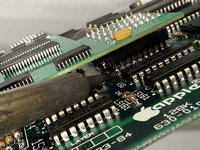
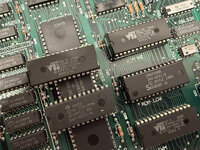
I soldered DIP Sockets (round type) to the top of the IC's (UF4, U11F and U11G). I had tried the lighter pin version, but found that the pins from the board were a bit stiff and would not fit properly. It's not pretty, but works.

There wasn't much flex to snap the expansion board in. I did like how the sockets fit on top of the IC. The harder round sockets sit much higher on the board.

I have male to male pin headers on the back of the expansion board and where the resistor array connect I added a header for the lower height.

The card does want to snap into place and fits. I just didn't want to attach it yet.
 

Attachments

  • IMG_3413.jpg
    IMG_3413.jpg
    1.5 MB · Views: 18
  • IMG_3389.jpg
    IMG_3389.jpg
    2.5 MB · Views: 20
  • IMG_3406.jpg
    IMG_3406.jpg
    1.2 MB · Views: 17
  • IMG_3395.jpg
    IMG_3395.jpg
    2 MB · Views: 16
  • IMG_3384.jpg
    IMG_3384.jpg
    2.1 MB · Views: 13
I was wondering a bit how this was done.

I soldered DIP Sockets (round type) to the top of the IC's (UF4, U11F and U11G). I had tried the lighter pin version, but found that the pins from the board were a bit stiff and would not fit properly. It's not pretty, but works.

There wasn't much flex to snap the expansion board in. I did like how the sockets fit on top of the IC. The harder round sockets sit much higher on the board.

I have male to male pin headers on the back of the expansion board and where the resistor array connect I added a header for the lower height.

The card does want to snap into place and fits. I just didn't want to attach it yet.
Here's a tip:

To ensure everything fits correctly and there's enough clearance to prevent bending the metal rails, try this approach:

Use light or spade-pin sockets (they have shorter pins) and solder them directly over the ICs instead of using machine sockets. Here's how to ensure a proper fit:

  • First, remove the pin headers you've already soldered to the RAM card and clean the pads. Try to restore the original hole clearance (1 mm).
  • Insert male-male headers into the sockets.
  • Fit the RAM card, wiggling it slightly if necessary. Be patient!
  • Once all the headers are fitted, you can solder them to the RAM card.
This method ensures that the RAM card will fit precisely again after detachment.

If you still want to use the machined sockets, that's okay, but I recommend shortening their pins enough so the socket touches the top of the IC. Otherwise, there might not be enough clearance to insert the LB into the rails, and you'll have to bend them. Also, I'm not sure if just a second row of pin headers at RP2 and RP3 will be sufficient if you keep those machine sockets without shortening their pins
 
Last edited:
Here's a tip:

To ensure everything fits correctly and there's enough clearance to prevent bending the metal rails, try this approach:

Use light or spade-pin sockets (they have shorter pins) and solder them directly over the ICs instead of using machine sockets. Here's how to ensure a proper fit:

  • First, remove the pin headers you've already soldered to the RAM card and clean the pads. Try to restore the original hole clearance (1 mm).
  • Insert male-male headers into the sockets.
  • Fit the RAM card, wiggling it slightly if necessary. Be patient!
  • Once all the headers are fitted, you can solder them to the RAM card.
This method ensures that the RAM card will fit precisely again after detachment.

If you still want to use the machined sockets, that's okay, but I recommend shortening their pins enough so the socket touches the top of the IC. Otherwise, there might not be enough clearance to insert the LB into the rails, and you'll have to bend them. Also, I'm not sure if just a second row of pin headers at RP2 and RP3 will be sufficient if you keep those machine sockets without shortening their pins
Thanks for the advice.

I removed the round pin DIP sockets and replaced them with the blade type.

The best way I found to properly locate the expansion card to the DIP sockets on the board was to attach the DIP sockets onto the expansion board pins then attaching the expansion board to the motherboard. I was having issues locating the expansion pins to the DIP sockets accurately because they were off by a bit.

What I did was I soldered a DIP socket on UF4 and header pins into the empty Resistor Array area. I snapped the expansion board in place and properly lined up the sockets over the remaining two IC's. I then soldered the DIP socket pins onto U11F and U11G while the expansion board was attached. Once in place I carefully removed the expansion board to solder the remaining pins on the DIP socket.

Everything lined up perfectly.
 

Attachments

  • IMG_3418.jpg
    IMG_3418.jpg
    1.5 MB · Views: 15
Last edited:
This is how I lined up the expansion card to the motherboard by attaching the DIP socket to the card and placing it onto the motherboard. Then soldering the pins. So much easier this way to line up the card to the board.
 

Attachments

  • IMG_3424.jpg
    IMG_3424.jpg
    1.2 MB · Views: 16
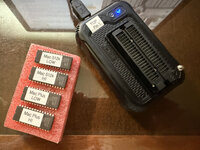
I flashed some 28 pin ST M27C512 with the ROM's provided in the link to make them 512k and Plus ROM's. I'm going to try these ROM's first and attempt a boot.

I also flashed the 32 pin SST 39SF040 for the BOMW ROM-inator I am putting together. I have some new PCB's arriving soon to make the ROM-inator.

All my soldered pins from the DIP sockets have continuity. I will be soldering the jumper wires later today. Hoping for a successful boot.
 

Attachments

  • IMG_3437.jpg
    IMG_3437.jpg
    1.2 MB · Views: 13
  • IMG_3442.jpg
    IMG_3442.jpg
    1.6 MB · Views: 19
Or can the IC's be removed and placed on the expansion card?

I wouldn’t recommend it. That’s what I did to my logic board while working on this project, and even with the right tools I struggled to remove those ICs without damaging traces.

Since I’ve already socketed those ICs (and repaired said trace damage) on my logic board, I’m going to go ahead and use IC sockets with long leads to protrude through the memory board and into the sockets on the logic board. I’m only going to build one board this way for my particular Mac.

If I populate other memory expansion PCBs, I’m going to leave the logic board IC connections unpopulated. That way the choice of connection options remains until install time! (I’m hoping someone can work out modeling and 3D printing those piggy back IC sockets)
 
I forgot to order the 6 pin connector plug wires. They arrive today. I also purchased some 6 pin right angle sockets. I didn't need them, but thought others could use the link.

I should in theory be able to boot tomorrow. However, I am not sure on the IC's I flashed the ROM file. I have also purchased some Winbond W27C512-45Z ROM chips. They arrive next week.

The PCB's I ordered for the BMOW ROM-inator arrive tomorrow. I will build one as well.

Amazon links
6 pin connector plug wire

6 pin right angle socket
 
Nice job!
Soldering the pins on the inside of the DIP sockets was tricky. I used a very long soldering tip. These generally don't produce a lot of heat at the tip. I did slightly melt the plastic on the socket as I tried to reach the middle pins, but not enough to ruin it. I have continuity between the IC pins and the socket and no bridging.
 
All wired up. EDO RAM in place. Switches are set.

I'm going to attempt to boot later today. ROM I think will be my issue with booting.

I currently have stock ROM installed. I have some ST M27C512 ROM's programed for the 512k. I also have a BMOW ROM-inator that I am setting up later today. I also downloaded the updated ROM file placed in this thread for the ROM-inator.

I also have some WinBond W27C512-45Z ROM IC's coming in a few days.

I don't necessarily need to use a ROM-inator installed because I have a HD20 drive to boot from.
 

Attachments

  • IMG_3500.jpg
    IMG_3500.jpg
    1.6 MB · Views: 16
Back
Top