


• Hello MLAers! We've re-enabled auto-approval for accounts. If you are still waiting on account approval, please check this thread for more information.

Apple LaserWriter 16/600 hard drive upgrade

Durosity

68000
I just thought I’d post a couple of pics of the HD upgrade and caddy for the 16/600 PS. I’ve had this installed for a while but I decided to upgrade the RAM today and thought I may as well document this interesting little addition!
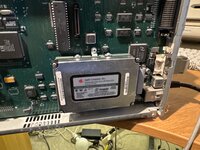
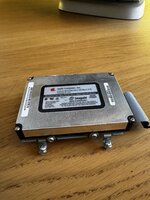
image.jpg
IMG_5563.jpeg
It’s surprisingly still working. It’s just a 200MB 2.5” scsi hard disk with a metal bracket and a special short connector cable. I’ve also upgraded the RAM to 12MB, although I’m currently hunting for some 16MB modules from the pile to max it out!
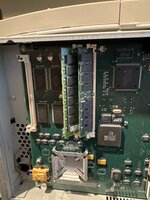
image.jpg

One fun thing I like about this printer, the service manual says to use the long floppy drive cable from the Quadra 900 if you need to run it with the board unmounted from the chassis. Clever little trick!
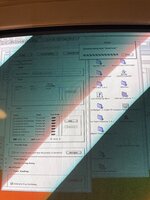
 
I forgot how slow it was to upload fonts to the damn thing (over 10mbit Ethernet from a 9600/350)image.jpg
 
Last edited:
a hard drive and RAM in a printer? That's interesting
It made sense back then.. if you uploaded all the fonts you used then it could save a lot of processing time sending a document using those fonts.. I know a lot of print houses loved them as it sped everything up drastically!
 
a hard drive and RAM in a printer? That's interesting
Even the first LaserWriter had its own RAM. It was as powerful as a Mac 128K itself, actually I think it’s 68000 processor ran faster than the Mac. Partly why it was so expensive.

I didn’t know that any had hard drives though… pretty cool.
 
I didn’t know that any had hard drives though… pretty cool
In theory you could have had 7 SCSI hard disks hosting thousands of fonts. I remember reading an article in Macformat or Macuser or something about one of their printers absolutely loaded with fonts. Apparently it was one of the reasons why LaserWriters were exceptionally popular in offices even those without a single Mac in them, because it was a feature that other printers couldn’t offer, or if they did it cost exceptionally more.
 
@Nixontheknight @Durosity The HDD was also used for mopying large documents (printing original copies from a single source) and spooling of multiple documents from different print jobs, which freed up resources for both the computer and networking equipment. Some of the fancy HP office laserjets could do it, too, such as the Laserjet 8500.
 
I just got a 16/600 PS myself and would love to add the hard drive. Does anyone know the part number for the bracket and cable? I’m sure it will be hard to find but worth a look. Thanks in advance!
 
I wonder how many fonts and pages 200MB would hold anyway, it's not like an office would be hammering it in your basement.

Printer upgrades are fun, took me years to get the RAM expansion for my 4/600 PS.
 
Revisiting this because of the latest posts, but I looked at the photos again and I see... electrolytic caps on that LW logicboard. I am not sure how old your LaserWriter is but it's probably worth thinking about a recap at some point? @Durosity
 
The HDD was also used for mopying large documents (printing original copies from a single source) and spooling of multiple documents from different print jobs, which freed up resources for both the computer and networking equipment. Some of the fancy HP office laserjets could do it, too, such as the Laserjet 8500.
Was this done automatically or was there some software (beyond the standard software printing interface) that did the magic?
 
@beachycove A little bit of both. When you set up the printer options on the client to indicate it has a HDD installed, then presumably it'll flag that option as it prints. Then depending on the size of the document, it'll store the print job and do copies. I'm not certain, but it might be able to store fonts as well. But I might be getting that confused with the font cartridges.
 
Out of curiosity, have you tried the 16/600 PS for "modern" printing? I've read it's possible if you set an IP address using the classic Mac utility... but I'm not sure if that's via lpd or...
 
I just got a 16/600 PS myself and would love to add the hard drive. Does anyone know the part number for the bracket and cable? I’m sure it will be hard to find but worth a look. Thanks in advance!
Service Pricing Pages shows these part numbers (unfortunately, there are no assembly numbers in these books)
076-0474 Hard Drive Bracket Kit
922-1204 Cable, Hard Drive

It's odd that the only drive listed under Modules section was a 240MB SCSI 2.5" 661-0191 🤷‍♂️
 
@beachycove A little bit of both. When you set up the printer options on the client to indicate it has a HDD installed, then presumably it'll flag that option as it prints. Then depending on the size of the document, it'll store the print job and do copies. I'm not certain, but it might be able to store fonts as well. But I might be getting that confused with the font cartridges.
I ask because I had thought the printer’s hard disk was used only to store fonts and things like letterhead graphics, but not to manage printing of multiple copies.

I used to have a hard drive in a LaserWriter Pro 630 (similar to the 16/600 but AppleTalk only and 68030 driven). I didn’t notice any particular improvements in printing speed. What I did find was that a dedicated print server (AppleShare) did massively improve on speed, first, in that it freed up the machine from which I was printing (say, a Classic II), and in that it seemed to speed up production of things like multiple copies of particular documents.

Twas some years back, mind.
 
Out of curiosity, have you tried the 16/600 PS for "modern" printing? I've read it's possible if you set an IP address using the classic Mac utility... but I'm not sure if that's via lpd or...
PostScript LaserWriters with native IP networking like the 16/600 or the 8500 will print with all the bells and whistles and will work perfectly, but at some point (X.9?) it became necessary to manually add the printer’s ppd description (which is just a text file) to the list in one of the unix Libraries in OSX. I have done that up to something like X.13, at least, but have had no need to try it in an up-to-date system these days, as I print to a Xerox currently. However, once you add the ppd file, the LaserWriter, complete with all native abilities like extra paper trays and such, will show up as expected in the printer setup dialogs.

If you use a bridging print server (OSX Server versions up to Leopard), you can still print to an AppleTalk-only Postscript Laserwriter from later OSX systems. You add the ppd to the relevant Library folder of the later machine, and everything works perfectly, as above. I’ve printed even to a LocalTalk-only Laserwriter 4/600 (networked via Apple Internet Router) that way, and suspect I could make it work now (via a Server and a LocalTalk bridge of any sort) from my M1 MBP if the mood suited.

In the end the things are just Postscript printers and they can be made to work, albeit somewhat slowly. Very occasionally, you might get a postscript error, which I take it comes from later PS code, but I have found that to be rare. Mind you, as I say, I haven’t tried it from my M1 MacBook.
 
Back
Top



