• Hello MLAers! We've re-enabled auto-approval for accounts. If you are still waiting on account approval, please check this thread for more information.
Boctor
Reaction score
17

Profile posts Latest activity Postings About

  • Disappointingly, it seems like flashing a Dell-branded OEM Rage 128 Ultra with the PowerMac Rage 128 Pro VBIOS does not automagically work. I didn't expect it to, but it was at least worth finding out.
    obsolete
    obsolete
    Oh my, this is an AGP card? Are you doing it just for the challenge? Otherwise, I would send you a Radeon 7000 for free. I have extras.
    obsolete
    obsolete
    The first issue I see is that this PC card has two 32-bit SDRAM chips (64-bit bus) for 16MB, and the Mac cards have eight 16-bit SDRAM chips (128-bit bus) for 32MB. Some later ATI cards still work despite this (and just report the wrong memory size), but maybe this is a showstopping problem for the Rage 128. Not many people have experience flashing them because they're the lowest-end AGP Mac video card.
    Boctor
    Boctor
    I was doing it purely for challenge, yeah. I could have sworn some of the Mac R128 cards had 16M and the same "R128P" GPU, but the bus would probably be a showstopper. I ended up putting back the stock GeForce2 MX and fixing my cheap SiL3112 card instead, which turned out better. (It was the typical out-of-spec 3.3V VRM issue. If I recall, you had also posted the name of the replacement part, so thanks!)
    Would it be wise to preemptively recap a PM7200 logic board ASAP? Nothing's gone bad yet. I'm unsure if this is as urgent as with the woefully leaky, late-80's SMT electrolytics, which seemed to go bad much sooner (and with more of a mess) than later-generation ones. I know the need for new caps is an eventuality, but it may be a while before I can break out the soldering tools again.
    • Like
    Reactions: demik
    J
    joshc
    yes, recap it
    Boctor
    Boctor
    All right, thanks for confirming. I checked the values and counted up the caps (plus a couple extra if I goof one up) to put in an order with Digikey. This Mac won't risk rotting out.
    • Like
    Reactions: joshc
    Boctor
    Boctor
    Still works, thankfully. I was afraid I'd crush the poor PPC601 while working! The HS doesn't even get warm before than the fan can pull air away from it, and the CPU lacks the discoloration/delamination you sometimes see in 6100/7100 boards. Seems like that rotated cooler design was a big improvement. I snuck in a surprise, too: A reflashed/resoldered SIL3112 SATA card, which it happily boots from.

    Attachments

    • recap-finished-cropped.jpg
      recap-finished-cropped.jpg
      273.6 KB · Views: 5
    • Like
    Reactions: joshc
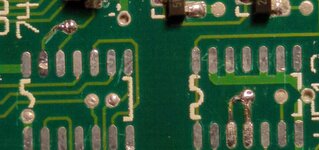
    Managed to ruin the ends of three traces while removing dead mask ROMs, only on the final chip. Everything was going smoothly until the last possible moment. At least the bodge wires will end up snugly pinned beneath the DIP socket, but it'll be weeks before I forgive myself for blemishing such a pretty logic board...
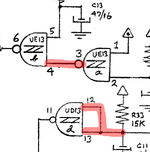
    My "new" IIci's soft power was stuck always signaling on, but I found the three micro-breaks in the relevant traces. Wish I'd spotted them during the board washing, but oh well. Humorously, both could've been fixed by simply bridging pins, but I wanted to make this look as elegant as I could, so as not to confuse any future owners.

    Attachments

    • bodges.jpg
      bodges.jpg
      219.8 KB · Views: 38
    • check_traces.png
      check_traces.png
      234 KB · Views: 37
    Got a hold of a cheap IIci and made the logic board sparkle again. Lifted dull-looking chips, cleaned the legs and pads, drag-soldered back fresh. Nice new caps, no broken traces in the acid zones, power circuit works. However, either the ROMSEL circuit or the ROM chips themselves are again bad, like in my IIcx, though the machine works great with a slot ROM. Am I cursed to irradiate every mask ROM I touch?!

    M
    max1zzz
    Those mask ROM's are starting to go bad very quickly these days, I have had quite a few myself. Luckily at least for stuff like the IIcx and IIci they use chips with a standard pinout and are pretty easy to replace
    • Like
    Reactions: Boctor
    Boctor
    Boctor
    I never thought I'd see the day, although I read somewhere that latent manufacturing problems in these can crop up after a couple decades. Unsure how true this is. I'll have to learn new desoldering techniques, or see if I can get to VCF some day and consult an expert, as it's hard to get some of those DIPs out and I don't want to ruin my boards. Good thing there's always the SIMM slot!
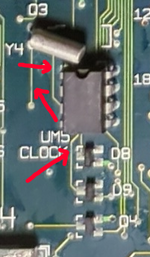
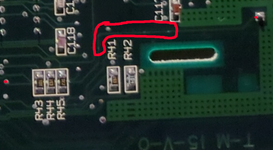
    I'd seen mentions of cursors flickering on some Macs because of time/RTC related problems. After taking a closer look at the RTC circuitry in my cheap Mac IIcx, sure enough, it's not the video card! After scraping, tinning, and meticulous bodging, it's all right.

    Attachments

    • bodges.png
      bodges.png
      124 KB · Views: 24
    • bodges2.png
      bodges2.png
      248.9 KB · Views: 20
    Boctor
    Boctor
    Thanks! The Xenforo search and the high-quality threads on this site are an amazing combo. Learning about the clock/PRAM circuit from the forums also alerted me to a broken trace and possible hidden corrosion on my IIsi, which I never would've otherwise caught.
    Iesca
    Iesca
    Were you also experiencing issues with clock drift, in addition to the cursor symptoms?
    Boctor
    Boctor
    Not sure if I'd call it drift, but on the IIcx, a second took a very long time to elapse. Apple Personal Diagnostics won't specify why the Logic Board Components test fails, but it'll actually fail when the 1hz on the clock doesn't tick as expected, whereas Snooper and MacTest Pro don't even test it.
    • Wow
    Reactions: Iesca
  • Loading…
  • Loading…
  • Loading…
Back
Top