
-
 Hello Guest! We're hosting a challenge to welcome vintage Intel macs to the MLA during the month of July! See this thread for more information.
 -
We've made some quality of life improvements to the Trading Post. More info here.
You are using an out of date browser. It may not display this or other websites correctly.
You should upgrade or use an alternative browser.
You should upgrade or use an alternative browser.
Photo Request : 5500, 6500 and TAM Logic Board
- Thread starter Phipli
- Start date


I think they all report as
The only other option supported by this version of the rom is
The choice is made by the sys-id value at 0xf8000000. xx00xxxx is gazelle and xx01xxxx is powerbook.
sys-id is the
The ids at maciobase + 0x34 aren't used anywhere except for the media bay stuff.
Code:
AAPL,e411
Code:
AAPL,3400/2400sys-id is the
AAPL,cpu-id property.The ids at maciobase + 0x34 aren't used anywhere except for the media bay stuff.

Anyone tried to place/remove 51ohm R207 on the SRS_PRSNT line to proof it?Those resistors are wired derectly to the OHare ASIC, see U5 (343S0172).
They form the so-called BoxID that can be obtained by reading OHare's CPU_ID register.
Disassembling of the logic board is not required.
The OHare CPU_ID register is located at 0xYY000034 where "YY" represents the base address of the chip assigned during machine startup.
Apple's HWInit sets OHare's base address to 0xF3000000.
Thus reading one byte at 0xF3000034 will return the BoxID set up by the above mentioned resistors.
Please keep in mind that Apple engineers used different names for well-known things causing confusions:
CPU_ID has nothing to do with the processor itself, CPU stands for logic board design in this case
BoxID usually means enclosure, for example, Gazelle or TAM
Here the disassembly of the startup bong playback routine from the Gazelle ROM:
Code:fn_FFF03D68: lisori r3, 0xF3000000 # load OHare's base address lisori r4, 0x34 # offset to the IDs register lwbrx r4, r4, r3 # read OHare's IDs register with endian swap rlwinm. r4, r4, 0,17,17 # isolate bit 6 of the Media Bay ID subregister bne l_FFF03D90 # branch if it's set lisori r3, 0xFFE00010 # load base address of the Gazelle bong b loc_303D98 l_FFF03D90: lisori r3, 0xFFE80010 # load base address of the TAM bong l_FFF03D98: lwz r4, 0(r3)
In other words, the startup bong playback routine looks at bit 6 of the Media Bay ID register.
This bit reflects the status of the DEV_ID2 pin that is connected to SRS_PRSNT signal.
SRS_PRSNT (active low) means surround sound is present if this signal is pulled low (see R207 pulldown in the Gazelle schematic).
If SRS_PRSNT is pulled low, the ROM will play the Gazelle startup bong.
Otherwise, you'll hear the TAM bong.


Anyone tried to place/remove 51ohm R207 on the SRS_PRSNT line to proof it?
Heck, why not?

NiceHeck, why not?


So very interesting finds. I tried to up the clock on my 6500/225 to 300MHz. The machine would boot but I would get no picture. I have since tried 250MHz and 275MHz neither of which let me get video out from the machine. I would like to point out that this has all been attempted with R207 removed. My question now is by having this resistor removed is this conflicting with higher clock speeds?
Yeah gonna give that a try I just find it really weird because I've done the overclock before but for some reason it is disabling video. Maybe with higher clock speed and that resistor removed it is looking for a TAM style display or video driver and not one built into the machine?Interesting. Sound like this is a easy thing to test by repopulate R207?
Yeah gonna give that a try I just find it really weird because I've done the overclock before but for some reason it is disabling video. Maybe with higher clock speed and that resistor removed it is looking for a TAM style display or video driver and not one built into the machine?
The edge connector doesn't have flat panel specific video signals, so it's at the very least still outputting RGB video to the port if it is actually outputting video at all.
The only thing that I would think of, is potentially the video sync type (perhaps the flat panel uses C-Sync instead of HV-Sync?), but I'm not certain.
That said, it could very well be that even a 25MHz push is too much for the 603ev, it might chime but it's not a sure fire sign that the system is fully booting, as the video doesn't initialize until after it chimes.
One way to check if the system is responsive, is to check if Caps/Scroll/Numlock do anything, as if the lights don't change on the keyboard, the system's likely to be hanging.

0 > f3000034 rl@ 8 u.r 7A1030E0 okAnyone with a 5500/6500/TAM able to get the value returned by this command in Open Firmware?
Code:f3000034 rl@ 8 u.r
0 >
Which Mac model is that from?0 > f3000034 rl@ 8 u.r 7A1030E0 ok
I just plucked off R133 to drop the CPU from 300 to 275 and saw no change, I still see:Does overclocking or under clocking affect any of the bits of f3000034 ?
0 > f3000034 rl@ 8 u.r 7A1030E0 ok
I just plucked off R133 to drop the CPU from 300 to 275 and saw no change, I still see:
0 > f3000034 rl@ 8 u.r 7A1030E0 ok
That makes sense.
R133 is connected to PLL_CONFIG1 which is PLL_CFG1 of the 603ev CPU. You can access these bits in the HID1 register of the CPU.
Code:
hid1@ 8 u.rDingusPPC hardcodes HID1 to 0x70000000 (225MHz).
@powermax mentioned the Gazelle schematics which can be found at:
https://www.macdat.net/files/pdf/apple/schematics/apple/powermac_6500.pdf
The 4 bytes at offset 0x34 of the mac-io device (OHare or Heathrow or Paddington) are these:
Code:
(fp_id << 24) | (mon_id << 16) | (mb_id << 8) | cpu_id | (this->emmo << 4)[/icode]

| DD2CSelect |  Flat Panel ID   |      Monitor ID    |   Motherboard ID   |         CPU ID      |
|            |       7A         |          10        |          30        |           E0        |
|    ?       | F2 F1 F0 ? ? ? ? | ? M2 M1 M0 ? ? ? ? | 0 D2 D1 D0 ? ? ? ? | C3 C2 C1 C0 ? ? ? ? |

FP_ID2 = RP2 10K pull up = high
FP_ID1 = AMP_OE1 = RP2 10K pull up = high for pm6500.
FP_ID0 = MIC_SENSE = J13 Communications Slot = J6 microphone input = high unless microphone connected?

MON_ID2 = BPWM = 0 for pm6500 because it doesn't have a display.
MON_ID1 = CPWM = 0 for pm6500 because it doesn't have a display.
MON_ID0 = FAN_CNTL = R169 pull up
These are connected to J18 via U34

DEV_ID2 = RP1 10K pull up = SRS_PRSNT; R207 pull down exists for TAM but is missing in pm6500.
DEV_ID1 = RP1 10K pull up, SNOOP_EN; R8 down (is this resistor missing to make it high/not connected to ground?)
DEV_ID0 = RP1 10K pull up, SCC_ENAB = U15 and J13 Communication Slot = pulled high?

CPU_ID3 = CPUID3 = R224 4.7K up
CPU_ID2 = BOX_ID2 = R273 4.7K up
CPU_ID1 = BOX_ID1 = R272 4.7K up
CPU_ID0 = BOX_ID0 = R165 (is this resistor missing? or grounded by J18 ?)
Beige G3 connects a EMMO button to BOX_ID0. It is active low, so this bit is normally 1.
The bits marked with ? are outputs that can be used like Apple Sense codes to get extended IDs (maybe used in laptops?).
Code:
|  ?   ?   ?   ?  |
| out oe2 oe1 oe0 |

oe2 = output enable for ID2
oe1 = output enable for ID1
oe0 = output enable for ID0
out = signal level for enabled output
The Power Mac 5500/6500/TAM ROM seems to want to probe CPU_ID extended codes with byte writes which DingusPPC doesn't support yet.
Monitor ID register most significant bit can be configured as an output for MON_ID2 by setting DD2CSelect, to do DDC (for reading EDID or whatever). This allows for 2 pins for DDC, one for data and the other for clock (SDA and SDC of I2C).
If you have a Mac with OHare, Heathrow, or Paddington, then give this a try:
My B&W G3 returns this:
CPU_ID on a B&W G3 is connected to BUS_SPEED[2:0]. I have a 1 GHz G4 upgrade which sets the bus speed to 66 MHz. BUS_SPEED[2:0] has 3 bits `010` where 0 is jumper bits grounded by the jumper block. I think probing the CPU_ID tries to set the bus speed to 90 MHz by trying to ground BUS_SPEED[1].
The info from probing the CPU_ID may help DingusPPC emulate the 5500/6500/TAM better. The CPU_ID is used to select a ProductInfo from the Universal Tables of the 5500/6500/TAM ROM and probably other ROMs.
Code:
cr " mac-io" find-device " assigned-addresses" active-package get-package-property device-end 2drop 8 + @ 34 + constant idreg

: probe-id ( idreg -- )
    >r
    0 r@ rb! 1 ms               r@ rb@ 2 u.r
    0 r@ rb! 1 ms 4 r@ rb! 1 ms r@ rb@ 2 u.r
    0 r@ rb! 1 ms 2 r@ rb! 1 ms r@ rb@ 2 u.r
    0 r@ rb! 1 ms 1 r@ rb! 1 ms r@ rb@ 2 u.r
    0 r> rb!
    cr
    ;

: probe-ids
    idreg 4 dump
    cr 4 0 do 3 i - idreg + probe-id loop
    ;

probe-ids
My B&W G3 returns this:
Code:
80800034: a0 20 10 70 :. .p:
70345261
10141211
20240221
a0a4 \ probing CPU_ID hangs on B&W G3 when trying to set BUS_SPEED[1] to 0
CPU_ID on a B&W G3 is connected to BUS_SPEED[2:0]. I have a 1 GHz G4 upgrade which sets the bus speed to 66 MHz. BUS_SPEED[2:0] has 3 bits `010` where 0 is jumper bits grounded by the jumper block. I think probing the CPU_ID tries to set the bus speed to 90 MHz by trying to ground BUS_SPEED[1].
The info from probing the CPU_ID may help DingusPPC emulate the 5500/6500/TAM better. The CPU_ID is used to select a ProductInfo from the Universal Tables of the 5500/6500/TAM ROM and probably other ROMs.
Copy and paste? You would have to do one line at a time, or increase the serial text pacing delay.Presuming I'm using a Power Mac 6500 via serial, how is this entered successfully?
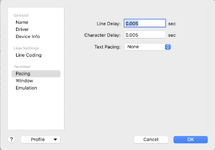
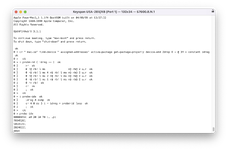
The Open Firmware download command
dl is fastest - it probably doesn't require increasing the text pacing delay.https://tinkerdifferent.com/threads/apple-network-server-macos-based-roms-found.4756/post-42356
I've attached a text file containing the Control-D character at the end which should work with or without using the
dl command.There's a "Connecting to Open Firmware" section at
https://forums.macrumors.com/thread...l-work-in-a-beige-power-macintosh-g3.2303689/
Attachments
Last edited:
Similar threads


- Replies
- 1
- Views
- 2K

- Replies
- 40
- Views
- 4K

- Replies
- 2
- Views
- 5K


- Replies
- 48
- Views
- 13K