
You are using an out of date browser. It may not display this or other websites correctly.
You should upgrade or use an alternative browser.
You should upgrade or use an alternative browser.
My Mad B&W G3 Setup!
- Thread starter Snial
- Start date




So, are you saying the problem doesn't happen if you replace one of those drives with an ATA HD? So, I could, e.g. replace the ZIP drive with an ATA, putting the CD ROM (actually DVD ROM) and HD on the same ATA?
Is there evidence that this is a real solution? It's not just an artefact of maybe the ZIP drive and DVD ROM not supporting fast DMA data transfer rates?
The secondary IDE channel goes back to the Paddington chip and doesn’t have the reliability problems of the primary, which uses a discrete chip. However, you drop down to 16.6 MBPS throughput and have to deal with the ‘OS being in the first 8GB’ limitation. However, it’s probably not a bad tradeoff for stability though you also lose the Zip drive as you say.
I think an 8.6 machine specific install will fit on a Zip disk no problem. I'm not around the B&W to confirm that though.
Sure, I made a bootable universal 9.1 install on a Zip-100 so it’s doable.
I thought the G3 came with FireWire btw.


Correct, but see earlier @joevt comment about perhaps being able update the B&W G3 firmware to support these features!It has an early version of FireWire, but can’t boot from it.
Correct, but see earlier @joevt comment about perhaps being able update the B&W G3 firmware to support these featuresIt has an early version of FireWire, but can’t boot from it.
Including the 8GB OS limit. This would be a very fair trade-off!The secondary IDE channel goes back to the Paddington chip and doesn’t have the reliability problems of the primary, which uses a discrete chip. However, you drop down to 16.6 MBPS throughput
I had a bootable 8.1 install on my PB1400, but it wasn’t reliable enough to complete the boot. Maybe data errors on the disk?Sure, I made a bootable universal 9.1 install on a Zip-100 so it’s doable.
It would, but the cheap availability of SATA PCI cards that can be flashed for use on a Mac would be a far better option.This would be a very fair trade-off!
Hmm, I've just tried this with the 40GB HD that had had a possibly corrupted version of Panther on it as Slave (as is the ZIP drive) and the DVD ROM as master, but it doesn't seem to spin up with the Mac OS 9.1 CDRW in it. I can hear the HD clicking early on as though it was powering up OK though. I'll try unplugging the HD in a bit and see if the CD is OK.The secondary IDE channel goes back to the Paddington chip and doesn’t have the reliability problems of the primary, which uses a discrete chip. However, you drop down to 16.6 MBPS throughput and have to deal with the ‘OS being in the first 8GB’ limitation. However, it’s probably not a bad tradeoff for stability though you also lose the Zip drive as you say.
Well done!Sure, I made a bootable universal 9.1 install on a Zip-100 so it’s doable.
LOL I did this over 20 years ago (it’s still readable). Young me thanks you for your praise!Well done!
Open Firmware in the B&W G3 is missing mass storage drivers for USB and FireWire. These can be found in later versions of Open Firmware.Correct, but see earlier @joevt comment about perhaps being able update the B&W G3 firmware to support these features
USB is OHCI, which should be in every version of Open Firmware that supports booting. Search for fcode images for the class code 0c:03:10
Code:
3.1.0f1 PowerBook G3 Lombard/Dump/Part1.txt:7065:  76412: 048D2C: FFFF FFFF 000C 0310 0000 0000
3.1.1f4 B&W G3/Dump/Part1.txt:7066:  80569: 0419C4: FFFF FFFF 000C 0310 0000 0000
3.1.1f4 B&W G3/with notes/Part1.txt:7072:  80569: 0419C4: FFFF FFFF 000C 0310 0000 0000
3.1.1f4 B&W G3 0/Dump/Part1.txt:7066:  80569: 0419C4: FFFF FFFF 000C 0310 0000 0000
3.1.2f2 G4 Yikes/Dump/Part1.txt:7066:  80542: 0415FC: FFFF FFFF 000C 0310 0000 0000
3.1.3f2 iMac (233 MHz) Bondi Blue/Dump/Part1.txt:7044:  69612: 0433BC: FFFF FFFF 000C 0310 0000 0000
3.1.3f2 iMac (266,333 MHz)/Dump/Part1.txt:7044:  69612: 0433BC: FFFF FFFF 000C 0310 0000 0000
3.1.3f3 iMac (266,333 MHz) 2/Dump/Part1.txt:7045:  69632: 0433F4: FFFF FFFF 000C 0310 0000 0000
3.2.4f1 G4 AGP Sawtooth/Dump/Part1.txt:7558:  88729: 04CACC: FFFF FFFF 000C 0310 0000 0000
3.3.2f1 G4 Cube/Dump/Part1.txt:7713:  96419: 0550EC: FFFF FFFF 000C 0310 0000 0000
4.1.0f1 G4 Digital Audio/Dump/Part1.txt:7792: 101294: 0581D4: FFFF FFFF 000C 0310 0000 0000
4.1.7f4 iBook G3/Dump/Part1.txt:7909: 102332: 058EF8: FFFF F900 FFFF FFFF 000C 0310 0000 0000
4.1.8f5 PowerBook G3 Pismo/Dump/Part1.txt:7909: 102359: 058F98: FFFF F900 FFFF FFFF 000C 0310 0000 0000
4.1.9f1 G4 Cube/Dump/Part1.txt:7909: 102393: 058FA0: FFFF F900 FFFF FFFF 000C 0310 0000 0000
4.1.9f1 iMac G3 Slot Loading/Dump/Part1.txt:7909: 102393: 058FA0: FFFF F900 FFFF FFFF 000C 0310 0000 0000
4.2.5f1 G4 Quicksilver/Dump/Part1.txt:8500: 106182: 0642FC: 0000 0000 FFFF F8C0 FFFF FFFF 000C 0310 0000 0000
4.2.7f1 iBook G3 600 (Late 2001 - Snow)/Dump/Part1.txt:8500: 106442: 0646C4: 0000 0000 FFFF F8C0 FFFF FFFF 000C 0310 0000 0000
4.2.8f1 G4 AGP Sawtooth Stock/Dump/Part1.txt:7909: 102420: 059040: FFFF F900 FFFF FFFF 000C 0310 0000 0000
4.3.2f1 iBook G3 600 14-Inch (Early 2002 - Snow)/Dump/Part1.txt:8499: 108958: 0676DC: 0000 0000 FFFF F8C0 FFFF FFFF 000C 0310 0000 0000
4.4.0f1 iMac G4/Dump/Part1.txt:8500: 109080: 067904: 0000 0000 FFFF F8C0 FFFF FFFF 000C 0310 0000 0000
4.4.1f1 iMac G4/Dump/Part1.txt:8500: 109084: 067914: 0000 0000 FFFF F8C0 FFFF FFFF 000C 0310 0000 0000
4.4.5f3 iMac G4 17 inch/Dump/Part1.txt:8959: 122736: 073FEC: 0000 0000 FFFF F8C0 FFFF FFFF 000C 0310 0000 0000
4.4.8f2 G4 Mirrored Drive Doors/Dump/Part1.txt:8960: 122798: 074054: 0000 0000 FFFF F8C0 FFFF FFFF 000C 0310 0000 0000
4.5.4f1 iBook G3 Snow/Dump/Part1.txt:9112: 124620: 0764D0: 0000 0000 FFFF FFFF 000C 0310 0000 0000
4.5.7f1 G4 FW 800/Dump/Part1.txt:10010: 135389: 080598: 0000 0000 FFFF FFFF 000C 0310 0000 0000
4.5.7f1 G4 FW 800 unpatched/Dump/Part1.txt:10010: 135389: 080598: 0000 0000 FFFF FFFF 000C 0310 0000 0000
4.5.8f1 iMac G4 1.0 GHz 17-inch (Flat Panel)/Dump/Part1.txt:10002: 132793: 07E2E4: 0000 0000 0000 0000 FFFF FFFF 000C 0310 0000 0000
4.6.0f1 G4 FW 800/Dump/Part1.txt:10010: 135389: 080598: 0000 0000 FFFF FFFF 000C 0310 0000 0000
4.6.2f1 PowerBook G4 1.0 GHz 17 inch (Aluminum)/Dump/Part1.txt:10066: 136795: 081560: 0000 0000 FFFF FFFF 000C 0310 0000 0000
4.6.4f1 iBook G3/Dump/Part1.txt:10088: 131763: 07DAAC: 0000 0000 0000 0000 FFFF FFFF 000C 0310 0000 0000
4.7.1f1 PowerBook G4 (15-inch FW800)/Dump/Part1.txt:10394: 142738: 0875C0: 0000 0000 FFFF FFFF 000C 0310 0000 0000
4.8.5f0 iBook G4 (Early 2004)/Dump/Part1.txt:10439: 128169: 07B164: 0000 0000 0000 0000 FFFF FFFF 000C 0310 0000 0000
4.8.7f1 iBook G4/Dump/Part1.txt:10967: 136333: 082B10: 0000 0000 FFFF FFFF 000C 0310 0000 0000
4.8.9f4 Mac Mini G4/Dump/Part1.txt:11002: 136702: 082BF8: 0000 0000 FFFF FFFF 000C 0310 0000 0000
4.9.3f0 iBook G4 14-Inch (Mid-2005 - Opaque)/Dump/Part1.txt:11027: 141672: 0843C4: 0000 0000 0000 0000 FFFF FFFF 000C 0310 0000 0000
4.9.4f1 Mac Mini G43/Dump/Part1.txt:11023: 140680: 083118: 0000 0000 FFFF FFFF 000C 0310 0000 0000
4.9.5f3 PowerBook G4 DLSD/Dump/Part1.txt:11049: 147882: 0895EC: 0000 0000 0000 0000 FFFF FFFF 000C 0310 0000 0000
4.9.6f0 PowerBook G4 DLSD 17 inch/Dump/Part1.txt:11049: 147882: 0895EC: 0000 0000 0000 0000 FFFF FFFF 000C 0310 0000 0000
5.1.5f2 G5/Dump/Part1.txt:10462: 132252: 07A8AC: 0000 0000 0000 0000 FFFF FFFF 000C 0310 0000 0000
5.2.7f1 G5 Quad/Dump/Part1.txt:10793: 131017: 07B74C: 0000 0000 0000 0000 FFFF FFFF 000C 0310 0000 0000
Of those, only 3.2.4 and later can boot USB.
FireWire in the B&W G3 is not OHCI so search for vendor/device 104c:8000 instead of FireWire OHCI class code 0c:00:10
Code:
3.2.4f1 G4 AGP Sawtooth/Dump/Part1.txt:7562:  92356: 04F30C: 8000 104C
3.3.2f1 G4 Cube/Dump/Part1.txt:7718: 101516: 05887C: 8000 104C
4.1.0f1 G4 Digital Audio/Dump/Part1.txt:7797: 106434: 05B9B4: 8000 104C
It maybe helpful to know if anyone with one of those Macs with a FireWire controller that has vendor/device 104c:8000 is able to boot FireWire or use FireWire target disk mode to verify that the firmware has sufficient code to support those features.
Maybe those Macs don't have 104c:8000?
All very intriguing. They contain OHCI, because class code oc:00:10 is there, but they can't boot from OHCI, because there's still a bit of fcode missing?Open Firmware in the B&W G3 is missing mass storage drivers for USB and FireWire. These can be found in later versions of Open Firmware.
USB is OHCI, which should be in every version of Open Firmware that supports booting. Search for fcode images for the class code 0c:03:10
Code:3.1.0f1 PowerBook G3 Lombard/Dump/Part1.txt:7065: 76412: 048D2C: FFFF FFFF 000C 0310 0000 0000 3.1.1f4 B&W G3/Dump/Part1.txt:7066: 80569: 0419C4: FFFF FFFF 000C 0310 0000 0000 3.1.1f4 B&W G3/with notes/Part1.txt:7072: 80569: 0419C4: FFFF FFFF 000C 0310 0000 0000 3.1.1f4 B&W G3 0/Dump/Part1.txt:7066: 80569: 0419C4: FFFF FFFF 000C 0310 0000 0000 3.1.2f2 G4 Yikes/Dump/Part1.txt:7066: 80542: 0415FC: FFFF FFFF 000C 0310 0000 0000 3.1.3f2 iMac (233 MHz) Bondi Blue/Dump/Part1.txt:7044: 69612: 0433BC: FFFF FFFF 000C 0310 0000 0000 3.1.3f2 iMac (266,333 MHz)/Dump/Part1.txt:7044: 69612: 0433BC: FFFF FFFF 000C 0310 0000 0000 3.1.3f3 iMac (266,333 MHz) 2/Dump/Part1.txt:7045: 69632: 0433F4: FFFF FFFF 000C 0310 0000 0000 3.2.4f1 G4 AGP Sawtooth/Dump/Part1.txt:7558: 88729: 04CACC: FFFF FFFF 000C 0310 0000 0000 3.3.2f1 G4 Cube/Dump/Part1.txt:7713: 96419: 0550EC: FFFF FFFF 000C 0310 0000 0000 4.1.0f1 G4 Digital Audio/Dump/Part1.txt:7792: 101294: 0581D4: FFFF FFFF 000C 0310 0000 0000 4.1.7f4 iBook G3/Dump/Part1.txt:7909: 102332: 058EF8: FFFF F900 FFFF FFFF 000C 0310 0000 0000 4.1.8f5 PowerBook G3 Pismo/Dump/Part1.txt:7909: 102359: 058F98: FFFF F900 FFFF FFFF 000C 0310 0000 0000 4.1.9f1 G4 Cube/Dump/Part1.txt:7909: 102393: 058FA0: FFFF F900 FFFF FFFF 000C 0310 0000 0000 4.1.9f1 iMac G3 Slot Loading/Dump/Part1.txt:7909: 102393: 058FA0: FFFF F900 FFFF FFFF 000C 0310 0000 0000 4.2.5f1 G4 Quicksilver/Dump/Part1.txt:8500: 106182: 0642FC: 0000 0000 FFFF F8C0 FFFF FFFF 000C 0310 0000 0000 4.2.7f1 iBook G3 600 (Late 2001 - Snow)/Dump/Part1.txt:8500: 106442: 0646C4: 0000 0000 FFFF F8C0 FFFF FFFF 000C 0310 0000 0000 4.2.8f1 G4 AGP Sawtooth Stock/Dump/Part1.txt:7909: 102420: 059040: FFFF F900 FFFF FFFF 000C 0310 0000 0000 4.3.2f1 iBook G3 600 14-Inch (Early 2002 - Snow)/Dump/Part1.txt:8499: 108958: 0676DC: 0000 0000 FFFF F8C0 FFFF FFFF 000C 0310 0000 0000 4.4.0f1 iMac G4/Dump/Part1.txt:8500: 109080: 067904: 0000 0000 FFFF F8C0 FFFF FFFF 000C 0310 0000 0000 4.4.1f1 iMac G4/Dump/Part1.txt:8500: 109084: 067914: 0000 0000 FFFF F8C0 FFFF FFFF 000C 0310 0000 0000 4.4.5f3 iMac G4 17 inch/Dump/Part1.txt:8959: 122736: 073FEC: 0000 0000 FFFF F8C0 FFFF FFFF 000C 0310 0000 0000 4.4.8f2 G4 Mirrored Drive Doors/Dump/Part1.txt:8960: 122798: 074054: 0000 0000 FFFF F8C0 FFFF FFFF 000C 0310 0000 0000 4.5.4f1 iBook G3 Snow/Dump/Part1.txt:9112: 124620: 0764D0: 0000 0000 FFFF FFFF 000C 0310 0000 0000 4.5.7f1 G4 FW 800/Dump/Part1.txt:10010: 135389: 080598: 0000 0000 FFFF FFFF 000C 0310 0000 0000 4.5.7f1 G4 FW 800 unpatched/Dump/Part1.txt:10010: 135389: 080598: 0000 0000 FFFF FFFF 000C 0310 0000 0000 4.5.8f1 iMac G4 1.0 GHz 17-inch (Flat Panel)/Dump/Part1.txt:10002: 132793: 07E2E4: 0000 0000 0000 0000 FFFF FFFF 000C 0310 0000 0000 4.6.0f1 G4 FW 800/Dump/Part1.txt:10010: 135389: 080598: 0000 0000 FFFF FFFF 000C 0310 0000 0000 4.6.2f1 PowerBook G4 1.0 GHz 17 inch (Aluminum)/Dump/Part1.txt:10066: 136795: 081560: 0000 0000 FFFF FFFF 000C 0310 0000 0000 4.6.4f1 iBook G3/Dump/Part1.txt:10088: 131763: 07DAAC: 0000 0000 0000 0000 FFFF FFFF 000C 0310 0000 0000 4.7.1f1 PowerBook G4 (15-inch FW800)/Dump/Part1.txt:10394: 142738: 0875C0: 0000 0000 FFFF FFFF 000C 0310 0000 0000 4.8.5f0 iBook G4 (Early 2004)/Dump/Part1.txt:10439: 128169: 07B164: 0000 0000 0000 0000 FFFF FFFF 000C 0310 0000 0000 4.8.7f1 iBook G4/Dump/Part1.txt:10967: 136333: 082B10: 0000 0000 FFFF FFFF 000C 0310 0000 0000 4.8.9f4 Mac Mini G4/Dump/Part1.txt:11002: 136702: 082BF8: 0000 0000 FFFF FFFF 000C 0310 0000 0000 4.9.3f0 iBook G4 14-Inch (Mid-2005 - Opaque)/Dump/Part1.txt:11027: 141672: 0843C4: 0000 0000 0000 0000 FFFF FFFF 000C 0310 0000 0000 4.9.4f1 Mac Mini G43/Dump/Part1.txt:11023: 140680: 083118: 0000 0000 FFFF FFFF 000C 0310 0000 0000 4.9.5f3 PowerBook G4 DLSD/Dump/Part1.txt:11049: 147882: 0895EC: 0000 0000 0000 0000 FFFF FFFF 000C 0310 0000 0000 4.9.6f0 PowerBook G4 DLSD 17 inch/Dump/Part1.txt:11049: 147882: 0895EC: 0000 0000 0000 0000 FFFF FFFF 000C 0310 0000 0000 5.1.5f2 G5/Dump/Part1.txt:10462: 132252: 07A8AC: 0000 0000 0000 0000 FFFF FFFF 000C 0310 0000 0000 5.2.7f1 G5 Quad/Dump/Part1.txt:10793: 131017: 07B74C: 0000 0000 0000 0000 FFFF FFFF 000C 0310 0000 0000
Of those, only 3.2.4 and later can boot USB.
Oh, right, so like Forth. You could copy the OF firmware (the actual ROM on Flash) compile in some more Forth definitions to support OHCI; re-burn the flash and then the extra definitions are there in the dictionary. Given that Fcode is a token-forth does that mean it's not a simple TIL and that later definitions with the same name can override earlier ones? (though I suppose if compiled FCode contains the token number, then precompiled definitions would reference the earlier tokens).FireWire in the B&W G3 is not OHCI so search for vendor/device 104c:8000 instead of FireWire OHCI class code 0c:00:10
Code:3.2.4f1 G4 AGP Sawtooth/Dump/Part1.txt:7562: 92356: 04F30C: 8000 104C 3.3.2f1 G4 Cube/Dump/Part1.txt:7718: 101516: 05887C: 8000 104C 4.1.0f1 G4 Digital Audio/Dump/Part1.txt:7797: 106434: 05B9B4: 8000 104C
It maybe helpful to know if anyone with one of those Macs with a FireWire controller that has vendor/device 104c:8000 is able to boot FireWire or use FireWire target disk mode to verify that the firmware has sufficient code to support those features.
Maybe those Macs don't have 104c:8000?
All very intriguing. They contain OHCI, because class code oc:00:10 is there, but they can't boot from OHCI, because there's still a bit of fcode missing?
0c:00:10 is FireWire OHCI https://admin.pci-ids.ucw.cz/read/PD/0c/00
0c:03:10 is USB OHCI https://admin.pci-ids.ucw.cz/read/PD/0c/03
OF 3.1.x has code for USB to use the keyboard but that's about it.
OF 3.2.4 adds USB and FireWire mass storage support.
TIL?Given that Fcode is a token-forth does that mean it's not a simple TIL and that later definitions with the same name can override earlier ones? (though I suppose if compiled FCode contains the token number, then precompiled definitions would reference the earlier tokens).
Later definitions cannot override earlier ones if the earlier definitions were referenced in a compile step and the compile step doesn't happen again. Compiled Forth or fcode uses the addresses of the definitions, not fcode numbers. In that case, a patch can be used so the old definition uses the new definition, or you can recompile definitions that used the old definition. I don't think any of that matters if the new code is going to be inserted into the ROM because in that case we can remove any old stuff that is to be replaced. Loading the code from disk would be different because in that case some of the code to be replaced may have already been compiled.
Threaded Interpreted Language, which is what Forth is usually implemented as, although I prefer Direct Threaded Code over Indirect Threaded Code. I quite like Token Forth, because it means you can (in theory) write 32-bit Forth as compactly as 16-bit Forth.0c:00:10 is FireWire OHCI https://admin.pci-ids.ucw.cz/read/PD/0c/00
0c:03:10 is USB OHCI https://admin.pci-ids.ucw.cz/read/PD/0c/03
OF 3.1.x has code for USB to use the keyboard but that's about it.
OF 3.2.4 adds USB and FireWire mass storage support.
TIL?
OK.Later definitions cannot override earlier ones if the earlier definitions were referenced in a compile step and the compile step doesn't happen again. Compiled Forth or fcode uses the addresses of the definitions, not fcode numbers. In that case, a patch can be used so the old definition uses the new definition, or you can recompile definitions that used the old definition. I don't think any of that matters if the new code is going to be inserted into the ROM because in that case we can remove any old stuff that is to be replaced. Loading the code from disk would be different because in that case some of the code to be replaced may have already been compiled.
@croissantking / @joevt
I made a bit of progress with the HD. I booted with my bootable Mac OS 9.1 in the CDROM as master ::8 or ::8 for the jumper setting where 8 is the jumper) and with the Zip drive replaced by the 40GB HD (as slave, :::: or ::. From OF I could list the devices. I took a guess that:
/pci@80000000/pci-bridge@d/mac-io@5/ata-3@20000/disk:
was the CDROM so I decided to dir it:
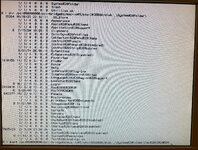
I could then:
It took a while for the CD to spin up, but then I got this image:
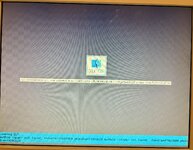
I thought it hadn't worked, but while I was deciding whether to photo it, suddenly:
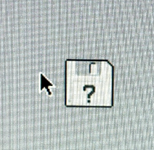
A flashing disk icon appeared, along with a cursor I could move. Then it became:
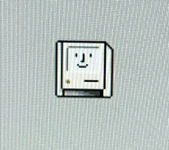
And proceded to boot to the CD containing Mac OS 9.1. This was a breakthrough, because by itself it wouldn't boot the CD, not even if I held down 'C'. After Mac OS 9.1 booted, it saw the 40GB disk (1 partition) and rebuilt the desktop (which took a long time). Then I created 3 partitions: 1.1GB, 6.5GB and all the rest. Then I copied the System Folder to the HD (130MB) to the first partition. I saw I could then make it the Startup Folder, so I did that and Restarted.
However, it didn't boot to the HD. I made a number of re-attempts to boot to the HD. I went back into Open Firmware again. It could see 1 disk: /pci@80000000/pci-bridge@d/mac-io@5/ata-3@20000/disk:
as before. Trying the same open firmware command to dir it, didn't work. I found a Apple Forum help about this from 2006.
It said, e.g:
boot-device mac-io/ata-4@1f000/@0:12,\\:tbxi
| | Partition/location
| on device
0 = master
1 = slave
for ata internal device
So, that means I should be able to type:
And in fact that worked, it listed the CDROM. But...
For slave didn't. I tried adding the :partition after the @1 with partition 0..f, then 10, but all it kept saying was "can't OPEN the DIR device". Yet oddly enough when I retry with the CDROM drive (@0, I can hear the HD click before it starts the CDROM.
Finally, just as a sanity check, I rebooted via the CDROM again, which... after a long time... worked as above. Get Info on the first partition of the HD says: ATA Bus 0 Dev 1, v3.3. I looked inside the HD's partition 1. The System Folder appeared blessed; the System and Finder were there, as was Mac OS ROM (v6.1). And when running the Startup Folder control panel it looked like it was the bootable one, but it doesn't boot from there on Restart; just the flashing folder/Finder icon. It doesn't even boot into the CDROM (but I can from Open Firmware).
Any ideas?
I made a bit of progress with the HD. I booted with my bootable Mac OS 9.1 in the CDROM as master
::8 or ::8 for the jumper setting where 8 is the jumper) and with the Zip drive replaced by the 40GB HD (as slave, :::: or ::. From OF I could list the devices. I took a guess that:/pci@80000000/pci-bridge@d/mac-io@5/ata-3@20000/disk:
was the CDROM so I decided to dir it:
I could then:
boot /pci@80000000/pci-bridge@d/mac-io@5/ata-3@20000/disk:,\System%20Folder\Mac%20OS%20ROMIt took a while for the CD to spin up, but then I got this image:
I thought it hadn't worked, but while I was deciding whether to photo it, suddenly:
A flashing disk icon appeared, along with a cursor I could move. Then it became:
And proceded to boot to the CD containing Mac OS 9.1. This was a breakthrough, because by itself it wouldn't boot the CD, not even if I held down 'C'. After Mac OS 9.1 booted, it saw the 40GB disk (1 partition) and rebuilt the desktop (which took a long time). Then I created 3 partitions: 1.1GB, 6.5GB and all the rest. Then I copied the System Folder to the HD (130MB) to the first partition. I saw I could then make it the Startup Folder, so I did that and Restarted.
However, it didn't boot to the HD. I made a number of re-attempts to boot to the HD. I went back into Open Firmware again. It could see 1 disk: /pci@80000000/pci-bridge@d/mac-io@5/ata-3@20000/disk:
as before. Trying the same open firmware command to dir it, didn't work. I found a Apple Forum help about this from 2006.
It said, e.g:
boot-device mac-io/ata-4@1f000/@0:12,\\:tbxi
| | Partition/location
| on device
0 = master
1 = slave
for ata internal device
So, that means I should be able to type:
boot /pci@80000000/pci-bridge@d/mac-io@5/ata-3@20000/@0:,\And in fact that worked, it listed the CDROM. But...
boot /pci@80000000/pci-bridge@d/mac-io@5/ata-3@20000/@1:,\For slave didn't. I tried adding the :partition after the @1 with partition 0..f, then 10, but all it kept saying was "can't OPEN the DIR device". Yet oddly enough when I retry with the CDROM drive (@0
, I can hear the HD click before it starts the CDROM.Finally, just as a sanity check, I rebooted via the CDROM again, which... after a long time... worked as above. Get Info on the first partition of the HD says: ATA Bus 0 Dev 1, v3.3. I looked inside the HD's partition 1. The System Folder appeared blessed; the System and Finder were there, as was Mac OS ROM (v6.1). And when running the Startup Folder control panel it looked like it was the bootable one, but it doesn't boot from there on Restart; just the flashing folder/Finder icon. It doesn't even boot into the CDROM (but I can from Open Firmware).
Any ideas?
@croissantking / @joevt
I made a bit of progress with the HD. I booted with my bootable Mac OS 9.1 in the CDROM as master
/pci@80000000/pci-bridge@d/mac-io@5/ata-3@20000/disk:
was the CDROM so I decided to dir it:
View attachment 91867
I could then:
boot /pci@80000000/pci-bridge@d/mac-io@5/ata-3@20000/disk:,\System%20Folder\Mac%20OS%20ROM
It took a while for the CD to spin up, but then I got this image:
View attachment 91868
I thought it hadn't worked, but while I was deciding whether to photo it, suddenly:
View attachment 91869
A flashing disk icon appeared, along with a cursor I could move. Then it became:
View attachment 91871
And proceded to boot to the CD containing Mac OS 9.1. This was a breakthrough, because by itself it wouldn't boot the CD, not even if I held down 'C'. After Mac OS 9.1 booted, it saw the 40GB disk (1 partition) and rebuilt the desktop (which took a long time). Then I created 3 partitions: 1.1GB, 6.5GB and all the rest. Then I copied the System Folder to the HD (130MB) to the first partition. I saw I could then make it the Startup Folder, so I did that and Restarted.
However, it didn't boot to the HD. I made a number of re-attempts to boot to the HD. I went back into Open Firmware again. It could see 1 disk: /pci@80000000/pci-bridge@d/mac-io@5/ata-3@20000/disk:
as before. Trying the same open firmware command to dir it, didn't work. I found a Apple Forum help about this from 2006.
It said, e.g:
boot-device mac-io/ata-4@1f000/@0:12,\\:tbxi
| | Partition/location
| on device
0 = master
1 = slave
for ata internal device
So, that means I should be able to type:
boot /pci@80000000/pci-bridge@d/mac-io@5/ata-3@20000/@0:,\
And in fact that worked, it listed the CDROM. But...
boot /pci@80000000/pci-bridge@d/mac-io@5/ata-3@20000/@1:,\
For slave didn't. I tried adding the :partition after the @1 with partition 0..f, then 10, but all it kept saying was "can't OPEN the DIR device". Yet oddly enough when I retry with the CDROM drive (@0
Finally, just as a sanity check, I rebooted via the CDROM again, which... after a long time... worked as above. Get Info on the first partition of the HD says: ATA Bus 0 Dev 1, v3.3. I looked inside the HD's partition 1. The System Folder appeared blessed; the System and Finder were there, as was Mac OS ROM (v6.1). And when running the Startup Folder control panel it looked like it was the bootable one, but it doesn't boot from there on Restart; just the flashing folder/Finder icon. It doesn't even boot into the CDROM (but I can from Open Firmware).
Any ideas?
Now that you've booted from the CD-ROM and set up the hard drive so you can boot from it, set the hard drive as master and the CD-ROM drive as slave.
Booting from slave ATA devices was weird and badly supported around that time, so it may just be a firmware limitation or bug.
The B&W G3 has device aliases that you can use for the boot device path:
You can use
You can use
Do these commands work?
The startup disk control should set the
You could try the
https://forums.macrumors.com/thread...eige-power-macintosh-g3.2303689/post-33250697
Read this thread for debugging multi-boot or for removing devices from the
https://tinkerdifferent.com/threads/blue-and-white-scsi-2-drive-issues.4076/
My B&W G3 only has the floppy drive in the
Other links:
https://68kmla.org/bb/index.php?thr...om-usb-from-the-boot-picker.48601/post-546120
Code:
0 > devalias
pci                 /pci
bridge              /pci/@d
mac-io              /pci/@d/mac-io
via-cuda            /pci/@d/mac-io/via-cuda
rtc                 /pci/@d/mac-io/via-cuda/rtc
adb-keyboard        /pci/@d/mac-io/via-cuda/adb/keyboard
adb-mouse           /pci/@d/mac-io/via-cuda/adb/mouse
sound               /pci/@d/mac-io/davbus/sound
enet                /pci/@d/mac-io/ethernet
scca                /pci/@d/mac-io/escc/ch-a
sccb                /pci/@d/mac-io/escc/ch-b
nvram               /pci/@d/mac-io/nvram
ide0                /pci/@d/mac-io/ata-3@20000
cd                  /pci/@d/mac-io/ata-3@20000/disk@0
zip                 /pci/@d/mac-io/ata-3@20000/disk@1
ide1                /pci/@d/pci-ata@1/ata-4@0
hd                  /pci/@d/pci-ata@1/ata-4@0/disk@0
ultra0              /pci/@d/pci-ata@1/ata-4@0/disk@0
ultra1              /pci/@d/pci-ata@1/ata-4@0/disk@1
usb                 /pci/@d/usb
fw                  /pci/@d/firewire
keyboard            /psuedo-hid/keyboard
mouse               /psuedo-hid/mouse
You can use
\\ instead of \System%20Folder\ if it's blessed correctly.You can use
:tbxi instead of Mac%20OS%20ROM if it has the correct file type.Do these commands work?
Code:
dir cd:,\\
dir zip:,\\
dir might work without a partition number but maybe boot doesn't?The startup disk control should set the
boot-device. Go into Open Firmware and use printenv to check what it was set to.You could try the
multi-boot command to see what choices it finds but it might skip some devices:https://forums.macrumors.com/thread...eige-power-macintosh-g3.2303689/post-33250697
Read this thread for debugging multi-boot or for removing devices from the
no-boot list.https://tinkerdifferent.com/threads/blue-and-white-scsi-2-drive-issues.4076/
My B&W G3 only has the floppy drive in the
no-boot list (since B&W G3 doesn't come with floppy drive). I don't know if it boots from cd or zip.Other links:
https://68kmla.org/bb/index.php?thr...om-usb-from-the-boot-picker.48601/post-546120
Changing the device master/slave setting changes the device's Open Firmware path.Now that you've booted from the CD-ROM and set up the hard drive so you can boot from it, set the hard drive as master and the CD-ROM drive as slave.
Booting from slave ATA devices was weird and badly supported around that time, so it may just be a firmware limitation or bug.
Is that a good thing, or more of a detailed explanation for why Slave booting doesn't work?Changing the device master/slave setting changes the device's Open Firmware path.
So, at the moment I have the HD where the Zip should be:
zip /pci/@d/mac-io/ata-3@20000/disk@1
But dev / ls doesn't list:
/pci/@d/mac-io/ata-3@20000/disk@1
just disk (no @0 nor @1).
A while back when I was trying to boot an iMac G3/400DV from USB I was trying to use the device aliases, i.e. to create one for the bootable USB flash drive I was using, but I probably had the wrong syntax, and gave up. Hence, the full device path.
Both the CD and HD are currently on the CD bus, because it's controlled by a slow IDE chip that doesn't have the issues of the other one. I have a potentially compatible Sil3112 SATA PCI card being delivered soon, so that might change things, but it might not have any cables, so I might have to get those before I can try it.Have you tried CS? Or two hard drives on the CD bus? I had this machine in the 2000s and had a hell of a time with the `zip` alias, and the `multi-boot` was always not great. I think I ended up doing something with yaboot's forth script to get it all working.
I thought the CS setting just meant it could detect if it was attached to the slave signal or master? So, it wouldn't make any difference, it's just about having less hassle connecting up drives. Perhaps I'm wrong, since thinking about it, there's no twist in the wires for an IDE drive. But that's certainly another option. Oh, it doesn't work by twisting..
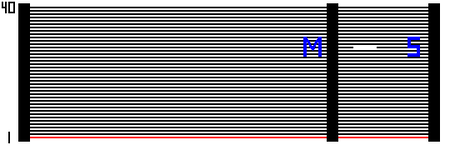
Using IDE Cable Select
Pin 28 is grounded for Master, but floating for slave in CS mode. So, a CS compatible cable connects pin 28 at the master end to a ground signal, but there's no connection for slave. It's equivalent to:
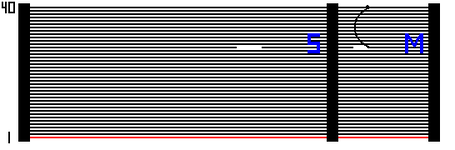
-thanks for the advice so far... it's a learning curve all the way!
Attachments
Last edited:
The suggestion was to switch master and slave after getting the HD to boot. Switching the devices means the HD would not have the same boot path that allowed it to boot so then it probably won't boot.Is that a good thing, or more of a detailed explanation for why Slave booting doesn't work?
disks are weird in Open Firmware. Multiple disks of a bus may be represented by a single device in the device tree or each disk may have their own entry. In the former case, when you open the device, you need to include a unit address (So, at the moment I have the HD where the Zip should be:
zip /pci/@d/mac-io/ata-3@20000/disk@1
But dev / ls doesn't list:
/pci/@d/mac-io/ata-3@20000/disk@1
just disk (no @0 nor @1).
@0 or @1 for master/slave for IDE or @0-@7 for SCSI ID) so that it knows which specific disk to open. I don't know if multi-boot takes that into account which is why I suggested enabling debug output for multi-boot to see what devices and unit-addresses it's looping through.The code for B&W G3 and Yikes versions of Open Firmware (3.1.1f4 and 3.1.2f2) is hard to read because the words are defined
headerless (unnamed). So look at iMac Bondi Blue's Open Firmware (3.1.3f2) instead.They use the
bootpath-search package to loop through devices.The first parameter to
findandadd-ilp is the number of IDs for a bus.findandadd-block-scsi-8 passes 8 (@0 - @7) to findandadd-ilpfindandadd-block-scsi-16 passes 16 (@0 - @f)findandadd-block-ide passes (@0 - @1)floppies (
swim3 or fdc) don't use findandadd-ilp. They might be limited to a single floppy drive?I guess that all means
bootpath-search should always loop through master and slave for any buses with device_type set to ide.B&W G3 code looks a little bit different. 3.1.1f4 might be newer than 3.1.2f2. It checks buses with
device_type set to either ata or ide when considering looping through IDE devices. It might be better to compare with 3.2.4f1 which has the same change.3.2.4f1 has some changes which might be bug fixes compared to 3.1.1f4. It uses
findandadd-block-ata-4 instead of findandadd-block-ide for devices compatible with cmd646-ata. I think findandadd-block-ata-4 only checks a single drive or it expects that each disk is a separate entry in the device tree. 3.2.4f1 for Sawtooth doesn't actually add a cmd646-ata device, so this change might be meant for Yikes/B&W G3.The
cmd646-ata device in 3.1.1f4 (ata-4) is interesting because its child disk device has a reg property which appears as the unit-address of the disk so you'll see a disk@0 in the device tree, unlike the other IDE bus. Perhaps this is what the change in 3.2.4f1 accounts for. The code for the cmd646-ata device has a loop to add up to 2 IDE devices in this way (either a disk or a cdrom). So both disks of this bus will appear in the device tree.The slow IDE is theBoth the CD and HD are currently on the CD bus, because it's controlled by a slow IDE chip that doesn't have the issues of the other one.
ata-3 bus.The fast IDE is the
ata-4 bus (cmd646-ata).Similar threads

- Replies
- 2
- Views
- 1K
- Replies
- 13
- Views
- 1K
- Replies
- 5
- Views
- 2K