
You are using an out of date browser. It may not display this or other websites correctly.
You should upgrade or use an alternative browser.
You should upgrade or use an alternative browser.
What FPS do you get in Quake on your machine?
- Thread starter noglin
- Start date


Oh that would be very interesting to see! The 6300/120 has the Valkyrie chip like the 5200/6200/5300, and it would be very interesting to see how much more FPS you would get with 120 mhz. The 5300 result (12.1 fps) showed that the 5200 (and likely 6200) is actually cpu bound (7.9 fps), which also makes me think that I could probably optimize quake quite a bit for the 5200. The 6300/120 would tell us if the 5300 is still CPU bound or if it starts to hit the limits of the valkyrie chip.I’ll be adding the 6300/120 soon, which was actually my original impetus to participate. I’m curious.
Maybe do a 6200 and/or 6400 as well.
The 6400 is also very interesting, as that one has the newer valkyrie AR chip!
Looking forward to see those results!

I have a 6500 @ 250MHz, ran the tests using the same image that I used for the PM6100 I posted earlier
603ev @ 250MHz
Mac OS 8.1
internal video
software render @ 320x200, no doubling or interleave
demo2:
without L2 cache: 20.9fps
with 256k L2 cache: 26.9fps ( close to +30%!! )
that cache is doing some heavy lifting!
Might be getting a 6360 later this week (which I think is the same as the 5400?)
603ev @ 250MHz
Mac OS 8.1
internal video
software render @ 320x200, no doubling or interleave
demo2:
without L2 cache: 20.9fps
with 256k L2 cache: 26.9fps ( close to +30%!! )
that cache is doing some heavy lifting!
Might be getting a 6360 later this week (which I think is the same as the 5400?)


603ev @ 250MHz, Mac OS 8.1, internal video, software render @ 320x200, no doubling or interleave.
Without L2 cache: 20.9fps, with 256k L2 cache: 26.9fps ( close to +30%!! )
that cache is doing some heavy lifting!
If we go back to my PB1400c/166 results:
User Machine Quake Version 320x200 320x200(2x) 640x480 Snial PowerBook 1400c/166 1.09 16.3 12.3 5.6
It looks like my PPC603e with 128kB of cache is proportionally faster. 7.9*166/75=17.4 fps. Alternatively, 16.3/7.9*75=>155MHz.
Again, your PM6500/250 is close to proportionally faster. Scaling up the 16.3fps to 250MHz gives 24.5fps. The 250MHz PM6500 is 50% faster than my PB1400c/166, but also the bus speed on the PM6500 (50MHz) is 52% faster!
So, assuming the video bandwidth is also proportional, then the extra 9.8% performance improvement from the scaled-up PB1400c is mostly due to the 256kB cache vs the 128kB cache on mine. This means the 128kB cache is doing even more heavy lifting (+17.2% from 128kB, another 9.8% from 256kB).

The thing about the Valkyrie chips is that, like Classic Mac OS multiprocessor support or AltiVec, programs needed to be aware of its presence and programmed with how to use it or there wasn't much benefit to it. AFAIK Mac OS didn't really provide abstracted (i.e., a program tells Mac OS to accelerate video and Mac OS figures it out) access to its advanced functions directly within the OS (QuickDraw) or via an add-on library like DirectX or OpenGL. Marathon had an option to check if you were running it on a Q630 or descendant and it would then address the Valkyrie directly, but that's the only game known to actively exploit the chip.
As for NuBus Power Mac PDS CPU upgrades, they do a sort of friendly takeover once the upgrade enabler loads. I'm not totally sure how it does it, but I imagine it changes a pointer or address that sends subsequent instructions to the upgrade card rather than the host CPU. You'll notice that at initial boot, the system chugs along at its usual pace (on the original CPU) until it gets to the upgrade enabler at which point it pauses while it switches and then it takes off like a shot.
As for NuBus Power Mac PDS CPU upgrades, they do a sort of friendly takeover once the upgrade enabler loads. I'm not totally sure how it does it, but I imagine it changes a pointer or address that sends subsequent instructions to the upgrade card rather than the host CPU. You'll notice that at initial boot, the system chugs along at its usual pace (on the original CPU) until it gets to the upgrade enabler at which point it pauses while it switches and then it takes off like a shot.
This might also partially explain why the G3 accelerator in the 6100 with its pokey 33MHz bus gets such a big boost - it's running at basically the same rate (247MHz vs 250MHz) but gets 39.8fps over the 603ev's 26.9fps. Iirc the G3 has it's own beefy 1MB L2 cache (and is a far better chip overall).Again, your PM6500/250 is close to proportionally faster. Scaling up the 16.3fps to 250MHz gives 24.5fps. The 250MHz PM6500 is 50% faster than my PB1400c/166, but also the bus speed on the PM6500 (50MHz) is 52% faster!
As an aside, the 6100 by default has crappy DRAM video which can be "solved" by adding a big enough cache to hold the video memory - I am wondering if the G3 card with the large cache has this additional effect, it feels like a totally different computer!
The graphics rendering code and most of the data used to construct a given frame will sit in a 1MB L2 cache and that means that most of the time, perhaps 95% to 98% of the time, it's avoiding main RAM.This might also partially explain why the G3 accelerator in the 6100 with its pokey 33MHz bus gets such a big boost - it's running at basically the same rate (247MHz vs 250MHz) but gets 39.8fps over the 603ev's 26.9fps. Iirc the G3 has it's own beefy 1MB L2 cache (and is a far better chip overall).
Not sure how that would work. Valkyrie I has its own video RAM and a queue of read/write transactions for when the video chip stalls VRAM access and also because VRAM is slower than a bus transaction (30ns or 60ns vs 40ns or 60ns?). This means that if L2 was properly caching VRAM in a kind of write-back mode, changes made to the L2 cache, caching the VRAM wouldn't cause screen updates at all (because the changes would remain in the L2 cache, which Valkyrie doesn't read).As an aside, the 6100 by default has crappy DRAM video which can be "solved" by adding a big enough cache to hold the video memory - I am wondering if the G3 card with the large cache has this additional effect, it feels like a totally different computer!
However, the L2 caches on the P5200, and PM6100 are write-through caches, so a write to a cached VRAM address would cause a main bus write to the same address, which would cause a video update. The update speed is then limited to the VRAM (or main bus) bandwidth rather than the L2 cache bandwidth, so you wouldn't see the benefits of an L2 cache, caching VRAM.
This is probably why VRAM addresses are normally marked as non-cacheable: that way, you don't waste L2 cache, cacheing something you can't speed up regardless.
Even so, it won't make much difference. Quake at 320x200 (8bpp I think even for Quake II) uses 64kB per frame, or 16k x 32-bit writes per frame. Assuming we can perform one Fast Page write per pair of writes that gives us: 60ns+40ns =100 ns / 2 =50ns on average, or 0.8ms per frame. In other words, writing to video memory isn't the bottleneck. Even at 40fps it's consuming just 32ms of bus bandwidth per second (3.2%). On the PB1400c/s main bus at 33MHz it's 50% slower, 40fps takes 48ms of bus bandwidth (4.8%).
Still, there are good reasons to believe a large L2 cache will significantly increase the performance of Quake:
- Video games usually use double-buffering (at least), so the buffered video frame(s) can be held in L2 cache (easily, because each frame is only 64kB).
- Model data and the copious numbers of tables Quake uses to render frames can be held in L2 cache.
This was a great and super informative read, thank you! So my takeaway is that an HPV card in this 6100 is unlikely to make much of a difference  I still want one since a couple of other games I want to try (The Sims, Alpha Centauri, etc.) require thousands of colors at... I want to say 800x600 or 1024x768, one of which isn't supported by the basic 6100 video
I still want one since a couple of other games I want to try (The Sims, Alpha Centauri, etc.) require thousands of colors at... I want to say 800x600 or 1024x768, one of which isn't supported by the basic 6100 videoHey folks, I'm enjoying the discussion! Will add in some info here:
What is interesting with the Civic is that its driver is actually in the system 7.1 leak, and it is a completely different chip than Valkyrie I for sure. The developer note for 6100/7100/8100 says it has 32 bit and 64 bit data path support, that might translate to faster 32-bit path as well / larger buffer writes.
("The PowerPCTM603 Microprocessor: Performance Analysis and Design Trade-offs" says they decided for "write-back" while the 603e user manual, with 603 supplements, says it can be set to write-through or write-back on a per page level. It is odd that the former says it is always write-back while the latter says it is configurable?).
The 6100 uses 601 cpu which is by the user manual either write-through or write-back (set per page). However from what I've gathered from hearsay, it is not allocate on write.
The 6100 uses the Civic video card, which seems quite a bit faster than Valkyrie I, on Speedometer graphics 8bpp, the 6100 civic gets 1.7 while Performa 5300 with Valkyrie I gets 1.08 (and the 5200 gets 0.95). https://docs.google.com/spreadsheets/d/1QwS0ZNBoV-QmE811DuWq7FnV9zBd_eyL-K8CRgYm0woThe graphics rendering code and most of the data used to construct a given frame will sit in a 1MB L2 cache and that means that most of the time, perhaps 95% to 98% of the time, it's avoiding main RAM.
Not sure how that would work. Valkyrie I has its own video RAM and a queue of read/write transactions for when the video chip stalls VRAM access and also because VRAM is slower than a bus transaction (30ns or 60ns vs 40ns or 60ns?). This means that if L2 was properly caching VRAM in a kind of write-back mode, changes made to the L2 cache, caching the VRAM wouldn't cause screen updates at all (because the changes would remain in the L2 cache, which Valkyrie doesn't read).
What is interesting with the Civic is that its driver is actually in the system 7.1 leak, and it is a completely different chip than Valkyrie I for sure. The developer note for 6100/7100/8100 says it has 32 bit and 64 bit data path support, that might translate to faster 32-bit path as well / larger buffer writes.
The 5200 has a PowerPC 603, afaik it is write-back and allocate on write, with possibility to change to write-through per pageHowever, the L2 caches on the P5200, and PM6100 are write-through caches, so a write to a cached VRAM address would cause a main bus write to the same address, which would cause a video update. The update speed is then limited to the VRAM (or main bus) bandwidth rather than the L2 cache bandwidth, so you wouldn't see the benefits of an L2 cache, caching VRAM.
("The PowerPCTM603 Microprocessor: Performance Analysis and Design Trade-offs" says they decided for "write-back" while the 603e user manual, with 603 supplements, says it can be set to write-through or write-back on a per page level. It is odd that the former says it is always write-back while the latter says it is configurable?).
The 6100 uses 601 cpu which is by the user manual either write-through or write-back (set per page). However from what I've gathered from hearsay, it is not allocate on write.
For comparison, on the 5200, each vram write of 8 bytes is 366ns when sustained over 320x200. For Quake (320x200x8bpp) on the 5200 320*200/8*1000/75e6 = 0.1ms, so even for valkyrie, it is not the bottleneck for Quake.This is probably why VRAM addresses are normally marked as non-cacheable: that way, you don't waste L2 cache, cacheing something you can't speed up regardless.
Even so, it won't make much difference. Quake at 320x200 (8bpp I think even for Quake II) uses 64kB per frame, or 16k x 32-bit writes per frame. Assuming we can perform one Fast Page write per pair of writes that gives us: 60ns+40ns =100 ns / 2 =50ns on average, or 0.8ms per frame. In other words, writing to video memory isn't the bottleneck. Even at 40fps it's consuming just 32ms of bus bandwidth per second (3.2%). On the PB1400c/s main bus at 33MHz it's 50% slower, 40fps takes 48ms of bus bandwidth (4.8%).
PowerPC cpu's and the 603/603e in particular that can only complete in-order must hit cache all the time to perform well (any expensive cache miss and the cpu quickly stalls completely). Quake really does *a lot* of computation per frame (and not only rasterizer either!) see here for example: https://valvedev.info/archives/abrash/abrash.pdfStill, there are good reasons to believe a large L2 cache will significantly increase the performance of Quake:
- Video games usually use double-buffering (at least), so the buffered video frame(s) can be held in L2 cache (easily, because each frame is only 64kB).
- Model data and the copious numbers of tables Quake uses to render frames can be held in L2 cache.
The 603e's SRU can do "add" instructions as well (the 603 cannot!). Attaching the compiler writers guide, there is a general "PowerPC model" that compilers probably used. It also shows that ballpark the relative instructions execute about the same on the 601/603/603e/604 but still compiler flags and cpu specific instructions can likely help quite a lot, how much is hard to say will depend on so many things.Finally, we are running the same compilation of Quake for all PowerPC CPUs, but due to the differences in the microarchitectures, it may be possible to improve performance with different instruction scheduling. For example, on the 603(e), FPU instruction completion stalls pending integer instruction (IU) completions. This implies that a FPU, IU sequence can complete in the same time as the FPU instruction, but an IU, FPU could take 1 cycle longer. But on a 603e, some integer operations can also be performed by the System Register Unit which means that an FPU, IU, SRU sequence can complete in the same time as the FPU instruction (@noglin might correct me here).
Attachments
If you do get an HPV card for your 6100, I would be very curious to see how that changes things though!This was a great and super informative read, thank you! So my takeaway is that an HPV card in this 6100 is unlikely to make much of a difference
I see now there is an entry for the 7100 which is just like yours except it is 80mhz, and it got 13.5 fps which is more than expected (combination of both cpu and bus improved?), so Civic is likely not bottlenecking you.

I guess you are referring to „Super Mario“, which is considered as the Quadra AV ROM source code? No wonder it has CIVIC driver, since these models use this chip!What is interesting with the Civic is that its driver is actually in the system 7.1 leak
That's right! Unfortunately the Performa 630 (which was first to use the Valkyrie chip) must have come just a bit later than this release.I guess you are referring to „Super Mario“, which is considered as the Quadra AV ROM source code? No wonder it has CIVIC driver, since these models use this chip!
The SuperMario code in general has some obvious gaps. I'm guessing it was forked from the previous generation before a lot of 1993/1994 machines were added. To give one example, the DFAC 2 audio I/O chip first seen in the LC520 only gets a mention as a feature flag bit in the Universal tables. There's zero about the unique hardware in the 580/630 or the preceding Quadra 605 generation. But on the other end there's a lot of code present for the PCI PowerMacs.

I should test out my Powermac G4 and G4 Aluminum on this.
Some G3+G4 tower results (more detail in spreadsheet):
| Mac | 320x200 | 320x200 (doubled) | 640x400 | 640x480 |
|---|---|---|---|---|
| MDD 2003 1.25GHz DP | 111.6 | 97.8 | 85.3 | 78.9 |
| MDD 1.0GHz DP | 106.4 | 93.7 | 76.1 | 67.6 |
| DA 533MHz | 96.8 | 87.6 | 64.6 | 57.0 |
| B&W 400MHz | 80.0 | 71.4 | 39.4 | 34.0 |

I did a lot of Quake benchmarks on six different CPUs in my PM7600. Rage 128 out of a B&W G3 for video so the CPU wasn’t bottlenecked, and 256MB of memory on Mac OS 8.6. This is 640x480 in GLQuake.
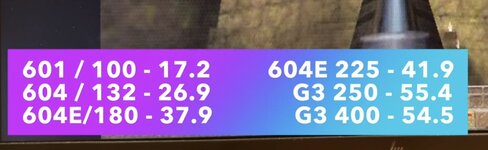
Lots of other testing too if anyone is curious.
Edit: just saw this is the NuBus forum sorry.
Lots of other testing too if anyone is curious.
Edit: just saw this is the NuBus forum sorry.
 Crazy result with the G3/250 vs G3/400, wonder why it hits a brick wall like that!
In the video I linked I said I thought it might be the Rage 128 but the more I think about it the more I blame RAM bandwidth. I have a B&W G3, a 6500, and a Sawtooth G4 that also all run at 400MHz and it’s something I plan to test in the next video whenever I get time.
Similar threads

- Replies
- 0
- Views
- 127


- Replies
- 2
- Views
- 411

- Replies
- 0
- Views
- 187
- Replies
- 5
- Views
- 328
