• Hello MLAers! We've re-enabled auto-approval for accounts. If you are still waiting on account approval, please check this thread for more information.

jmacz journey

@finkmac just want to make sure I understand this correctly.

From the weird marks on the rear polarizer, it's clear that the angle is 45 and 135, ie they are 90 degrees apart. That part is clear. Now you mentioned in my profile post thread, that the front should be 45 and the rear should be 135. Does that matter? I just need it at a 45 degree angle and the front/rear 90 degrees apart meaning I can either do front 45 and rear 135.... or front 135 and rear 45. Is that right? Or does the front have to be 45 and if so, how did you tell that from the weird marks on the bad rear polarizer?

Some other questions. The films available for purchase have a line marking the angle. They sell them in 0, 45, 90, 135 angles. One side has adhesive. You can always rotate the film to the angle you want, but buying film with the proper angle is better since if you rotate the film, the dimensions of the film may no longer cover all of your LCD.

That said, given one side is adhesive, I should get two 45 degree film right? Because one goes on the front at 45 degrees and adheres to the front. And then I turn over the LCD and I do 45 degrees again on the rear and it adheres to the rear. Given I turned the LCD over, they will be inverted and thus 90 degrees apart. If I actually buy a 45 degree film and a 135 degree film, then given they are on opposite sides, they will be the same and not 90 degrees apart. Is that not the case?
 
I answered my own question I think. Seems like they just have to be 90 degrees apart, doesn't matter if the front is 45 or the front is 135. And for a 90 degree difference, you want the same degree film for both front and rear. Because you're putting it on opposite sides of the LCD, it will automatically be 90 degrees difference because you flip the LCD over. This is true only for 45/135 degrees. This is not true for 0/90.

I had some film but it was a 0 or a 90. This meant that I had to turn it 45 degrees to be correct for this LCD but turning it meant it was no longer large enough to cover the entire display. With this knowledge, I decided to consider this film throwaway and just do a test fitment to learn.

The result:
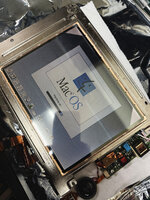
IMG_9735.JPG

Screen actually looks great! This was with adhesive. No air bubbles. BUT there are a few specs of dust and I know that's going to give me OCD so when I get new 45/135 degree film, I need to figure out a better way to combat dust. You can see the corners are missing film because again, I rotated 0/90 degree film which meant I didn't get full coverage across the LCD. It's fine, this was just a test.

Process

I used the same degree on both front and rear because again, you're flipping the screen so it will be 90 degrees apart. For each side I cleaned the LCD with alcohol wipes and got as much dust off as I could. I then prepared a solution of water and dish washing soap. Not overly soapy but enough to allow the film to slide around on top of the LCD. I used my finger to just cover the LCD with the soap water... didn't drench the thing, just enough to cover the area where the film would go. I then pealed one side of the protective film on the adhesive side of the polarizer, placed that edge down on the LCD, and then pressed down as I removed the rest of the protective film. This ensured I didn't get dust on the adhesive. I moved the film into position and when satisfied, I used a squeegee to push the soap water out of the edges. Started from one side and evenly pushed it out the far edge. I used a paper towel to quickly dab up the soap water coming out to keep it from getting to the PCBs. It wasn't too bad to clean up and at the end, the PCBs were dry.

The end result is above with no air bubbles at all. But again, there are some specs of dust.

I am going to order the proper 45 degree film and then do this again so I don't have empty corners :)

For the dust, I am going to try something different. Going to try building my own laminar flow hood. Should give me a workspace with filtered air that is blowing out of an enclosed space. Going to build it out of a 12V power supply, 9 PC fans 120x120mm, that should give me roughly a 360mm x 360mm array of fans doing around 400-ish CFM. Will put a 14"x14" home HVAC air filter in front of it to trap the dust particles, and then have that pumping filtered air into a 14"x14"x14" walled workspace. Back wall will be the filtered fans. Front wall will be open for me to work in the space. That should generative positive filtered air flow preventing dust from entering the space. Should be $30 worth of supplies so let's see if it works. I realize I can get a larger industrial fan but I wanted to try with PC case fans as I have them lying around, and their smaller profile which allows this set up to not take up that much space when stored.
 
mm nice progress. seems like you've answered your own questions :ROFLMAO:

yeah, exactly correct about the rear/front polarizer. it'll be the same degree, just flipped. for the other side of the TFT
Or does the front have to be 45 and if so, how did you tell that from the weird marks on the bad rear polarizer?
the polarizer seems to crystalize along the axis of polarization first. you can use the orientation of crystallization to infer the degree of polarization.

my suggestion is to get a few 135degree sheets and a few 45degree sheets. TFTs are generally either of those, and you'll be able to cover all bases
that way.

0/90 degree polarizers are mostly used on IPS displays I believe.

and then STN/DSTN (passive matrix) polarizers are a whole different pile of problems.
 
Thanks for outlining your film strategy; it solves a few issues I've always had (I usually get 3x as much film as I need; the first application grabs all the dust particles, and either the second or third succeeds without bubbles that won't go away on their own in 24 hours).

I wonder if the solution to the dust is to have a statically charged panel above the screen so any dust doesn't land in the first place? I'd love to hear some tested solutions for those of us without a clean room and bunny suit.
 
I wonder if the solution to the dust is to have a statically charged panel above the screen so any dust doesn't land in the first place? I'd love to hear some tested solutions for those of us without a clean room and bunny suit.

A laminar flow hood might be a solution, though those aren't exactly cheap (though the fact you can get them in the lower three figures, makes it downright cheap compared to a clean room :-P).
There are also plans online for clean boxes for HDD repairs, not sure how dust free those truly get, but it might be good enough for LCD repolarization.
 
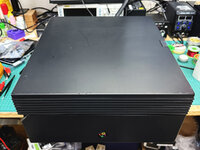
Not quite sure how I'm going to get this laser printer working... don't have the cables yet to even see if it does anything. Another project for another day.

IMG_9768.JPG
 
Someone on the vcfed forums has a thread outlining their NeXT laser repair journey, might be good info for you
 
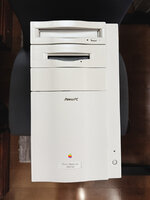
Finished up my Power Macintosh 8500. I'm going to leave it alone and not touch it because it seems every time I open up the chassis, another piece of plastic breaks. :eek:

@nathall I went for it with decals :)

IMG_9766.JPG

IMG_9770.JPG

The original model number got messed up while I was removing the badge. I was able to save the clear plastic on the badge but the actual model designation is a sticker and it tore into pieces (parts were stuck to the clear plastic, other parts were stuck to the chassis). So I cleaned off the clear plastic piece, made a decal with a '500' on it (since it's upgraded to a Newer Tech 500MHz G3), and after applying the decal, used clear adhesive to put the clear plastic piece back on.
 
Nice! Your PowerPC decal looks better than the one on mine I simply masked out for painting resulting in a mismatched background.

I like your /500 idea. If I ever do decals for mine, I might do a /400.
 
Just took in some more stuff..

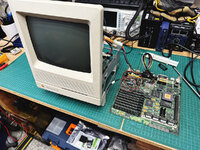
First is an SE/30.. battery was still there but hadn't leaked yet. But the caps did leak all over the place. Going to be some work to get this working as right now it's not.

IMG_0012.JPG

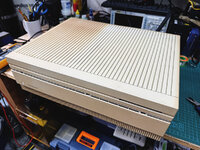
Second is a Macintosh II.. batteries hadn't leaked yet but again, capacitors did a lot of damage. The inside is super rusted to the point where the power supply won't come out. It's like fused to the metal shielding inside..

IMG_0021.JPG

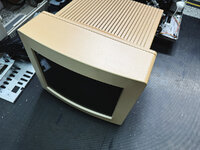
Third is a very sun burned M0401 13" monitor. The backend is orange. But it works which is great.

IMG_0022.JPG

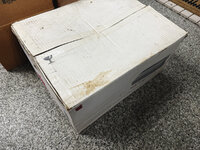
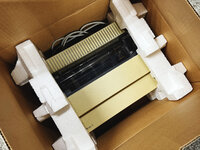
Last is an ImageWriter II with original box. Neat! Haven't tested it yet but not keeping this one. Once I test the condition, going to probably put it up so that a collector can get it.

IMG_0019.JPG

IMG_0020.JPG
 
That Mac II and monitor are good candidates for paint, I think. I really like those M0401 monitors.

Yeah.. it has a crap ton of broken traces :( going to be a while before it runs. I've got 3 of those M0401s now (not sure why), and 1 broken one. I really like them too!
 
Fixed up the Macintosh II and it's working great. Also fixed up the SE/30 and finally got another unit to put Bolle's gray cake grayscale video card into.

But in other news...

IMG_0415.JPG

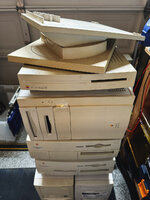
I gotta stop taking stuff in... No place to put them! Newest load: Quadra 840AV, two Power Macintoshes, an LC III, and finally an M0403 monitor stand. Also got two PCs that came with the lot and no idea what I'm going to do with those. Not to mention yet another M0401 13" RGB monitor... my 5th... I've got a problem.
 
Well, you win some, you lose some.

Monitor stand works great. The 840AV also works although the bottom metal shielding in the case is rusted. Fixable. The LC III might be a goner. Looks like it was stored on its side so the battery leaked, went over the memory chips, did a number on the motherboard, and then pooled onto the PSU, leaked into it, and out the other side. Not sure it's worth saving given the sheer number of traces that were destroyed. Will have to clean it up and use as a parts board. Still need to crack open the two Power Macintoshes but I hear rattling inside -- hopefully that's not bad news.

If I walk away with just the 840AV and the monitor stand, it was still worth it. Everything else is a bonus.
 
Well, you win some, you lose some.

Monitor stand works great. The 840AV also works although the bottom metal shielding in the case is rusted. Fixable. The LC III might be a goner. Looks like it was stored on its side so the battery leaked, went over the memory chips, did a number on the motherboard, and then pooled onto the PSU, leaked into it, and out the other side. Not sure it's worth saving given the sheer number of traces that were destroyed. Will have to clean it up and use as a parts board. Still need to crack open the two Power Macintoshes but I hear rattling inside -- hopefully that's not bad news.

If I walk away with just the 840AV and the monitor stand, it was still worth it. Everything else is a bonus.

A working 840AV is a great result. The fronts often look different between models as they transitioned from caddy CD-ROM drives to tray loading; and from auto-inject to manual inject floppy drives. I have the opposite to you.
 
Back
Top