• Hello MLAers! We've re-enabled auto-approval for accounts. If you are still waiting on account approval, please check this thread for more information.

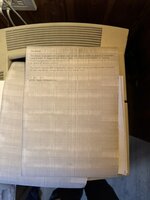
Laserwriter 4/600 PS with streaks all over printed page.

I bought a LaserWriter 4/600 PS pretty cheap off ebay. The ad says it was in poor condition but powered on. So I took a gamble. Sure enough it looked pretty dirty but powered up fine and immediately connected to my AppleTalk network. However, for printing it left dirty streaks on both sides of the paper. Wiping the transfer roller clean (I used dry paper) solved the issue on the rear of the paper, but not the front.

From searching I came across the "halfway test" where you wait until a printed sheet is halfway through, then halt it by lifting the cover. Then by removing the toner cartridge you can see the print before it's been fused. If the issue is caused by the cartridge then you would see the issue here. If the image is fine then the issue is caused by the fuser. Sure enough the image here is exactly the same as the end result. So replacing the toner cartridge should fix the issue.

So I replaced the toner cartridge. Luckily it takes HP 92274A cartridges that are still available and are also pretty cheap.

But it has not solved the issue. Since I've replaced the toner cartridge could it be the logic board that's at fault?

Any other suggestions?

Cheers
Ferg
7B49C326-5CDE-437A-B22E-46C5579B7463_1_105_c.jpeg
 
NOS toner can degrade, particularly the wiper for the drum that scraps waste toner off. Look at the drum after printing and see if it is completely clear of toner. If it has streaks/residue, the wiper is failing. It could also be a bad drum as well. With the Canon PX engine printers, it takes multiple passes of the drum to complete a letter sized page, so you'll usually see "ghosting" of previous lines on the printer (note the pattern on your test print).

Apple's service documents can be kinda thin on printer engine troubleshooting. The HP LaserJet 4P/4L manual covers the PX engine as well and might provide additional tips. Also, the latest OEM 74A cartridges I've seen on ebay tend to be made no later then the mid 2000s. Going by the number of open box units, I suspect a lot of people bought a NOS cartridge, found out it printed streaks, and decided to resell them on ebay.
 
NOS toner can degrade, particularly the wiper for the drum that scraps waste toner off. Look at the drum after printing and see if it is completely clear of toner. If it has streaks/residue, the wiper is failing. It could also be a bad drum as well. With the Canon PX engine printers, it takes multiple passes of the drum to complete a letter sized page, so you'll usually see "ghosting" of previous lines on the printer (note the pattern on your test print).
Many thanks for that. The drum is covered in toner. Both the old toner catridge and the new one. From the manual I found the wiper is inside the cartridge though? Is that correct? Have I just been unlucky and both cartridges are failing? The cartridge was unwrapped but it had the plastic strip still in place.
 
From googling the "HP Laserjet 4P/4L" it appears that the elasticity of the rubber wiper blade does deterioate so if these are nearly twenty years old I guess that's the issue!
 
NOS toner can degrade, particularly the wiper for the drum that scraps waste toner off.
Sorry I see you actually wrote that the wipers deterioate! I guess my only option is to get a toner cartridge that has a new wiper blade added. I did see that Alibaba do sell the wiper blades so I guess there's a market for remanufactured ones! Thanks again for putting me on the right path.
 
I had this happen on a 4/600 once and new toner would only be good for so long before it did this. It's a common problem.
 
If they get hard, I wonder if soaking them with alcohol will loosen them up. I should check my old lasers out and see if they still work, been ages since I used them.
 
If they get hard, I wonder if soaking them with alcohol will loosen them up. I should check my old lasers out and see if they still work, been ages since I used them.
According to this thread by @beachycove then the wiper blade can be improved by just heating and cooling. I guess I may as well give it a go!

The first step is to remove the hinged bit of the cartridge to expose the wiper blade. The wiper can then be removed, and the blade can be retensioned by heating, flexing, and cooling (under water, I have read somewhere, but maybe by just going outdoors in January!). It would be good to devise some sort of jig so as to apply even pressures on the blade while retensioning. Worth a shot?
 
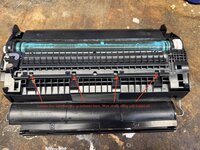
So I had a go at "renovating" the wiper blade. I found this YT video that shows it's actually pretty easy to remove the two halves of the cartridge.

So removing one screw turning over loosing four tabs, then with a couple of large flat headed screwdrivers (levers would be better!) prying the two apart.
827F50CF-5772-4070-BE94-9F4083ADC30E_1_105_c.jpeg

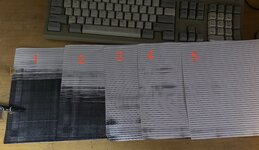
Then I moved the wiper blade (two screws and you need to cut the foam attaching it at each end. I cleaned the wiper blade with isopropanol and returned it. That was slightly better on one side but much worse on the other (see print 1).

73FAF745-2C14-41F3-99A6-1864EEB93359_1_201_a.jpeg
So I removed and tried to make the silicone blade press harder on the drum. I placed it in hot water (approx 50degC) in a measuring cylinder (seemed the easiest) and left it for 20 mins (water was still hot).

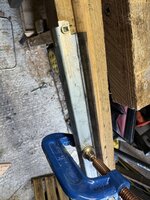
I removed then added it to a simple jig I made that will hopefully give the blade some curvature towards the drum. I then poured cold water over it. That gave print 2. So better but not great.

5277B800-3620-4BE2-A606-A673C4454680_1_105_c.jpeg
I repeated this and instead when it was in the jig I left it overnight in a cold shed (about 3degC).

This time (print 3) it's a lot better. I repositioned the wiper blade twice more and ended up with prints 4 then 5. At this point I was a little sick of getting covered in toner (I did wear a mask and gloves) so I left it here. Perhaps I'll repeat later!
 
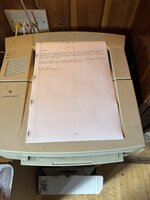
Here's the same print as the first one. So pretty far from perfect, but a massive improvement. Shame that even my keyboard is covered in toner... I'm really, really glad I wore a mask! (A decent half mask respirator!).78CAB57B-8359-4818-B743-C9F8C228EB90_1_102_o.jpeg
 
That's a huge improvement!

Hopefully these wipers will be at some point re-produced in some way that it would be easy to replace them. I wonder if there could even be a 3D-printable replacement (there are flexibly materials like TPU, but the material would really need to withstand the heat inside the toner cartridge during printing).
 
The 74A cartridge in my LJ4MP has the opposite problem. For some reason it doesn't deposit toner at all onto statically charged portions of the drum. Printer itself is working, I can see a light ghost of the test page on the paper.
 
There are, I think, two blades in all toner cartridges. One is deeper in the mechanism. Maybe try the same with the other blade?

More generally: Obviously, what we all really want is new material on the blade, or a new blade metal and all. Thinking about this, the rubber/ silicon/ whatever in those blades was probably all taken from the same roll in cartridges from the same manufacturers, so POSSIBLY it would be possible to find some sort of ghetto fix by swapping or altering parts. The better solution, of course, is proper new parts. There are niche companies that supply replacement blades, because there is a small industry of toner cartridge refurbishment. Parts have got to come from somewhere. Finding parts for the HP74a is the challenge, but somewhere there are parts lying around that were meant to be used to refurbish those cartridges and that have not been used (yet).
 
Years back, I came across a company in Poland called agawa ( https://www.agawa.pl/ ) that sells all sorts of printer/ toner parts, when I was scouting out parts for a LaserWriter 8500. You might need to order 10+ blades, mind (assuming they have them).

Also, these guys in Toronto are really good: https://www.comlaser.ca/ . Write and ask about the part, as they are a family business or similar in scale and you’ll get proper service. That’s been my experience, at any rate.
 
I just checked out agawa, and unfortunately, they don’t seem to have cartridge parts like they used to. They do, however, seem to have new or renewed cartridges for the 4/600: https://www.agawa-shop.com/szukaj/74A/eng . Or you could try writing to them and asking about the parts. Most Poles will have decent English these days.
 
The 4/600 is a Canon LBP-PX engine. If you google "Canon PX wiper blade" you'll find a few companies that claim to offer to have some in stock. Some may be telling the truth!

I am still on the hunt for wiper blades for the LBP-CX engine, as used by the original LaserWriter. I found a company that will remanufacture them for me, but they want a minimum order quantity of 100. I'd want a few spares for myself, but 100 is a bit excessive!
 
I would say I'd buy a few of those myself. However, I think I've gone and broken the printer! It was not feeding properly, so I took it apart (using the proper instructions in the manual) and cleaned all parts. I also got a rubber roller rejuvanator (AF Platenclene Cleaning Solution). However, on reassembly the printer is completely dead! I've taken it apart and resassembled. I've checked obvious things like fuses (just one) and power is getting to the fuse. So not sure where to go to from here!
 
Aha! After posting that I stripped it down a fourth time. This time I noticed a bit of plastic in my parts box that I'd gone and missed three times before! When the printer is the correct way up that goes between a field sensor on the controller board. I guess to stop you using the printer upside down :-) Anyway with this inserted correctly the printer powers up fine. It's still misfeeding so whatever is causing it, it's not the rollers. So back to square one, but at least it's not for the "pile of things that are broken and I have no idea how to fix". Well not yet at least. So I am definitely up for some of those wiper blades.
 
I found a great guide to refurbishing the HP Laserjet 4L printer, which as far as I understand is the same printer under the hood. This has a lot of things to clean that I never did before. So I think a fifth tear down is in order. Oh what I thought was a field sensor is actually an optical sensor and there are a few others that the guide suggests need cleaning.:)
 
Back
Top