• Hello MLAers! We've re-enabled auto-approval for accounts. If you are still waiting on account approval, please check this thread for more information.

PowerBook 500 Series Battery Rebuild Failure (Oops, all dead EMMs!)

Fascinating. Is that one rebuilt and working, and do you have a picture of the whole EMM? Same cell configuration?
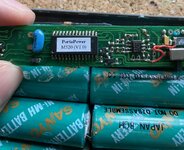
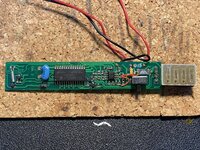
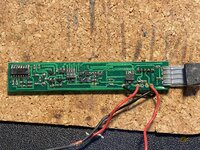
Nope, it’s dead, I just finished disposing of the rotten Sanyo cells it had internally. Here are some photos of the EMM:

IMG_8031.jpeg
IMG_8046.jpeg
IMG_8047.jpeg

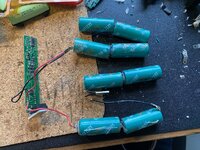
Here’s the cell config, looks identical:

IMG_8041.jpeg
 
Hmm, interesting. Does look simpler/more crude. My two programmers don't look like they support that chip. Would be great if it can be copied opening the door to some clones.
 
So I got another Apple EMM board working with a rebuilt battery pack. I moved an EMM chip from one board to another and it came to life. And even better, EMMpathy was able to correct all errors on the memory chip.

Given all the problems people are having restoring these batteries, I think having two working ones is a pretty reasonable outcome.

I will try out the third party battery next, though I’ll see if I can do so without investing in new cells. It takes 4/5A size cells rather than A.
 
Last edited:
Congrats!! I was only 2 for 3 on mine.. the one that failed has a bad Apple EMM chip. It's pretty awesome having these working batteries as it makes the PowerBook's that much more enjoyable. Mine have held up for months now. I assume you already fixed the PRAM battery too?
 
Congrats!! I was only 2 for 3 on mine.. the one that failed has a bad Apple EMM chip. It's pretty awesome having these working batteries as it makes the PowerBook's that much more enjoyable. Mine have held up for months now. I assume you already fixed the PRAM battery too?
Yes, it’s absolutely great to have batteries in these machines.

I haven’t fixed the PRAM battery, but I’ve got some VL2330s on order - I’ve built one for my PB1400 so I pretty much know what to do.
 
Ah bugger - the one I repaired today has died. I fully charged it, then ran the laptop off it until it had discharged and it’s now disappeared again.
 
It’s probably a failed EMM, right? Can they be so flakey?

My EMM chip had a short on one of the pins (confirmed with chip removed) so something definitely seemed wrong with it. It did not have any physical damage, or visible corrosion. Could have been ESD although I was grounded and took precautions. Mine didn't exhibit as flakiness. It was dead.
 
Yeah. I’m just trying to decide if I should swap EMMs again or if the failure could be with a passive component. It is still putting out 5V on the middle pin, next to the +ve terminal.
 
IMG_8403.jpeg
Ohhhhh yeahhhhh
For the time being, my OEM supply is cooperating. It’s still a bit unclear whether these will charge with ONLY VBATT and not VMAIN, but right now VMAIN is deciding to work on my OEM supply regardless. We’re charging.
 
Mine is a 3rd-party battery as well. I suppose there's no easy way to get it open short of dremelling.
 
Mine is a 3rd-party battery as well. I suppose there's no easy way to get it open short of dremelling.

I've just been using a sharp x-acto knife and just cutting along the seems over and over again until it starts spreading. That way there's minimum loss of material so I can close it up again, vs a dremel which will cut up a lot of material.
 
I've just been using a sharp x-acto knife and just cutting along the seems over and over again until it starts spreading. That way there's minimum loss of material so I can close it up again, vs a dremel which will cut up a lot of material.
Exactly, I do this and it’s the best method I’ve found.
 
VMAIN kicked it on my OEM supply again so it's no longer charging. Battery runs great though, just have to buy that 1A regulated supply and I'll be good. I can now confirm it absolutely 100% won't charge with JUST VBATT. If VMAIN is down then it doesn't detect that it's plugged in, so it doesn't start the battery charge.
 
Nice, progress! How did you get it to detect? What was wrong?

For the uncorrectable errors, some folks said you need to keep trying a few times. For me, after 10 attempts, I gave up. It looked like the errors were in the stored data in the battery so I decided to replace the Atmel 93C66 memory chip. After doing so, Lind reported the memory was totally corrupt (instead of the usual 1-4 errors) and asked if I wanted to overwrite it. Once overwritten, it's been working great. No more errors.

This was the one I used: https://www.mouser.com/ProductDetail/579-93C66-E-SN

I’ve just replaced the 93C66 chip with the part you linked to and EMMpathy was able to correct all errors. So now I have one fully operational battery, at least. Thanks for the tip.
 
Back
Top