
-
 Hello Guest! We're hosting a challenge to welcome vintage Intel macs to the MLA during the month of July! See this thread for more information.
 -
We've made some quality of life improvements to the Trading Post. More info here.
You are using an out of date browser. It may not display this or other websites correctly.
You should upgrade or use an alternative browser.
You should upgrade or use an alternative browser.
Two SEs & Accessories - $300
- Thread starter jdcurry
- Start date



Could you take a closeup of the top of the BBU? The big square chip. It looks mangled?
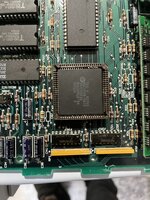

Are the pins chewed up? The photo is out of focus, I can't quite tell.
Indeed, looks a bit weird, but hard to see on the photo...Are the pins chewed up? The photo is out of focus, I can't quite tell.

Yes it appears something got damaged.Are the pins chewed up? The photo is out of focus, I can't quite tell.
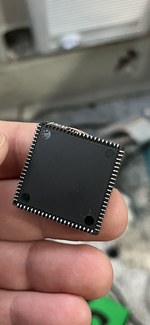
Guess you have found the reason why the LB won't work!Yes it appears something got damaged.
Yes it appears something got damaged.
How does the socket looks like?
You might be able to get yourself a cheap battery leak damaged SE board where the BBU is not affected...
The socket appears in good condition as far as I can tellGuess you have found the reason why the LB won't work!
How does the socket looks like?
You might be able to get yourself a cheap battery leak damaged SE board where the BBU is not affected...
Yikes. Why did they even have the BBU out! It's not exactly a user serviceable part.
There is a chance that that level of damage has also bent pins in the socket.
You might be able to bend the pins back, but it will take a lot of care and skill.
Cheapest solution is probably a replacement working logic board. I'm not saying it isn't fixable, but if you need to buy a BBU and socjet, and then pay a professional to solder in a new socket, it will cost more than just getting a board.
There is a chance that that level of damage has also bent pins in the socket.
You might be able to bend the pins back, but it will take a lot of care and skill.
Cheapest solution is probably a replacement working logic board. I'm not saying it isn't fixable, but if you need to buy a BBU and socjet, and then pay a professional to solder in a new socket, it will cost more than just getting a board.
Bob's turnin' around in his graveYikes. Why did they even have the BBU out! It's not exactly a user serviceable part.

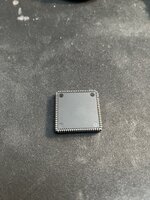
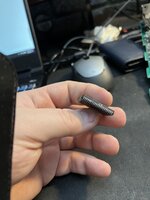
Did pretty well.Repair attempt #1 failed. But I must say I think it looks a little nicer (not that it means anything if it doesn't work). Been using a plastic spudger tool with a pointy end to carefully move the pins around.
View attachment 56216View attachment 56217
It's likely that the previous mangled insertion bent the pins in the socket back, so worth checking to make sure the contacts are... in contact.
Put a straight edge down the pins and check for ones that don't stick out enough.
Check the socket, are any contacts crushed? Can they be adjusted with a careful poke?
Yes, it has four sticks of 256k.Note even if you get it right, it is possible that the BBU being mangled like that has toasted it, or something else on the board. Just to warn you.
What RAM do you have in it at the moment? If you haven't cut the resistor you need the 256k SIMMs.
I have included four close-up images of the BBU socket (rotating the board as I go). I don't have a magnifying tool to assist me but it looks to be okay. Maybe. Please let me know if you see anything out of place...
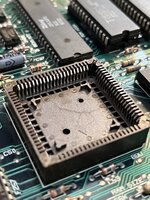
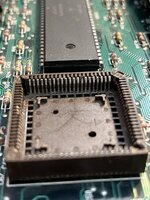
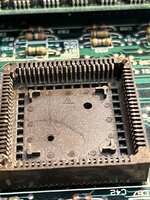
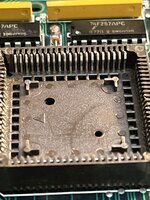
I am sorry for my ignorance but I don't know what the BBU function is .... at first glance it appears that could you could insert it incorrectly though.Sure looks a whole lot better, but I just worry the BBU itself might be toast due to the pins being shorted out or being in the wrong place before...
---edit--- Phipli beat me by a nanosecond
The BBU is many things. It is a load of functionality that was spread through several chips in older macs done better in a single chip.I am sorry for my ignorance but I don't know what the BBU function is .... at first glance it appears that could you could insert it incorrectly though.
It does address decoding, clock generation and other stuff.
It is... a very bad thing to plug it in the wrong way.
BBU, short for the Bob Bailey Unit, combines a whole lot of functions which were handled by individual chips (PLA's) in earlier Macs.
One of the issues you had before with the display being garbled,, well, the BBU handles memory access for the video, so the sypmtoms make an bit more sense now seeing the state of your BBU!
---edit--- Feeling old, keep on getting beaten
@Phipli definitely types faster
One of the issues you had before with the display being garbled,, well, the BBU handles memory access for the video, so the sypmtoms make an bit more sense now seeing the state of your BBU!
---edit--- Feeling old, keep on getting beaten
@Phipli definitely types faster


Similar threads


- Replies
- 14
- Views
- 1K