
It happens faster than you would like to believe.
I have no doubt. I'm also currently investigating how to squeeze every bit of life out of an iMac G3, and it will only get worse from here.


It happens faster than you would like to believe.

I was thinking of making a couple different partitions of 1GB each, for System 5/6/7, and see which I liked the most.If you can get that hard drive for a reasonable price, I'd say it'd be worthwhile. As it's not an Apple shipped drive, you'll need to use a patched version of Apple HD SC Setup to initialise it before installing a System on it. If you'll be using anything earlier than 7.5.x, you'll need to partition it into 2GB or smaller pieces.

This looks interesting, thanks! Using this method I would need to pull the top floppy, correct?The first bracket actually has pics showing it mounting on its side behind the floppy drives. It'd block any potential expansions like networking but I'm not sure that's a big concern for most people. The 2nd is a factory bracket and to the best of my knowledge it won't fit on top of two floppies.
If that HDD ends up going for a bit much, or you want to save a bit of money, https://68kmla.org/forums/index.php?/topic/28013-my-macintosh-se-that-was-damaged-in-shipping/?p=299373is a setup I've done (and have pics of later in the thread) that works fine in an SE, just a bit of adapter chaining.
Thanks for the feedback.Edit: Looks like that ebay ad shows the drive *not* blocking the rear opening, as they've something in it. That may be your best bet. Looks like it mounts on the back of the top floppy drive, using the mounting screws to retain it while also keeping both floppies in.
Another option if you want to keep both floppies and run the ethernet card you might want to look into an external SCSI box and throw a hard drive in there. Whether that's a dedicated HDD chassis or a CD one with the CD ripped out, makes no real difference.
Could also use something like a SCSI2SD sticky taped to the top of a floppy drive. A bit pricier than a hard drive but figuring out how to make it fit isn't much of an issue.

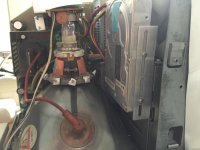
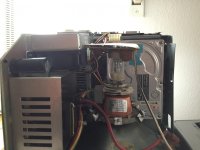

That's exactly how my dual-Superdrive + HD SE is internally.Regarding the harddrive mounting options... I mounted a HD in my dual floppy SE right on top of the second floppy drive using the Apple standard mounting bracket which came with the FDD/HD configurations of the SE.
The HDD is getting pretty close to the CRT. Full size drives will not fit this way.

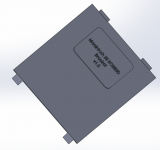
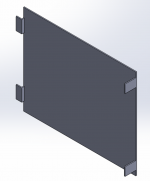
I think that's great, and there's a 3D printer about a half mile from my work. I'd be very interested in getting permission to use that, once you're done with it. Or if you're going to sell them, I'll buy one from you.I am in the middle of creating a bespoke SCSI2SD bracket for SEs equipped with 2 floppy drives.
Here's how it looks like for now. I need to double check dimensions and finish it up (holes for screws etc)
Screen Shot 2016-10-07 at 07.54.07 pm.png Screen Shot 2016-10-07 at 07.54.48 pm.png
The two front tabs are inserted in the dedicated slots inside the upper floppy bracket while the two tabs at the back would secure the thing in place with two screws. It gets installed in the same way a standard HD bracket would but it is considerately thinner!
I'm using Dassault Solidworks but I can export the finished product later to a 3D-printer friendly file.
I think this is pretty cool. What do you guys think?
After much vascilating, I've got a SCSI2SD coming later this week. Any update on your bracket?I would release this thing free of any charge, of course. But I don't know when I'm gonna release it. About one month from now I guess (have other stuff to do before tackling this thing)

That's great thanks! My local library has a 3D printer so I'm going to fire one off and see how it works.There is also a completed mounting bracket here, as another option:
https://68kmla.org/forums/index.php?/topic/28500-scsi2sd-universal-mount/
BTW, I'm the one who sent you here from reddit. Happy to see you got your SE working!




