• Hello MLAers! We've re-enabled auto-approval for accounts. If you are still waiting on account approval, please check this thread for more information.

Troubleshooting a Macintosh SE

Hard drive questions!

In my reading, I've seen that by using a third party bracket, I can add a SCSI hard drive without removing either of the floppy drives.  I've seen a couple options, but I'm not sure which is the most appropriate for the machine.

Option 1: http://www.ebay.com/itm/142103154551?_trksid=p2060353.m1438.l2649&ssPageName=STRK%3AMEBIDX%3AIT

It looks like this will attach to the metal bit in between the two floppy drives in this pic: http://i.imgur.com/Hgkjka0.jpg

Option 2: http://www.ebay.com/itm/400974553248?_trksid=p2060353.m1438.l2649&ssPageName=STRK%3AMEBIDX%3AIT

I don't know if this will go on top of the floppy drives, or if this is intended to replace one of the floppies.  

Hard drive:

I was looking at getting this, since I've read there's no hardware upper limit on SCSI hard drives, and with the FloppyEmu, I should be able to format any hard drive: http://www.ebay.com/itm/162225777279?_trksid=p2060353.m1438.l2649&ssPageName=STRK%3AMEBIDX%3AIT

Am I on the right track, or totally off base?

 
If you can get that hard drive for a reasonable price, I'd say it'd be worthwhile. As it's not an Apple shipped drive, you'll need to use a patched version of Apple HD SC Setup to initialise it before installing a System on it. If you'll be using anything earlier than 7.5.x, you'll need to partition it into 2GB or smaller pieces.

 
If you can get that hard drive for a reasonable price, I'd say it'd be worthwhile. As it's not an Apple shipped drive, you'll need to use a patched version of Apple HD SC Setup to initialise it before installing a System on it. If you'll be using anything earlier than 7.5.x, you'll need to partition it into 2GB or smaller pieces.
I was thinking of making a couple different partitions of 1GB each, for System 5/6/7, and see which I liked the most.

 
The first bracket actually has pics showing it mounting on its side behind the floppy drives. It'd block any potential expansions like networking but I'm not sure that's a big concern for most people. The 2nd is a factory bracket and to the best of my knowledge it won't fit on top of two floppies.

If that HDD ends up going for a bit much, or you want to save a bit of money, https://68kmla.org/forums/index.php?/topic/28013-my-macintosh-se-that-was-damaged-in-shipping/?p=299373is a setup I've done (and have pics of later in the thread) that works fine in an SE, just a bit of adapter chaining.

 
The first bracket actually has pics showing it mounting on its side behind the floppy drives. It'd block any potential expansions like networking but I'm not sure that's a big concern for most people. The 2nd is a factory bracket and to the best of my knowledge it won't fit on top of two floppies.

If that HDD ends up going for a bit much, or you want to save a bit of money, https://68kmla.org/forums/index.php?/topic/28013-my-macintosh-se-that-was-damaged-in-shipping/?p=299373is a setup I've done (and have pics of later in the thread) that works fine in an SE, just a bit of adapter chaining.
This looks interesting, thanks!  Using this method I would need to pull the top floppy, correct?  

I have an Asante card coming tomorrow that I'd like to use, so I'd like to avoid blocking anything.  I also have a FloppyEmu coming tomorrow, so I may try to use that as a hard drive for a bit and see how I feel about it.

 
Edit: Looks like that ebay ad shows the drive *not* blocking the rear opening, as they've something in it. That may be your best bet. Looks like it mounts on the back of the top floppy drive, using the mounting screws to retain it while also keeping both floppies in.

Another option if you want to keep both floppies and run the ethernet card you might want to look into an external SCSI box and throw a hard drive in there. Whether that's a dedicated HDD chassis or a CD one with the CD ripped out, makes no real difference.

Could also use something like a SCSI2SD sticky taped to the top of a floppy drive. A bit pricier than a hard drive but figuring out how to make it fit isn't much of an issue.

 
Last edited by a moderator:
Edit: Looks like that ebay ad shows the drive *not* blocking the rear opening, as they've something in it. That may be your best bet. Looks like it mounts on the back of the top floppy drive, using the mounting screws to retain it while also keeping both floppies in.

Another option if you want to keep both floppies and run the ethernet card you might want to look into an external SCSI box and throw a hard drive in there. Whether that's a dedicated HDD chassis or a CD one with the CD ripped out, makes no real difference.

Could also use something like a SCSI2SD sticky taped to the top of a floppy drive. A bit pricier than a hard drive but figuring out how to make it fit isn't much of an issue.
Thanks for the feedback.

I came across the SCSI2SD option digging through this forum, and it's very interesting.  My only concern would be the longer term data integrity of storing on an SD card, but my feeling is that it's less of a concern on a legacy system where there aren't (I'm assuming) constant writes happening to the disk as there would be running a more modern OS.  I had thought about potentially picking up the second bracket and rigging something on top of the other two for the SCSI2SD, but I want to see what it looks like after the ethernet card is in.  It seems like this is a pretty viable option to pursue, though.

 
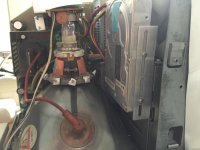
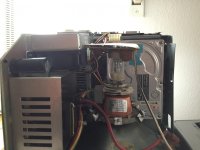
Regarding the harddrive mounting options... I mounted a HD in my dual floppy SE right on top of the second floppy drive using the Apple standard mounting bracket which came with the FDD/HD configurations of the SE.

The HDD is getting pretty close to the CRT. Full size drives will not fit this way.

IMG_0671.JPG

IMG_0674.JPG

 
Regarding the harddrive mounting options... I mounted a HD in my dual floppy SE right on top of the second floppy drive using the Apple standard mounting bracket which came with the FDD/HD configurations of the SE.

The HDD is getting pretty close to the CRT. Full size drives will not fit this way.
That's exactly how my dual-Superdrive + HD SE is internally.

 
That's great thanks for the photos!  They're very instructive.

A follow up question:

Did you just screw the bracket onto the top of the floppy bay?  That's what I was going to do, after finding some shallow depth screws that would just hold it in place and not interfere too much.

 
That is exactly what I did. The HDD tray has two mounts on the front that go into corresponding holes on the floppy bay. The back of the HD tray is fixed with the screws you see.

I´m pretty sure this is the same way how the second floppy is mounted onto the first one.

The HDD tray came out of a newer SE FDHD I think.

 
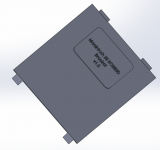
I am in the middle of creating a bespoke SCSI2SD bracket for SEs equipped with 2 floppy drives. 

Here's how it looks like for now. I need to double check dimensions and finish it up (holes for screws etc)

Screen Shot 2016-10-07 at 07.54.07 pm.png   Screen Shot 2016-10-07 at 07.54.48 pm.png

The two front tabs are inserted in the dedicated slots inside the upper floppy bracket while the two tabs at the back would secure the thing in place with two screws. It gets installed in the same way a standard HD bracket would but it is considerately thinner!

I'm using Dassault Solidworks but I can export the finished product later to a 3D-printer friendly file.

I think this is pretty cool. What do you guys think?

 
I am in the middle of creating a bespoke SCSI2SD bracket for SEs equipped with 2 floppy drives. 

Here's how it looks like for now. I need to double check dimensions and finish it up (holes for screws etc)

attachicon.gif
Screen Shot 2016-10-07 at 07.54.07 pm.png   
attachicon.gif
Screen Shot 2016-10-07 at 07.54.48 pm.png

The two front tabs are inserted in the dedicated slots inside the upper floppy bracket while the two tabs at the back would secure the thing in place with two screws. It gets installed in the same way a standard HD bracket would but it is considerately thinner!

I'm using Dassault Solidworks but I can export the finished product later to a 3D-printer friendly file.

I think this is pretty cool. What do you guys think?
I think that's great, and there's a 3D printer about a half mile from my work.  I'd be very interested in getting permission to use that, once you're done with it.  Or if you're going to sell them, I'll buy one from you.

 
I would release this thing free of any charge, of course. But I don't know when I'm gonna release it. About one month from now I guess (have other stuff to do before tackling this thing)

 
I would release this thing free of any charge, of course. But I don't know when I'm gonna release it. About one month from now I guess (have other stuff to do before tackling this thing)
After much vascilating, I've got a SCSI2SD coming later this week. Any update on your bracket?

 
Got my SCSI2SD, configured the SD card, was able to see it and initialize it in System 5.5, installed System 7.5.3 onto the SD card, and everything looked like it'd be good to go.  Then I restarted the Mac, and the SD card isn't recognizable at all by the Mac.  I popped in the System 5.5 disk that I have, and it's not able to see the SD card properly.  Any suggestions?  Doing some light Googling, it seems like maybe I should be using System 6.0.8, but the install disks I got from BMOW don't seem to be the correct set.  Does anyone have a good download link?  It seems like the Apple provided links don't work anymore, which is a bummer.

 
I would expect 7.5.3 to work since you have 4 MB of RAM. However, I do prefer System 6 on the Mac SE. You find download links for 6.0.8 here: http://gryphel.com/c/sw/system/sys60/index.html

What do you mean by "not able to see the SD card"? It doesn't appear on the desktop (and doesn't prompt to format an uninitialized disk)? Is the drive visible in Apple HD SC Setup, SCSIProbe, or Lido?

 
Back
Top