• Hello MLAers! We've re-enabled auto-approval for accounts. If you are still waiting on account approval, please check this thread for more information.

The last of the "subnotebook collection"

Finally added a 2400c to my collection. Arrived nonfunctional, was sold as functional. Plugged in to get the dreaded "GLOD". Thought maybe the PRAM battery had exploded or leaked in shipping, so disassembled to find the PRAM battery was actually absolutely pristine, with zero indication there had ever been any leakage.

Reassembled, making sure to seat the daughterboards properly, powered right up. Battery even holds ~1 hour of life!

So promptly connected it to my PowerCD:
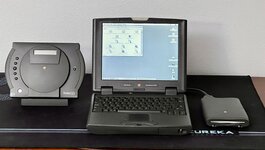
IMG_0750.jpeg

And lined up the whole collection of "subnotebooks":

IMG_0795.jpeg

(PB100 - sadly dead; Duo 280c, 2400c, OG 13" MacBook Air, 11" MacBook Air, 12" Retina MacBook.)
(By my definition, the subnotebooks are the models that are either severely crippled for portability over usability (Duo, 12" Retina, due to missing ports) or are missing the primary removable storage that *ALL* other models of the same year of release had (floppy for the 100, floppy or CD for the 2400, DVD for the MBAs. This notably excludes the 12" PowerBook G4 (which I do have one of) because it was an equal to its same-release larger systems in capability.)
 
Not sure. It worked when I last put it in storage, and all batteries were removed (then fresh PRAM put in before trying to power on.) So probably caps. It just shows zero signs of life.
I’m pretty sure that @3lectr1cPPC has recovered a number of PB 100s, and that (1) recapping was absolutely necessary, and (2) it was a bit of a labor of love and somewhat painful to get them working again. But it would be a shame to not get it working again!
 
I do have a restored PB100, but only the one - all mine took was a recap and then it was good to go. A lot of other people end up way unluckier than me. Maybe it was @imactheknife you were thinking of? He's been through a few.
 
I think i did 3. All the logic boards seemed to work but could only manage to get one display to work with a logic board. Nothing guaranteed with these even with recapping unfortunately. Some people seem to have better luck than me with these powerbooks
 
Lovely lot - Apple made some really nice sub notebooks over the years. The 2400c has a special place for me in particular, it doesn’t have any big limitations.

I went through 3-4 x PB100 until I got a working one, tiring!
 
Well, I just tried my PowerBook 180, which I know worked perfectly, and it showed zero signs of life, too. So I thought maybe it was the power brick.

Tried another power brick, and both power on! The PB100 is nonfunctional, though. The screen powers on, but shows absolutely nothing, and the hard drive just spins up for 30 seconds, then spins down for 30 seconds, reapeating.
 
And now, "all integer inch size screens", 8-17: (Yeah, have to truncate sizes, not round, to get that.)
IMG_0827.jpeg
(The 14" is powered off because it's my work laptop and I'm off work this week.) Kind of interesting that the 13" MacBook Air is in the center of the picture, when it's also exactly at the center, age-wise. (16 years between PowerBook 100 and MacBook Air, 16 years between MacBook Air and 14" MacBook Pro.)

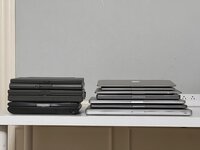
IMG_0830.jpeg
I enjoy that the three plastic "sub notebooks" are thicker than the *SEVEN* Aluminum laptops, including *FOUR* "full power" models.

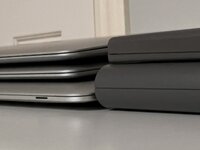
IMG_0832.jpeg
Heck, the three Aluminum sub notebooks combined are thinner than just the Duo!

The list, for the curious:
  • 8.4" PowerBook Duo 280c
  • 9.0" PowerBook 100
  • 10.4" PowerBook 2400c
  • 11.6" MacBook Air (2015)
  • 12" MacBook (Retina, 2015)
  • 13.3" MacBook Air (2008)
  • 14.2" MacBook Pro (M1 Pro)
  • 15.4" MacBook Pro (Retina, 2012)
  • 16" MacBook Pro (Touchbar, 2019 Intel)
  • 17" MacBook Pro (Unibody, 2011)
 
PB 1x0 always take a bit of coaxing to get running after not being used I find.

Hope you get your PB100 going, if a good LCD you're 70% there, recap and check the inductors around the caps resurrected mine.
 
Well, I just tried my PowerBook 180, which I know worked perfectly, and it showed zero signs of life, too. So I thought maybe it was the power brick.

Tried another power brick, and both power on! The PB100 is nonfunctional, though. The screen powers on, but shows absolutely nothing, and the hard drive just spins up for 30 seconds, then spins down for 30 seconds, reapeating.
My PB100 had those same symptoms, logic board recap got it booting but then needed to recap the display to actually see something.
 
pretty much all passive matrix panels need a recap, and active matrix panels like the one in that duo need a recap. waiting much longer will result in unrepairable displays.

@Anonymous Freak I hope that 280c has had a recap. Using an un-recapped 280/c is playing with fire... at least don't turn it on until you've replaced the 33uF cap.

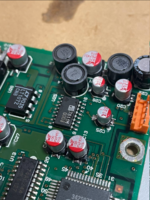
As for the pb100. a complete recap of the panel and board is in order... I'd advise tossing the logic board in an ultrasonic cleaner after removing all the caps.

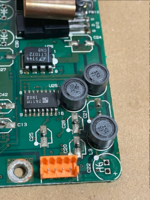
1735053329667.png
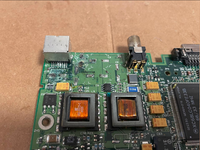
as mentioned before, this corner is the worst. all those inductors should be removed to clean up cap goop.
The IC at U25 is very important for operation. It generates the twist voltage for the passive matrix LCD. if there's too much cap goop it won't work properly or at all.
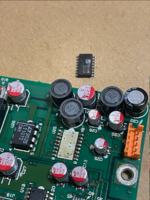
one of my units had an LCD that did not turn on reliably, until I removed U25 and cleaned under

1735053478885.png1735053522703.png

before and after


1735052944931.png
 
Back
Top