• Hello MLAers! We've re-enabled auto-approval for accounts. If you are still waiting on account approval, please check this thread for more information.

Struggling to keep my SE/30 webserver online w/ MacHTTP - any tips?

Huxley

68000
So I've got an SE/30 set up as a web server with MacHTTP2 hosting a little show-off page. It was working fine and very stably for ~36 hours (racking up 2000+ visitors!), but sometime yesterday it started bouncing up and down multiple times per hour. I set up an UptimeRobot account to get a better sense of what's going on, and this is the result.

I'm just running this on my home Comcast / Xfinity account - are they messing with my incoming port 80 traffic since it's not a business / hosting account? I had made some changes to the MacHTTP.config file to increase the user-count and stuff, but this issue persists even after I restored the original config file and restarted the program.
 
I do have a dedicated internal IP reserved for the SE/30, and I've got incoming traffic to port 80 assigned to the SE/30 on my Netgear router. I should also note something (potentially) useful about the weird issue I'm having - as best I can tell, even when the site is "down" from the outside, it always loads without any issue when accessed via internal IP from another machine on my own network - I'm assuming this means that MacHTTP isn't going non-responsive...
 
Thanks for any tips!
 
Last edited by a moderator:
Probably a stupid answer, but what about trying to set it all up freshly again? I doubt comcast would care about a site so small, but looking at your patterns it might mean they are...

 
I don't think it's on the ISP side, it's most likely local to your router. The HTTP tests you tried don't help to narrow down the problem at present. Change it to ping instead and post the results.

Being able to connect via LAN even if it's down for WAN suggests it is networking related. Comcast routers should have logs, so I would check those for anything out of the ordinary. Also, is there any kind of logging for MacHTTP?

 
Last edited by a moderator:
I agree that it sounds like something on your router.  But it sounds like DNS is working and routing traffic correctly, at least on the LAN side.  Maybe try rebooting your router/updating the firmware?

I had an issue kinda like this with streaming traffic - the router itself was actually running out of memory and would slow down, freeze up, or crash completely.  This was a WRT-54G that I replaced with a new TP-Link router.  Uptime has been over a year so far, totally fixed the problem.  Could just be freaking out because of all the extra incoming traffic?

I highly doubt your ISP would be cutting you off, but I guess it could be possible.

 
I wouldn't put it past Comcast to do something like that given that they're known for monitoring and "adjusting" traffic (see streaming, BT, and online gaming) but my guess is that the problem lies with the router as well.  I have a Netgear N300 router which has had trouble in the past if I have too many things flowing through it (like say 11 wired clients and 23 wireless devices) and a reboot has fixed it.

 
I don't think we know enough to say whether DNS is working or not. He says it works via LAN IP, but we don't know what the nature of the failure is on the WAN side, even if it's DNS or not. To narrow this down a suite of tests needs to be performed while the WAN side is down, starting with pinging the domain, then the WAN IP, and finally (from within your LAN) the LAN IP. We can assume pings to the LAN IP will work since he says he can use the LAN IP just fine, but even still we may see useful information.

Along with checking the router logs, those tests should be done before anything else is tried. I don't know what the current system status is, but I tried pinging 98.207.115.64, which is your Comcast IP, and never got a response. This probably just indicates you have ICMP turned off/firewall is on, or the router is down. I also pinged the DNS nameservers, which are both up, and indicates DNS is up (although it does not tell us if it's "working").

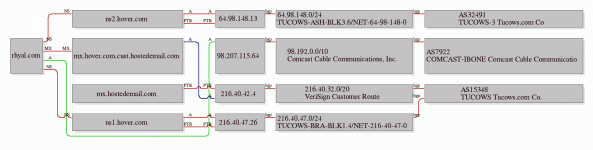
Here is some Robtex graphing goodness to give you a good idea of what your domain looks like.
graph.png

We can see the A-Record is being picked up just fine. Those nameservers are used by hundreds of people, so a service outage would be fixed quickly and likely not seen again for awhile. I do not suspect DNS is the issue at this point.

Also, here's where the connection is stopping at (#11 in this traceroute):

traceroute to rhyal.com (98.207.115.64), 30 hops max, 60 byte packets
1 10.0.0.1 (10.0.0.1) 1.883 ms 3.435 ms 4.082 ms
2 96.120.5.45 (96.120.5.45) 21.396 ms 23.247 ms 22.391 ms
3 xe-9-2-0-sur01.n1alpharetta.ga.atlanta.comcast.net (68.86.110.153) 22.612 ms 22.814 ms 23.031 ms
4 162.151.88.117 (162.151.88.117) 26.852 ms 28.083 ms 28.396 ms
5 be-7725-cr02.56marietta.ga.ibone.comcast.net (68.86.93.125) 28.587 ms 28.799 ms 35.379 ms
6 be-11424-cr02.dallas.tx.ibone.comcast.net (68.86.85.22) 54.339 ms 34.199 ms 36.365 ms
7 be-11524-cr02.losangeles.ca.ibone.comcast.net (68.86.87.173) 75.046 ms 74.634 ms 70.658 ms
8 be-10915-cr01.sunnyvale.ca.ibone.comcast.net (68.86.86.97) 80.553 ms 86.826 ms 85.947 ms
9 be-7922-ar01.santaclara.ca.sfba.comcast.net (68.86.90.94) 87.273 ms 87.065 ms 87.472 ms
10 hu-0-5-0-1-sur03.hayward.ca.sfba.comcast.net (68.87.192.214) 93.610 ms hu-0-5-0-0-sur03.hayward.ca.sfba.comcast.net (68.87.192.210)        92.306 ms hu-0-5-0-1-sur03.hayward.ca.sfba.comcast.net (68.87.192.214) 93.179 ms
11 te-6-0-acr02.hayward.ca.sfba.comcast.net (68.85.190.226) 79.579 ms 84.573 ms 80.720 ms


To connect to your router, this needed to have gotten to hostname c-98-207-115-64.hsd1.ca.comcast.net, which it did not. Again, I don't know the current status of the router or if it's receptive to these kinds of tests (firewall etc...).

 
Last edited by a moderator:
Well the amount of script kiddys pounding servers on the internet these days is several orders of magnatude higher than it was back then. I setup a simple cloud server to host our CRM, and within minutes I was getting hammered with requests, and then brute forces on SSH which I had to setup fail2ban system for. 

Your computer may just simply being DOSed by a script kiddy. those machines arnt powerful so a single connection/computer can bring it down. 

 
It certainly seems as if MacHTTP is working properly on your SE/30. My guess is that your router is intermittently failing to forward port 80 to the Mac in a timely fashion or at all. Whether that's due to too much traffic, malicious traffic, a case of bufferbloat on the router, or some combination thereof, I'd say the router is a good point of investigation. I just ran a speed test and was surprised by the amount of bufferbloat (or extra latency under load) with my current router. Here's an interesting read: https://www.internetsociety.org/blog/tech-matters/2015/04/measure-your-bufferbloat-new-browser-based-tool-dslreports

 
Back
Top