


Hello all,
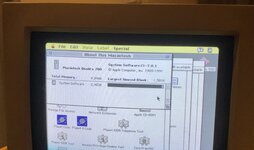
I’ve searched far and wide but not found anyone with what I’m seeing, nor have I ever seen it on other Macs before… This particular Macintosh (that I was using to test a monitor) has a green-tinged menu bar, as you can see in the photo. I suppose you could say it’s yellow.
I tried adjusting the just-repaired 12” RGB monitor to move the display down (wondering if the phosphors at the top were worn-out). Then I realised that the two icons (at the right end of the menu bar) have correct colours.
The rest of the display has correct colours, especially the white areas, so it’s not a case of adjusting the green gain/cutoff of the monitor. I also doubt it’s a degaussing problem, as it is exactly the menu bar that’s affected. I think I saw the same on an LCD connected to the same machine but will of course test that again when I am able.
Any ideas on a software cause, please? I looked through extensions and control panels and found nothing out of the ordinary, but I do note that disk activity is indicated by a flashing dot in the top-left corner, which feels like it may be non-original.
Cheers
I’ve searched far and wide but not found anyone with what I’m seeing, nor have I ever seen it on other Macs before… This particular Macintosh (that I was using to test a monitor) has a green-tinged menu bar, as you can see in the photo. I suppose you could say it’s yellow.
I tried adjusting the just-repaired 12” RGB monitor to move the display down (wondering if the phosphors at the top were worn-out). Then I realised that the two icons (at the right end of the menu bar) have correct colours.
The rest of the display has correct colours, especially the white areas, so it’s not a case of adjusting the green gain/cutoff of the monitor. I also doubt it’s a degaussing problem, as it is exactly the menu bar that’s affected. I think I saw the same on an LCD connected to the same machine but will of course test that again when I am able.
Any ideas on a software cause, please? I looked through extensions and control panels and found nothing out of the ordinary, but I do note that disk activity is indicated by a flashing dot in the top-left corner, which feels like it may be non-original.
Cheers
Last edited:





