• Hello MLAers! We've re-enabled auto-approval for accounts. If you are still waiting on account approval, please check this thread for more information.

Strange behavior Radeon 9100 128MB Flashed

Did any version of the ATI Graphics Accelerator load?

Normally when you get these desktop hangs in OS 9 with an ATI card the ATI Graphics Accelerator which handles 2D graphics acceleration is the offending extension.

If your card has the same device ID as the Radeon 8500 you should not need hacked drivers. Just install the latest ATI drivers for Mac OS 9, nothing more.

If the ATI Graphics Accelerator is still x'ed out then we need a full dump of the cards .properties. This can be done from Open Firmware in two machine mode or with the Display Name Registry tool in OS 9 from the PCI DDK. Or it can be done with the ioreg command line tool in OS X.

That's right, none of the ATI Graphics Accelerator programs I've tried have load; they all appear crossed out.

How can I dump .properties using the ioreg command line tool in OS X?

Thanks.
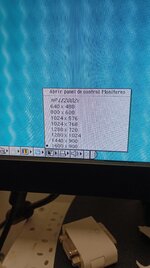
 
Hi, thanks @DarthNvader for the instructions. I'm not sure I did it right. I don't think I typed it correctly in DeviceName because it looks like a full dump. But the two files have different weights just by changing the graph, so I assume all the information will be there.
 

Attachments

Hi, thanks @DarthNvader for the instructions. I'm not sure I did it right. I don't think I typed it correctly in DeviceName because it looks like a full dump. But the two files have different weights just by changing the graph, so I assume all the information will be there.
Not seeing anything that jumps out at me, as we already know the Device ID is the same and that is what I hacked in the OS 9 drivers to get the ATI extensions to load for the Radeon 9200 in the Mac mini G4/eMac G4/iBook G4.

The only difference I see that maybe the issue you could do something about is the 'ndrv's do not seem to be the same. That maybe due to different OS's on the two Mac's from the dumps?

We can take an OS X 'ndrv' and make an OS 9 'ndrv' out of it, that's what I did for the R9200's.
 
Thanks @DarthNvader .

This dump is for the same G4 GE. I dumped the 8500 first, then replaced it with the 9100 and ran the other dump.

So I understand it's not something that can be modified in the ROM, but rather the drivers.

I appreciate the help; these steps are beyond my knowledge.
 
Thanks @DarthNvader .

This dump is for the same G4 GE. I dumped the 8500 first, then replaced it with the 9100 and ran the other dump.

So I understand it's not something that can be modified in the ROM, but rather the drivers.

I appreciate the help; these steps are beyond my knowledge.
when you boot OS 9 without the ATI extensions can you change the screen resolution?
 
Okay, @DarthNvader, I really appreciate your help.

I don't know what could be causing ATI Graphics Accelerator to not load. Do you know the first version of the drivers for the 8500? I don't know if they came stock with some OS9 or with an installer. As an idea, I'd like to try others.

Thanks.
 
I went through hell trying to get a 9200 LE to work with my vintage Mac's. Although it is a regular PCI card, if memory serves me correct, I believe they were used in G5 Xserve's and were never meant for use in G3/G4 systems. I wound up getting it working in a Blue and White G3 using the Rom updater/xtender and the OS9 fix (I think), however as has been stated preiovusly it treated it like a secondary monitor and I could not get graphics acceleration to work. Also, I feel like I remember the machine locking up if the 8500 accelerator was loaded at startup. I wound up putting in a G4 MDD and it works great! I got a Radeon 7000 for my 9600 G3.
 
I've continued trying other drivers, with no changes. I've tried booting without the 8500 extension, and although the ATI graphics accelerator is still blocked, this time the desktop loads, but without 3D acceleration.

Perhaps the 8500 extension is half-finished at 64MB?

I finally tried running the ATI ROM Updater that was used to flash, and after rebooting, the image appears distorted.

I reinstalled the PC HACK ROM.
 
I've continued trying other drivers, with no changes. I've tried booting without the 8500 extension, and although the ATI graphics accelerator is still blocked, this time the desktop loads, but without 3D acceleration.

Perhaps the 8500 extension is half-finished at 64MB?

I finally tried running the ATI ROM Updater that was used to flash, and after rebooting, the image appears distorted.

I reinstalled the PC HACK ROM.
It's been so many years since Joe worked on this. Back in the day I had a 9100 PCI in my PM8600 but I can't recall if it ever worked with the ATI Extensions for OS 9.
 
Yes, I had a 9100 on a GE, but I think it was 64MB, and maybe I wasn't using OS9 back then.

We've tried at least. Thanks for your effort.
 
Today I remembered I had the original EEPROM and dumped its contents. Can help us solve the problem? I can read Radeon 8500 in the first few lines, but I can't decipher much more.
 

Attachments

Last edited:
Hi, today I flashed a Radeon 9250LE with the driver from this site, and the same thing was happening to me as with the 9100: "ATI Graphics Accelerator" appears crossed out upon startup. However, I found these drivers on my HDD, which I had saved for a while, and they made the graphics card work. I tried the same drivers for the 9100, but it still fails. These drivers also don't work with the 8500-64MB.

I don't know how these drivers were made or what they add to allow the 9250LE to work, but would it be possible to do something similar to get my 128MB 9100 working?

I don't have the skills to do it; I need help from skilled people like @DarthNvader or @joevt.

Is there anything I can do? Could the original ROM for my graphics card I provided earlier lead to a solution?

:)
 

Attachments

Hi, today I flashed a Radeon 9250LE with the driver from this site, and the same thing was happening to me as with the 9100: "ATI Graphics Accelerator" appears crossed out upon startup. However, I found these drivers on my HDD, which I had saved for a while, and they made the graphics card work. I tried the same drivers for the 9100, but it still fails. These drivers also don't work with the 8500-64MB.

I don't know how these drivers were made or what they add to allow the 9250LE to work, but would it be possible to do something similar to get my 128MB 9100 working?

I don't have the skills to do it; I need help from skilled people like @DarthNvader or @joevt.

Is there anything I can do? Could the original ROM for my graphics card I provided earlier lead to a solution?

:)
The thing is what I changed for the R9200 from the iBook G4/eMac G4/Mac Mini G4 was the device ID in the drivers and added an 'ndrv' I took from OS X into a Mac OS style driver.

None of this can be done for the R9100, because the 'ndrv' is already loaded and it has the same device ID as the R8500, while at the same time there must be some deference in the R9100 as to why the drivers are not loading, we just have no idea what that maybe.

The 9250 drivers likely make the same changes I made for the R9200, but maybe they made a change I am not aware of, I never looked at them.

As far as OS 9 drivers they have a resource fork and a data fork, https://www.macintoshrepository.org/7323-hexedit

Hexedit can read both, you just need to compare the data in the 9250 drivers to the data in the 8500 drivers and find what has been changed in both the resource and data forks of the drivers and maybe you can find a change that needs to be made for the 9100.
 
Thanks @DarthNvader, I'll try to see what's going on. I don't know if it'll be able to detect the error.

I don't know if it has any influence, but the Mac Mini extensions I had saved in a folder were 14 extensions, and the 9250 extensions were 16 extensions. I don't know if those two additional extensions add any functionality, or if I made an incomplete backup of the Mini. I'll have to check it.
 
Hi, it's strange what's happening with this graphics card.

I recently got my hands on another 64MB Radeon 9100. I downloaded the original 8500 227 ROM and the ATI 9100 Devid hack, and opened them in Aticcelerator to set the speed to 250/250MHz. Since the Devid hack showed strange speeds in Aticcelerator (1570MHz GPU and 75MHz memory), I decided to use the original 8500. After programming it on an M25P10 and installing it, it works perfectly in both OS9 and OSX.

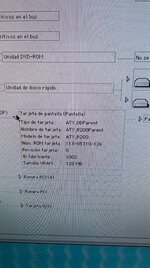
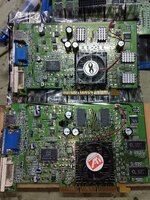
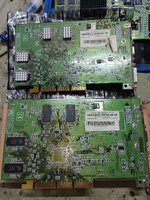
After this, I decided to compare this card with the famous 128MB 9100, and it turns out they're identical!!! Absolutely identical: same components, same resistors, everything in the same locations; only the size of the memory chips changes. The 64MB version's label says PCB# 35-F149-G0-20, and the 128MB version says PCB# 35-F149-G0-40. That's the only difference.

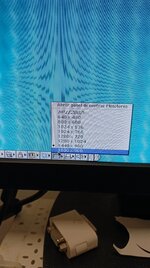
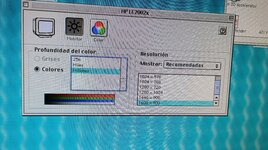
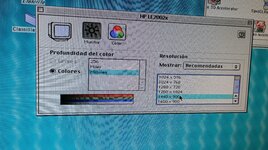
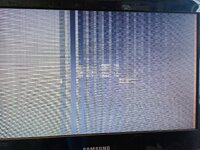
After seeing this, I decided to install the same original 8500 ROM at 250/250MHz on the 128MB graphics card, and it turns out the image is distorted from the start.

The one above is the 64MB 9100, and the one below is the 128MB 9100.

IMG_20250628_172535.jpgIMG_20250628_172550.jpgIMG_20250628_172910.jpg

Could the VRAM size be determined by the ROM? The only solution I can think of, but I'm not sure it works, would be to raise the leg that gives access to the last 64MB on all VRAM chips.

I'm no expert on graphics cards, so I don't know what could cause them to behave differently with the same ROM. Other graphics cards I've flashed with the same ROM have worked on cards with different VRAM sizes.
 
Back
Top