• Hello MLAers! We've re-enabled auto-approval for accounts. If you are still waiting on account approval, please check this thread for more information.

signs of dead flyback transformer? Mac Plus issues

hi guys,

I got this Macintosh Plus with non bleeder type FBT. Completely dead, no signs of life..NADA. 

It had a nasty battery spillage which got outside its compartment and corroded metal frames, luckilyy no visible damage to the logic board.

That battery goo affected analog board as well, but not severly, there is a greenish residue on some resistor legs and on the power switch connectors, which I cleaned. No change.

I tested this Mac with multimer, but I get no voltage! No ticking  sound of FBT. I believe  it must be power related. Does dead flyback give these symptoms too?

PS. Even tried to reheat the analogue board inc. U3 optoisolator, but it did not change anything. 

 
Well usually there's something... Are you sure the traces are all good and everything? Sounds like they might not be with that goo.

 
T1 (The flyback transformer) is powered by several components: Q1, C1, L1, and I think Q2. I would check the voltage leading to these parts.

Is there voltage going into the logic board? Sounds to me that the Power Supply Part failed due to battery leak and not the video section failed.

 
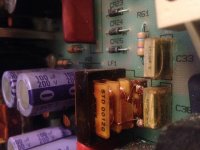
thank you Elfen, today I gave it a closer look and see what I found, cracked two 4.7uF x2 capacitors. Might be more damaged parts. 

IMG_5666.JPG

 
those caps being cracked is fairly normal. the plastic shrinks and cracks, eventually leads to the failure of the capacitor. 

Check your fuse. Bet its blown, if it is, you have a short somewhere. 

 
thank you for this suggestion techknight, strangely fuse seems to be ok. Gave this Plus a ride to a repair shop, maybe they will find the cause. 

Will keep this topic updated. 

 
Every dead Plus I've seen it was those caps you've spotted - replace them and you may well be good to go. But probably a good idea to do as technknight says too :)

 
ok it's alive again! Spent $10 for a service in a local repair shop, but I guess it was worth it. 

The problem is it has weird glitch on screen... tried to replace the simms, but the problem persists. Any ideas?

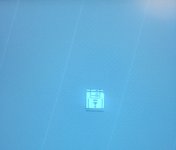
IMG_5839.JPG

 
unfortunately does not boot from floppy disc, it spits out fine bootable floppy and shows blinking question mark.. there's normal bong. Might it be ROM related? Which chip is responsible for generating graphics?

 
It's not clear whether the floppy problem is related to the video problem or not. Booting with an external SCSI drive or a Floppy Emu would clarify. But it may well be a separate issue.

If you look closely at the photo, you see that every 4 lines of the picture are duplicated, and every other 4 lines are missing. That'll be a problem with the video address lines. The Plus doesn't have dedicated VRAM; it uses system RAM for video. Since the machine doesn't give a Sad Mac, it's likely (though not guaranteed) the RAM itself is okay, and the problem is specifically in the circuits reading the video data out of RAM.

4 video lines = 2048 pixels = 256 bytes. On the Plus (and earlier machines), U1F and U1G count up the address in memory for displaying video. If the 256 byte line got stuck, for example from a rotted trace, you'd see the picture you see. I think that's line VA8, but it might be VA7.

Use a multimeter to check the following connections for continuity:

U1F pin 8 <--> U1G pin 1 <--> U2F pin 13 <--> U4G pin 13 (VA8, most likely culprit?)

U1F pin 7 <--> U2F pin 6 <--> U4G pin 3 (VA7)

U1F pin 6 <--> U2F pin 3 <--> U3G pin 13 (VA6)

U1G pin 3 <--> U2F pin 10 <--> U4F pin 9  (VA9)

Signal names and connections taken from the following schematic. It's for the 128k and 512k but it's more readable than the Plus schematic I can find, and the video circuit looks the same: 

http://bitsavers.trailing-edge.com/pdf/apple/mac/EarlyMacSchematics.pdf

More generally, since you said there was battery leakage, have a careful look at the logic board for any signs of corrosion. Given the symptoms, check especially around all the chips listed above.

 
ok time to update, my Mac is working fine except for doubled rows of horizontal lines.

I tried to make connections as suggested by apm, but unfortunately I get no picture at all. It seems that Plus might be a bit different.

Can anyone give me the Plus-specific  chips and pins  connections for VA7 and VA8?

 
I had a very similar issue with my SE. I even have a video of it here:


I never really looked into it but I think it is a logic board issue. Probably bad caps. I also remember the brightness being way too high.

 
ok it's alive again! Spent $10 for a service in a local repair shop, but I guess it was worth it. 
So for anyone else that stumbles across this thread (like me)... What ended up being the problem? What was replaced? And what kind of repair shop did you find that would work on a compact Macintosh?!

 
Back
Top