


• Hello MLAers! We've re-enabled auto-approval for accounts. If you are still waiting on account approval, please check this thread for more information.

Setting up a PC Trasporter on a IIGS

Awesome possum! Now I can start cross checking stuff.

My color switch card does nothing when connected, so I just threw a few bucks at it and replac d these parts... Let's see.

Bought the same chips with the same intent of replacing them on a (seemingly) non-working ColorSwitch... but then never found the time to do it :D - let us all know if something changes!

Anyway I guess the new ColorSwitch pcb project could be a place to look at, for finding some answers, even related to the pinout we're all trying to figure out; for instance your question:
Also, does Ground need to get connected to each of the various grounds at the DB15, or is one sufficient? (Pin1+Pin6+Pin13)
have been bugging me for a couple years already :D as I am scared to fry / mess up something with wrong connections, being a total noob with electronics.
 
Bought the same chips with the same intent of replacing them on a (seemingly) non-working ColorSwitch... but then never found the time to do it :D - let us all know if something changes!

Anyway I guess the new ColorSwitch pcb project could be a place to look at, for finding some answers, even related to the pinout we're all trying to figure out; for instance your question:

have been bugging me for a couple years already :D as I am scared to fry / mess up something with wrong connections, being a total noob with electronics.
Confirmed. I plugged a IIgs video cable into the back of a IIgs, and then measured pins 1, 6, 13, and the shield, and they all have continuity to each-other, so are all a common ground. I'll wire up my DA15 (?) the same way.
 
Unfortunately, even after chip replacement and proper wiring harness, i still get no IIgs video output via the colorswitch.

I'm going to hook up two monitors in parallel and see if i can get PC Transporter signs-of-life or not. Have to figure out how to get software into this machine, which is booting off of an ancient IDE type card (that has a CF card on it now). May have to borrow my son's CFFA3000 and use that to shuttle software onto it - ugh.
 
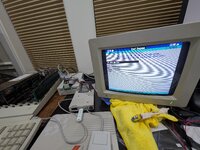
Progress!

Switcher doesn't work, but video output does!

Got to figure out how to configure stuff now.

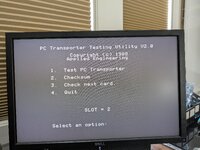
The TEST feature says it's going to erase the card. What do s this mean, any concern?
 

Attachments

  • PXL_20251229_193349082.MP.jpg
    PXL_20251229_193349082.MP.jpg
    1.8 MB · Views: 10
Progress!

Switcher doesn't work, but video output does!

Got to figure out how to configure stuff now.

The TEST feature says it's going to erase the card. What do s this mean, any concern?

I knew it! Direct video-out signal seems to never fail.

Reading through the first posts, you will discover that under proDOS the card memory can be used as a RAM disk - in this case, testing it will erase any file saved there.

Your issue anyway seems to be with the ColorSwitch... which seems to me quite common. I would recommend to focus on setting up devices, disk images, programs etc and have fun with the PCT as much as possible - then maybe new developments of the ColorSwitch clone will help us :D
 
So no matter what I do, i can't get 720K 3.5" drive emulation to work via Gotek and the nanja.info adapter. How did you get this working?

Meanwhile, any chance you have a MSDOSVOL type "hard-file" that is bootable and functional so I can test with? So far, i can get this thing to pass all its tests, I can configure it "properly", but i haven't been able to get it to boot anything.
 
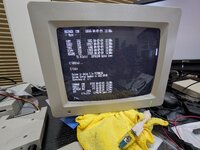
I ended up only able to fit the mostly empty 20mb dos "partition" (from the pct-connectors-rebuild github) onto my Alltech CF card's 2nd partition. But got it to boot!
PXL_20251230_053756571.MP.jpg
PXL_20251230_053639882.jpg

I'll try a bit longer with the color switch and floppy stuff, and see if I can get anywhere further.

Then, it's all for sale!
 
Last edited:
So no matter what I do, i can't get 720K 3.5" drive emulation to work via Gotek and the nanja.info adapter. How did you get this working?

Meanwhile, any chance you have a MSDOSVOL type "hard-file" that is bootable and functional so I can test with? So far, i can get this thing to pass all its tests, I can configure it "properly", but i haven't been able to get it to boot anything.

Honestly I am not sure I ever used 720K disk images, but anyway I had to try a lot of DOS images before finding some actually working on the Gotek.

I have this zip file in my archive, that should be the MSDOSVOL I have on the USB stick plugged to the xDrive inside my IIGS. Let me know if it will work for you, otherwise I should get the actual IIGS and move the file from there. Remember to set the path to the DOS volume in the PCT panel (there should be a README file with instructions inside the zip).
 

Attachments

Last edited:
Figured out my colorswitch problem!!! The wiring doesn't make sense based on colours, and it turns out that by reading the schematics here https://github.com/patdie421/pct-connectors-rebuild/tree/main/hardware/colorswitch/v0.3, and following a facebook post by Chris Satterfield in Apple II Cards group, the proper wiring is as such:

1 - CSYNC (black wire)
2 - N/C (blue wire)
3 - Green (green wire)
4 - Red (red wire)
5 - Blue (brown wire)
6 - N/C

Wiring that pattern to the DA15 got my Color Switch working!!!
 
Could someone please help me?

I've never been able to get my board to work. For years I've been trying unsuccessfully, always running into some obstacle, like a lack of a pre-installed MS-DOS image or a bootable floppy disk, etc.

I don't have any of the installation kits, but with the help of the project on Github and this discussion, I made a composite cable, and so far I've managed to get the board to run and open the configuration menu.

I'm asking for help to validate if the board boots and works in these situations:
  • Using only the composite output;
  • Configuring only the MSDOSVOL image and disabling drivers A and B.
With that configuration I can see the PCT splashscreen and than nothing more happen.

Besides that, it was possible to verify that the 768K of RAM is OK using the PCTRAM.SYSTEM test program.

Any help is welcome.

Thank you.
 
Last edited:
Could someone please help me?

I've never been able to get my board to work. For years I've been trying unsuccessfully, always running into some obstacle, like a lack of a pre-installed MS-DOS image or a bootable floppy disk, etc.

I don't have any of the installation kits, but with the help of the project on Github and this discussion, I made a composite cable, and so far I've managed to get the board to run and open the configuration menu.

I'm asking for help to validate if the board boots and works in these situations:
  • Using only the composite output;
  • Configuring only the MSDOSVOL image and disabling drivers A and B.
With that configuration I can see the PCT splashscreen and than nothing more happen.

Besides that, it was possible to verify that the 768K of RAM is OK using the PCTRAM.SYSTEM test program.

Any help is welcome.

Thank you.
Add a screen shot of what you end up seeing on your PC Transporter output? Does it say that MSDOSVOL is not a DOS Disk or something to that effect? If so, that's correct - the MSDOSVOL is just a small DOS volume that holds some utilities from Applied Engineering folks.

I saw that @micheledipaola added a DOS volume just above, you could try that one?
 
Add a screen shot of what you end up seeing on your PC Transporter output? Does it say that MSDOSVOL is not a DOS Disk or something to that effect? If so, that's correct - the MSDOSVOL is just a small DOS volume that holds some utilities from Applied Engineering folks.

I saw that @micheledipaola added a DOS volume just above, you could try that one?

Hi @luvwagn,

Tks for your response. It just hang with a black screen.

Yes, tested with @micheledipaola image. Next I will try with those on Github.

I´m using my CFFA300 to mount the images.

Regards
 
I've never tried composite output from it, only the rgb via color switch.

Do you have a floppy drive configured and connected?

You can get into the "BIOS" by doing shift+caps+caps I think? And reconfigure drives and such
 
Back
Top