• Hello Guest! The forum software will be upgraded weekend of 06/26. See this announcement thread for more information.

Serving TCPIP network over PPP via integrated modem

I've been dealing with the conundrum of getting my SE and 68k PowerBooks onto my LAN in a limited capacity, largely because I have gotten everything where I want it configuration-wise and need something stupid to do so I don't get bored. I have been looking at hardware but have completely ignored the G4 tower under my desk, which has a perfectly good modem port.

I am curious if anybody here has bothered to use a modem-to-modem connection as a bridge, and what their experiences were. If it's not absolutely terrible to set up I'll give it a shot and will try to document my work.
 
Last edited:
No direct experience, but some potentially useful links I dug up in the course of a (similar, stalled) project:
Many of these are a bit too complicated for what you want to do and rely on using a software PBX and VoIP to emulate an entire phone network, but for a simple point-to-point connection you can use an ATA (analog telephone adapter) like the Linksys SPA2102 to let two modems dial each other through the ATA. You can get more ports with something like a SPA8000 if that's appealing. The second CRD article also mentions that you can use the ATX3 command to do what you're trying to do without an intermediary device, but not sure if that's actually documented anywhere.
 
You can hack a modem to modem connection with a phone cable and 9v battery

I looked at this years ago and decided that a serial to serial connection, or USB to serial connection would be way easier.
 
This is exactly what I'm trying to avoid. I had hoped I could just plug in an RJ11 straight from the modem port on a PowerBook to the modem port on the G4 and just tunnel via PPP. If I still have to simulate a dialtone or otherwise create a simulated dialup environment I'm probably just going to get a SCSI ethernet adapter and 10/100 switch off That Auction Website since the performance difference between that and a serial connection are pretty sizeable.
 
Last edited:
You can try "ATX1" and see if they work. I'm not sure that EVERY modem requires the line current and all that.

You may be able to get an ethernet to localtalk bridge, although I think they are rather pricey and the speed will certainly be a lot lower than the SCSI ethernet adapter. For whatever reason, when I was in high school (mid 1990s) they networked the building but for whatever reason used an ethernet backbone with localtalk (with those phonenet adapters so it was phone line) on most of the local segments (even though the macs were plenty new enough to support ethernet.) I can indeed assure you the localtalk was quite slow.
 
Back in the day, I had a Color Classic connected to an iMac via null modem cable. But I never got around to setting up PPP; I just used ZTerm on both sides and YMODEM to transfer stuff back and forth.

So there's a few tricks here: one is, you need to swap RX and TX on one end of the RJ11 to the other, or you're not actually going to be able to send/receive anything. Second is, stick a 9v battery in-line if you want to actually run the modems properly (see https://68kmla.org/bb/threads/serving-tcpip-network-over-ppp-via-integrated-modem.52597/post-594270 above). I used to get around that with an OT script that would take the modems off hook and then use AT commands to make the modems think they'd already connected, so they could just send data at 57.6kbps.
Now, you can still do this and use SLIP -- if the host system is running OS X, you can just install SLiRPd on it and set up accounts for the connecting devices, and then you can use a SLIP client on the other systems, dial in using ZTerm, then run SLiRPd and start the SLIP client from the Chooser.

If you want to just be able to use a PPP client to auto-connect and have a fully functional IP stack on the clients, you're going to have to get a bit more creative.
 
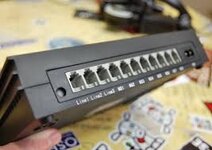
I have used a PBX and ARA to connect a Mac via Supra Fax modem to another Mac's Supra Fax modem which has AppleTalk Internet Router with other Macs connected via local means. If setup properly the calling Mac can see the entire AppleTalk Network. It's slow for sure. If Apple IP Gateway is setup to send IP address via Mac IP then the receiving Mac will get an IP out of that range.

The two are connected on the inside of the PBX and nothing was connected to the outside lines as I don't have a land line any longer. The calling Mac dials 608 and the receiving Mac accepts on 604 and ARA can hangup the call and then call the calling Mac back to save on long distance charges. :)

I've also read where you don't need to go to this extreme using a PBX as you can connect the modems together and use a specific AT command and no phone number but I forget how to do that.

images.jpg

Speeds are definitely faster with a bridged Mac and LocaTalk connection.

Edit:
I forgot to mention that there are several versions of Apple Remote Access and they don't all play nice with each other. If you're using a 68000 Mac then ARA Personal Server 2 will work but it won't connect to ARA 3 yet ARA 3 will connect to ARA 2. The ARA built-in to Mac OS 8.6 will connect to ARA that you can install on to a Mac SE but not the opposite way.
 
Last edited:
Back
Top