• Hello MLAers! We've re-enabled auto-approval for accounts. If you are still waiting on account approval, please check this thread for more information.

SE/30 Welcome to Macintosh

Yes I have had the HDD disconnected and am only trying via the FDD which I have serviced and tried on another machine to ensure it is working correctly.  I am going to try different sequences of the RAM chips over the weekend when I have some time.  I noticed that if I just use 4MB in SIMM1&2 it makes no difference.  How much RAM does it need for System 6.08 to fully load.

Next steps will be to undo the recapping of the logic board and re do after a clean under the caps.

I have checked the power output on the HDD Molex and it seems to sit stable.

Link to other thread - 


When it “freezes” booting System 6.0.8, try pressing the programmers interrupt switch on the side and see if the box comes up that you can type into. 
 

Type:

G

hit enter/return. It should go away. Also, are you able to install MacsBug 6.2 onto your startup disk and boot with that?

 
Yes I have had the HDD disconnected and am only trying via the FDD which I have serviced and tried on another machine to ensure it is working correctly.  I am going to try different sequences of the RAM chips over the weekend when I have some time.  I noticed that if I just use 4MB in SIMM1&2 it makes no difference.  How much RAM does it need for System 6.08 to fully load.

Next steps will be to undo the recapping of the logic board and re do after a clean under the caps.

I have checked the power output on the HDD Molex and it seems to sit stable.

Link to other thread - 

You only need 1MB to boot System 6 but I think you need to install in 4s. 

 
When it “freezes” booting System 6.0.8, try pressing the programmers interrupt switch on the side and see if the box comes up that you can type into. 
 

Type:

G

hit enter/return. It should go away. Also, are you able to install MacsBug 6.2 onto your startup disk and boot with that?
I will try,  I don't have the ability to load Macsbug 6.2.  Still working with net disconnected Classic Macs and no other machine with 3.5 FD :-(  

 
Thanks for your offer, I am in Melbourne Australia.  I will persist for now and I am going to borrow a FloppyEMU which will allow me to load some apps and connect them.

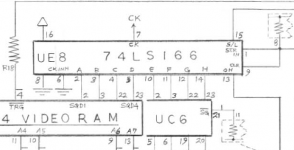
On another note does anyone know where pins 6,7,8 of the IC on UE8 go to,  under closer inspection they are right next to a SMD cap and look a bit dull and crusty.  If someone has a schematic I can check continuity on those to see if there are issues.

 
Hi all,  an update here.  I recapped all the SMD Caps on the weekend and cleaned the logic board.  I discovered from previous work on the band that the -ve of C9 wasn't connecting to Pin 7 of the connector correctly so I got that working ok.  But after all of that no charge in the outcome :-(  I am waiting on new Caps fr the analog board and the two axial caps of the logic board to arrive so I can recap the remaining.  After that I am not sure where to try.  Will provide an update after this recapping.

 
what voltages do you get on the +12, -12, +5, -5 power rails on the logic board itself, theres an edge connector row of pins near the from of the board you take take readings from, also if you have another floppy drive try using that with the hdd disconnected and see if that boots a floppy the whole way to the desktop...

dont forget that you will want to recap the psu itself at some stage too

 
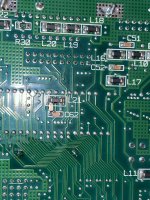
Hi all,  I have recapped the analog board and the PSU with no change.  I have also tried another HDD and FDD from a working machine and the same result.  On further inspection on the underside of the logic board I noticed something that doesn't look right.  There seems to be a jumper Cap between C62 and L21 as per the attached image.  This is under the FDD controller chip UJ11.  Does anyone know if this is normal ?  It is a 820-0260-A Logicboard

IMG_7235.jpg

 
yes that extra cap between L2 and C62 is normal, I  forget what board revisions have it but it is definitely a factory fitted part, as for the voltages they are within tolerance/spec. 
I think now you are are the stage whereby you either need to start probing out connections between chips or sending it to somebody whom can do some more in-depth analysis of your board. there are many things that could be causing this and you've done all the basic troubleshooting steps to check the usual things that could be wrong.
im not sure what you electronics background is but besides starting to check continuity between traces the next step would be to use an oscilloscope to check for abnormalities such as stuck lines and/or intermittent faults from different chips causing the boot hang?
 perhaps if you can upload some hires photos of the topside of the logic board I or someone else may be able to offer more advice on things to check.

also did you get a chance to change out the ram and try a different set of 4 sims?

 
Last edited by a moderator:
Yeah I have started checking continuity.  Anyone have any ideas where the most likely area of concern might be.  I am currently focusing in on the SCSI and FDD chips

 
I have tried the SE/30 logic board in a working SE FDHD,  same result.  The SE FDHD Logic Board with the SE/30 PSU and Analog board works fine.  So the problem is definitely in the SE/30 Logic board,  I also tried this with the RAM of the SE FDHD and vice versa so RAM also not the problem.    I think I will start with the SCSI area as I noticed when the SE/30 Logicbaord was in the SE FDHD chasis it kept the the HDD high light lit when it was trying to access the FDD.

I was thinking about buying an oscilloscope so maybe this is a sign that I need a new toy !!

 
im a bit busy with uni right now, but ill have another look at the schematics etc later today and see if i can think of some areas on the logic board worth focusing you attention towards
 

as for the oscilloscope look into the rigol 1054, you can hack the firmware serial to fully unlock all the features 

 
hi Cinan, its been a really long day for me, its almost 1am here, haven't had a chance to go over the schematics or anything tonight, but I haven't forgot about you and you se/30, I have the day off tomorrow so ill find some time to hopefully provide some further help. sorry I haven't had a chance too get back to you this arvo

 
I may have found the problem.  I don't have continuity on D(28) between Pin 43 of UG12 and Pin 13 of UJ11.  I think this may be caused by recapping damage from previous owner on C9 as per my earlier post,  it seems that traces have been burned away by some amateur solbering.  I have put a new trace wire in directly between the pins. I will recheck this afternoon before powering up and see what happens.  I did some checking between the via's along the traces to validate the thinking.  D(28) gets from the CPU to UJ11 but then not between UJ11 and UG12.

 
So it boots now,  D(28) was the problem. So all those hours with a magnifying glass, multimeter and schematics were worth while.

Onto the next problem,  I am getting a lot of Bus Errors when I select things now though so need to track that down next.

 
Back
Top