• Hello MLAers! We've re-enabled auto-approval for accounts. If you are still waiting on account approval, please check this thread for more information.

SE/30: RAM configuration with 16MB SIMMs

JDW

68020
Low End Mac mentions that any RAM configuration above 32MB is no specified by Apple and therefore there are no specific guidelines for higher configurations.  I therefore am curious to hear from those of you who own 16MB SIMMs to see if you experience matches my own.

I have an SE/30 with the stock SE/30 ROM and a CPU-socketed 50MHz Daystar 68030 Power Cache accelerator.  When I fill all 8 RAM slots (motherboard RAM slots -- the Daystar card has no RAM), the SE/30 powers on with with the normal bong (although the bong sound is cut short a bit at the end for some reason) and I can confirm 128MB of RAM when I boot.  But when I put only 4 of those 16MB SIMMs in Bank A or only 4 in Bank B (for 64MB RAM total), I get the chimes of death (full chime sound, not cut short) and see the following garbage on screen:
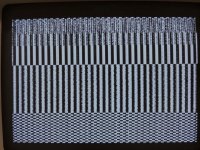
IMG_1494.jpg

This is true even with no ADB devices attached, no internal HDD, and the internal Floppy Drive disconnected.  The motherboard, analog board and SONY PSU are all recapped.  And nothing is in the PDS slot.

Have any of you SE/30 owners had success filling only 4 slots (Bank A only or Bank B only) with 16MB SIMMs?


 
Yes, I have 64mb in bank A in my se/30 and the configuration works. Worked with both DiiMo & Daystar PDS-based accelerators, haven't tried socketed yet.

EDIT: I am wrong, you need to have Bank B filled with something for Bank A to use 16x4 (64mb)

 
Last edited by a moderator:
Hmmm...

Thank you for sharing.

Another interesting thing is that when I replace the stock ROM with a IIsi ROM and fill all 8 slots (128MB RAM), when I switch the power ON, I hear the full bong sound but see the same garbage on screen as shown in the photo of my opening post.  That screen never changes and I cannot boot.  But again, with the stock ROM, all is well.

 
I use Dougg3/BMOW ROMinator based on IIsi ROM with my machine along with the stock se/30 ROM and both work fine. I use OWC's 16mb chips.

Apologies, looking at my notes just using Bank A with 64MB won't work according to a table I copied from this page. However with Bank B filled with anything (1mb x 4 or higher) works. I run this config (68mb, with 4mb in Bank B). Also, apparently larger / higher density RAM must be placed in Bank A not Bank B.  

Also, an 8mb (2MB x 4) configuration using 2-chip sticks didn't work for me. Apparently this is not a valid config. Only 4mb (1mb x 4) and 16mb (4mb x 4) work with just Bank A filled.

Here's some other links from my notes that may be helpful:

MacFAQ Memory

Old 68kmla post that said 2-chip and 3-chip ram worked in se/30 (these are known to be more flakey, so they may not always work)

Old 68kmla post on a sadmac error 0300FF that is memory related, this time due to ram chips being the wrong speed (ns) and solved by changing ram chips

 
Last edited by a moderator:
The short chime should be normal when you have any kind of PowerCache accelerator in there.

All my Macs with a 030 Daystar do this.

Just as nickpunt said you need something in the second bank when you fill the first one with 64MB.

 
@Bolle, thank you for the tip about the "short chime" being tied to a PowerCache being installed!  I appreciate it!  By the way, do you have a copy of PowerCentral newer than v2.2?  (I have

@nickpunt, I put in my ROM-inator II MEGA and it has its own chime and boots normally (whether into its own ROM or from my FloppyEMU or HDD).  So no problems there.

Wow! I just put my IIsi ROM back in and waited 5 minutes.  This time it booted, despite the garbage on screen!  Hmmm...  Well, at least that proves my IIsi ROM is still OK.  I guess I forgot just how long it takes to check 128MB of RAM, even with an accelerator!  Even so, the garbage on screen is curious.

Anyway, one bad thing about the ROM-inator II is that I sometimes get errors when I first switch on power.  They unfortunately made the PCB a tad too thin so the ROM SIMM pads don't touch the motherboard pins as firmly as with Apple stock ROMs.  Of course, their documentation suggests using either a rubber band -- which is crazy because rubber bands disintegrate rather quickly over time -- or a metal paperclip as a brace -- which sounds a bit scary to me since if that thing ever popped off while your up and running, goodness knows what it would short out!  I thought about hot glue to secure it, but if the pads aren't getting good contact anyway, hot glue isn't going to be a fix here.  Maybe I should add solder to all the ROM-inator pads front and back to make them push against the motherboard pins better?  Anyone thoughts? 

 
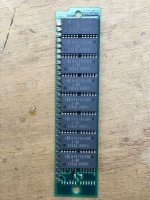
Well, nobody replied to my previous post :-( , so I will at least answer my question put forth to @Bolle.  I found the last update to the Daystar Digital software downloads page.  It seems that PowerCentral v2.2 is the last version ever released.  So that question is answered.  By the way, Bolle, in your last post to me you said I "need something in the second bank when you fill the first one [A] with 64MB."  Which implies that one can fill ONLY Bank A and get away with it, which is what @nickpunt said, however, that is only true in the stock condition and obviously doesn't apply when one has a Daystar PowerCache socketed accelerated installed like I do, which for some reason prevents installing 4 16MB SIMMs (64MB total RAM) only in Bank A.  Here's a photo of one of my 16MB SIMMs, by the way:

IMG_1495.jpg


@nickpunt, I think you missed the question I put forth to you in my previous post so I will repeat it...


One bad thing about the "ROM-inator II" is that I sometimes get errors (can't boot) when I first switch on power.  They unfortunately made the PCB a tad too thin so the ROM SIMM pads don't touch the motherboard pins as firmly as with Apple stock ROMs.  Of course, their documentation suggests using either a rubber band -- which is crazy because rubber bands disintegrate rather quickly over time -- or a metal paperclip as a brace -- which sounds a bit scary to me since if that thing ever popped off while your up and running, goodness knows what it would short out!  I thought about hot glue to secure it, but if the pads aren't getting good contact anyway, hot glue isn't going to be a fix here.  Maybe I should add solder to all the ROM-inator pads front and back to make them push against the motherboard pins better?  Anyone thoughts? 


Thanks.

 
Last edited by a moderator:
I'm not sure about ROMinator solutions. I have one that no longer works in SE/30 (but fine in Iici) and another that works fine.

As far as RAM in Bank A, I'd assume regardless of having an accelerator (socketed or pds) or being stock, 4 x 16mb in Bank A alone is not going to work. Only 4 x 1mb and 4 x 4mb work. Feel free to try all the permutations, but I'm not sure you'd get a different result than from the Japanese repair link posted earlier. If (sans accelerator) you're able to get 4 x 16mb to work in Bank A alone, then that's a new finding. 

 
 Maybe I should add solder to all the ROM-inator pads front and back to make them push against the motherboard pins better?  Anyone thoughts? 

 
I've had success adding solder to only one side of the ROM SIMM. Since you're probably not going to be able to make all pads the same thickness, you just make that side a bit thicker so that the unchanged side is more firmy pushed to the contacts of the socket.

 
I've had success adding solder to only one side of the ROM SIMM. Since you're probably not going to be able to make all pads the same thickness, you just make that side a bit thicker so that the unchanged side is more firmy pushed to the contacts of the socket.
I finally fixed the ROM-inator II Mega with a thicker paperclip as I describe in this post.

 
I couldn’t get the rominator II to work on my SE/30 using macos7.5.5 without doing a major os wipe as it needs downgrading, some systems changes before upgrading it back again to 7.5.5 which i couldn’t be bothered to reinstall all my configuration and software so i took it out will try again at somepoint maybe when i get scsi2SD.  Back to the memory i installed mode32 and used 8 x 16mb  OWC Memory modules and it worked great be it after long ram check. I had similar screen with previous cheap ram Which thankfully went away once the OWC memory went in. And it only took 3 days to arrive in the uk from us. Neal

p.s rubber band worked on the rominator for me before i took it out

 
Last edited by a moderator:
Neal, you are not supposed to use the Mode32 extension when you use the ROMinator.  

And as to getting system 7.5.5 or 7.6.1 or OS 8.1 to work with the ROMinator,  you must use resident to hack the System file as per the instructions given on the ROMinator product web page. 

 
No mode32 is for 24bit dirty rom, rominator is 32bit clean.

yes you need to res edit system code but the process means it needs to be done on 7.5.1 i think then add the 7.5.3 and 7.5.5. There’s instructions on the rominator site. For me i have my se/30 setup nicely with a bunch of software and utilities so didn’t want to wipe a 2gb worth of stuff and re-install it all for the clean rom and quicker boot time. 

I still have it and will likely add it in future when i have time to do some hdd upgrades.

neal

 
Right.  In your earlier post you first mentioned your use of the ROMinator II and then you spoke about the need to add Mode32, which I assumed you meant you were still using the ROMinator, in which case you would NOT use Mode32.  Of course you need Mode32 under the stock SE/30 ROM, although you would not need it for the IIsi, IIci or IIfx ROMs, which all work in the SE/30.

As to the 7.5.5 hack, I've not hacked mine in a while, but if you already have 7.5.5 installed, I don't see why you need to install 7.5.1, then do the hack, then upgrade over that hack.  I would think all you would need to do on an existing 7.5.5 install is do the ResEdit hack as described on the ROMinator web page.

 
Ah sorry I probably wasn’t very clear because i put it in, took it out etc..

yes i went back to the standard Rom with mode32 as it worked. I had tried the hack with 7.5.5 and couldn’t get it to work unless it was using just the rominator with 7.1 and the internal 8mb on the rom simm but it wouldn’t boot with my hard drives so i just put it back to standard and back with mode32 and live with the ram check

 
When you had the ROMinator II installed and when you tried to boot System 7.5.5 (with hacked System file), what did you see on the internal CRT during boot time?  Sad Mac?  Gray screen with no content?  Disk icon with flashing "?" inside?

 
It's been a long while since I booted into 7.6.1 and OS 8.1, but I tried it just now without problem using my ROMinator II MEGA.  But I had already hacked the system files, so it wasn't surprising I was able to boot without problem.  Interestingly, I have "Wish I Were" installed in my 7.6.1 System Folder and set to "IIsi," but I don't even have it loaded on 8.1 and 8.1 works fine.  According to the ROM-inator II documentation, OS 8.1 should have Wish I Were set to a Quadra 700 for some reason.  You can read that here:

https://www.bigmessowires.com/mac-se30-with-upgraded-rom/

What does "Wish I Were" even do?  It's obvious it's not needed in OS 8.1 as per my test just now working fine without it.  But I'm curious if there are some situations that may require it. (Apple System Profiler in the Apple menu won't load and just beeps at me under OS8.1.  Curious if that is a "Wish I Were" related problem or just a ROM incompatibility.)

By the way, if you're wondering whether to run 7.5.5 or 7.6.1 (or even OS 8.1) with a non-stock ROM, check out this LowEndMac Article.

 
Last edited by a moderator:
Back
Top