• Hello MLAers! We've re-enabled auto-approval for accounts. If you are still waiting on account approval, please check this thread for more information.

SE/30 PDS Adapter Epic Blunder

Do as @techknight already proposed and measure the resistance to ground and 5V on the pins that got connected to a voltage supply or ground. If any of them is close to zero ohms it is most probably broken.

I checked SIZ0 on my Turbo040 and it reads in the MOhms range to both vcc and gnd for example.

To narrow it down afterwards you can as well remove the CPU from its socket and repeat the measurement.

Most of the bus signals (including SIZ0) go through the big Daystar labeled chip. If that one is dead your Turbo040 is gone for good.

 
I checked SIZ0 on my Turbo040 and it reads in the MOhms range to both vcc and gnd for example.
Thank you for the testing tips!  But what is "Vcc" specifically?  If Vcc=+5v, why then is it deliberately labeled "Vcc" instead of being labeled "+5V" like all the other power lines on the Cache Connector? (See 4-C in the diagram in my previous post.)

I will need to defer testing until Sunday because I don't have the board here with me at home.  I have it all the office with all my test equipment.  But the following resistivity tests will be taken on the Daystar card's connector, as per the advice kindly given:

  • Set Meter to Ohms and measure between 40-C(SIZ0) & 4-C(Vcc) -- should read MegaOhms.
  • Measure between 40-C(SIZ0) and 40-A(GND) as well as 39-A (also GND) -- should also read MegaOhms.
  • Remove CPU from socket and repeat 1st two resistivity tests.

 
Hopefully your Daystar labelled chip is okay!  Someone correct me if I'm wrong but, for testing purposes, a cheap 68LC040 CPU could be dropped into the socket of the accelerator, correct?   If that fixes it, then you could bother with trying to find another full 68040 CPU.  I essentially gave away my old 68LC040 when I upgraded my LC575 board otherwise I'd send it your way.  

If that CPU full/LC(fpu-less) swap is possible, there are a bunch on ebay.  Here is an example with the pins looking mostly straight for $13 shipped.

https://www.ebay.com/itm/XC68LC040RC25B-Processor-R2/202126496632?hash=item2f0fad9378:g:ASYAAOSwdW9aEFQs:rk:32:pf:0

Plenty more listings as well all over in price, but many low cost options it looks like, for the sake of testing your Daystar.

Best of luck!

BTW, my E.B. was installing tantalum capacitors backwards on a Macintosh TV logic board.  Never seen that much smoke come out of a computer before.  Amazingly the board survived, but with 2 decent-sized scorch mark scars to remind me to always check the polarity labeling on components.

 
Last edited by a moderator:
[SIZE=1.4rem]...my E.B. was installing tantalum capacitors backwards on a Macintosh TV logic board.  Never seen that much smoke come out of a computer before.  Amazingly the board survived...[/SIZE]
Especially amazing since tantalums tend to fail shorted!

It was actually during the filming of my forthcoming video on capacitor replacement for the DiiMO accelerator that my Epic Blunder occurred.  I chose Niobium Oxide caps instead of tantalums because they are small enough to fit onto the existing pads nicely at a safe voltage rating, they won't burn, and they don't fail shorted.

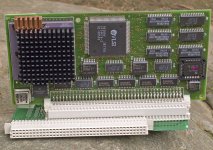
Anyway, here's a photo of the front of my 40MHz Daystar Card:

DayStar_68040_40MHz.jpg

 
Last edited by a moderator:
You may get lucky and only have lost one of the ABT573 ICs. They seem to buffer what goes in and out of the bus on that card. Thats assuming SIZE0 doesnt run all the way back up to one of the custom ICs, without a schematic you wont know unless you trace it all out. 

 
Interesting heat sink hack on that card, is that mod a standard feature for that accelerator series? I've never seen it before, certainly not in any advert pics, but they don't necessarily show a heatsink at all.

View attachment 21711

The standard 68040 heatsink appears to have been removed from the CPU if those black splotches around it and that honking great copper(?) mod are indicators.

tk, the red dot on that GAL usually denotes an IC having been tested as good and passed in troubleshooting, no?

 
The black heatsink came with the card.  The black stuff is Arctic Silver™ Thermal Adhesive is what I applied to parts that didn't look to me to be secured well.  I then added the copper heatsink for better cooling, expecting to put one more right beside it (to the right side, in my photo), but I realized that I only had the one left and I never added another.  Two more technical could fit on the side, but when you install the card using the TS adapter, that part comes right up against the CRT and so I cannot add two more there (the exposed CPU part to the left of the black heatsink in my photo).  I actually had to cut off 50% of the leftmost column of black heatsink fins to ensure the card would fit.  Without cutting those off, the heatsink would hit the CRT and the card would not be possible to mount on the TS adapter.

Tomorrow when I get into the office, I will perform the following tests:

  • Set Meter to Ohms and measure between 40-C(SIZ0) & 4-C(Vcc) -- should read MegaOhms.
  • Measure between 40-C(SIZ0) and 40-A(GND) as well as 39-A (also GND) -- should also read MegaOhms.
  • Remove CPU from socket and repeat 1st two resistivity tests.


I asked about Vcc but no one gave me and answer, so I will use a large font size to ensure it can be seen this time.   :-)   (I don't know if none of you know the answer or if you simply failed to see my question.)

Pages 387-393 of Designing Cards and Drivers for the Macintosh Family make no mention of the voltage level of Vcc, nor does a keyword search for "Vcc" in that same PDF yield any results.  Does "Vcc" (see location C-4 on the Cache Connector) mean +5V?  If Vcc=+5V then what differentiates "Vcc" from the other Cache Connector pins explicitly marked "+5V"?

 
It is just a normal 5V pin. I would say it is a typo in the book.

It connects right to the other 5V/VCC pins on the adapter:

se30_diimo.jpg

 
Last edited by a moderator:
I just finished testing with my Fluke 8845A benchtop meter:

  • Meter Set to Ohms (auto-ranging), probes between 40-C & 4-C shows an open circuit (M-ohms on meter)
  • Meter Set to Ohms (auto-ranging), probes between 40-C & 40-A shows an open circuit (M-ohms on meter)
  • Meter Set to Ohms (auto-ranging), probes between 40-C & 39-A shows an open circuit (M-ohms on meter)
  • Meter Set to Ohms (auto-ranging), probes between 39-A & 40A shows connected together (milli-ohms on meter)
  • Retested the above with my 4-wire probes and got the same result.
  • Meter Set to Continuity, probes between 40-C & 4-C shows an open circuit (no beep or Ohms shown)
  • Meter Set to Continuity, probes between 40-C & 40-A shows an open circuit (no beep or Ohms shown)
  • Meter Set to Continuity, probes between 40-C & 39-A shows an open circuit (beep confirmed continuity)
  • Meter Set to Continuity, probes between 39-A & 40A shows connected together (beep confirmed continuity)
  • Removed CPU and retested all of the above and got the exact same result.
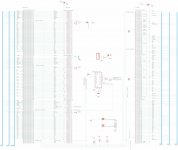
Pinouts are shown in my chart.

All said, the above series of tests told me nothing other than the fact that the two grounds found at 39-A and 40-A are connected to each other, which is unsurprising.  Any further suggestions on testing would be appreciated.

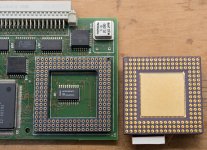
Not sure if it matters, but I found a little chip labeled U2 beneath the CPU as shown in the following photo:

DayStar_Turbo040_UnderCPU.jpg

 
Gutted, you have my dream se/30 setup too :(  i feel for you
Thank you for the kind sentiments.  Right now, my primary dream is about another round of testing advice that might speed me on my way to finding a fix.  I've not given up yet.  I simply am not sure where to turn next.

 
I actually had my camera rolling at the time of my Epic Blunder.  In the following clip you can hear me switch on the power at the back of the SE/30, then 130ms later you can hear a pop from the SE/30's speaker but nothing on screen (the SEASONIC PSU inside the SE/30 shutdown power, apparently), and less than 3 seconds after that I switch off the power.  

If anyone has any further testing advice, I'm all ears.  Thanks to one and all for the tips provided thus far.


If we consider my side-by-side once again and ponder the implications of my Epic Blunder, we see the following:

  • 39-B on Cache Conn. is +5V but on PDS connector is GND.  If all the +5V and Vcc are connected together on the Daystar card (they seem to be), and separately if all the GNDs connected together (they seem to be), because 39-B of the PDS slot puts GND on +5V and also puts GND on the GNDs of the Daystar too, there would be no difference of potential (i.e., no voltage) on any of the +5V lines of the Daystar card.  This is actually a good thing.
  • 40-A on the Cache Conn. is GND, but when connected to the PDS Conn. it became -12V shorted to GND.  As we have already established, all the GNDs are connected together and all the +5V and Vcc lines are connected together too because of 39-B, so there was no difference of potential between the GND and +5V lines of the Daystar.  Precisely what happened when -12V was shorted to GND is unknown.  Either all the GNDs and +5V and Vcc briefly dropped to -12V or remained at Ground. -12V being shorted to ground may have been what triggered the SEASONIC PSU to instantly shutdown when I switched on the power.
  • I am curious about 40-B CACHE.  What is "Memory controller for cache access"?  Is this a voltage rail or a pin expecting signal?  It got hit with -5V.  That could have fried something too along the CACHE line, haven been rather significant under-voltage with respect to the GND lines, assuming all the GND lines on the Daystar stayed GND (0V).
  • 40-C is the second problem point. +12V was fed into SIZ0 of the Daystar card, which is a signal line. If all the GND points and all the +5V and Vcc points on the Daystar card remained at GND level, then any pull-up resistor used by SIZ0 would become a pull-down.  And if the GND point was pulled even temporarily to -12V, then the difference of potential at every point along SIZ0 would be 24V! 12V or 24V, either way, it's over-voltage.  But due to the lack of a schematic (curious what happened to all the technical documentation when Daystar went under in 1999), it's impossible to know the implications.  And again, since I lack a 68040 machine in which to test the CPU of the Daystar, it is unknown what is good and what is bad.  Ditto for the TS Adapter, since I bought it exclusively to work with the Daystar card.
If anyone has any other brilliant testing ideas, I'm all ears and eager to try.  But for now, I'm now sure how best to proceed.

View attachment 25617

 
...(curious what happened to all the technical documentation when Daystar went under in 1999)...
Ah, now you've hit on something I may actually be able to help with. One of my best friends is a corporate bankruptcy attorney. His specialty is documentation forensics. I'll give him the corporate identity of the company, and if anyone has these documents  somewhere, he should be able to tell me who has them and how you can contact them. Given the pending holiday, you'll have to give me into the new year, but I should be able to get some results for you.

 
Last edited by a moderator:
Troubleshooting something like this is not easily done; it is why you are not getting a whole lot of suggestions on how to proceed.  

First off, the ARTMIX card.  Do you have anyway to test it? Have you tested for shorts across the capacitors on that card?  It would be the easiest of the two cards to troubleshoot, and you shouldn't rule it out.  It needs to be verified firstly.

Following that,

As you suggest, the most likely candidate is SIZ0, but we can't dismiss that other pins received wrong voltages and are suspect as well.  If you look in the DCaDftMF under the IIci Cache slot descriptions, it also lists the load limits.  Mostly in the µA - .x mA range.  It also describes the function of the signals, including the CACHE signal.  "CACHE, an active-high signal, disables the memory controller (MDU) so that it cannot start a memory cycle and allows the cache card to supply the data instead."

The main problem, most of these signals are processed by either the ASIC or the PALs-- or more likely, both.  All are irreplaceable if damaged.

The programmable logic in the PALs are programmed at the time of manufacture, and unless you have the JEDEC fusemap, they are realistically impossible to recreate without a working card, a logic analyzer, a good knowledge of the function of the pin you are decoding, and a whole lot of time.

But a funny thing, I search up "VY14676-2" (the ASIC) into Google, and there are several "part suppliers" that show this part in stock, and even manufactured by Daystar.  Of course, no way to tell the validity, or if these are Chinese scammers.  But if the cost is only a few dollars (no, I did not price them), perhaps worth a try?

If this were my card, I'd have to limit my troubleshooting to something I could repair.  In this case, a component tester on all the commodity parts (hot air removal) to check if they are good.  Check the resistors and capacitors on the back.  (boring, and a goose chase most likely, I know).  Replace the CPU with a good one, and as a last resort, try one of those ASICs if cost allows.

I have a second card, so I could also check for burned internal traces.  Choose a signal pin on the CPU socket (these are known by looking at the CPU pinout) and see where it goes and verify on the bad card.  Do the same with the signals on the cache slot connector.  Of course, with schematics, this process would be infinitely easier.  If a burned internal trace is found, repair with a bodge wire.

I wish the best of luck, and so sorry this has happened!

 
@joethezombie Thank you for taking time to investigate and provide excellent ideas and extensive advice!

I measure (4-wire cable, Fluke 8845A) 105.1k-ohms between each of the 6 blue capacitors (i.e., between +5V and GND) on the ARTMIX TS Adapter (see photo below), so there are no shorts there.  However, I have no way to functionally test the TS Adapter using another accelerator inserted in its Cache Connector because I purchased the TS Adapter for exclusive use with my Daystar Turbo 040 accelerator.  I have no other accelerators that need an adapter for the SE/30 to test in the TS Adapter, unfortunately.


Ah, now you've hit on something I may actually be able to help with. One of my best friends is a corporate bankruptcy attorney. His specialty is documentation forensics. I'll give him the corporate identity of the company, and if anyone has these documents somewhere, he should be able to tell me who has them and how you can contact them. Given the pending holiday, you'll have to give me into the new year, but I should be able to get some results for you.
Wow.  Thank you for your kindness, @Paralel!  Here's the WIKI on Daystar Digital:

https://en.wikipedia.org/wiki/DayStar_Digital

If schematics could be found and then legally made available to the vintage Mac community, that would be simply outstanding!

 
Back
Top