• Hello MLAers! We've re-enabled auto-approval for accounts. If you are still waiting on account approval, please check this thread for more information.

SE/30 battery bombed repair attempt

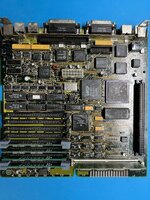
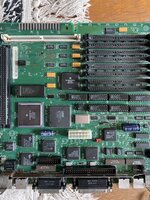
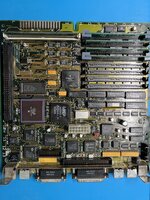
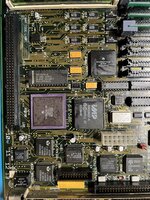
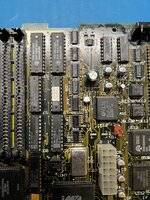
I recently bought a battery bombed SE/30, originally just to salvage some components from the logic board.

However, the damage wasn’t too severe, so I decided to try repairing the board.

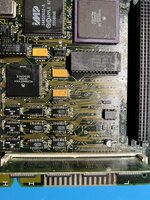
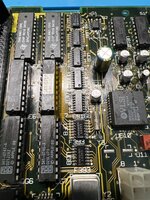
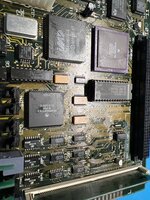
I replaced five F258D chips with new ones, and there are no visibly broken traces. I also washed the board several times in my ultrasonic cleaner.
I haven’t checked under a microscope yet, but everything looks fine at first glance.

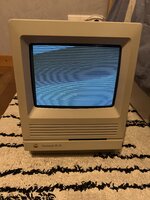
With a known-good ROM and RAM installed, the board immediately plays the death chime on startup and displays horizontal strips :

I have a parts board to interchange components.

What should I check next ? I just ordered an oscilloscope, it arrives tomorrow.
 

Attachments

  • image4.jpeg
    image4.jpeg
    2.8 MB · Views: 52
  • image3.jpeg
    image3.jpeg
    2.4 MB · Views: 39
  • image2.jpeg
    image2.jpeg
    2.5 MB · Views: 37
  • image1.jpeg
    image1.jpeg
    2.6 MB · Views: 38
  • image0.jpeg
    image0.jpeg
    1.8 MB · Views: 35
Since you get a "sad mac" chime, you could try using a null serial cable to run "TechStep" commands on the mac - it might shed some light what is wrong:

Here is info on another person's attempt to do so:


I was able to use "TechStep" commands on my SE/30 with broken video, using cable I made for using ADTPro on my IIGS.

I would be curious what error code TechStep reports.
 
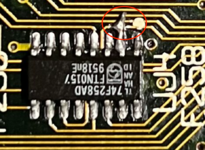
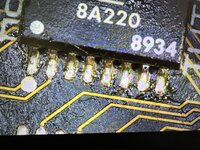
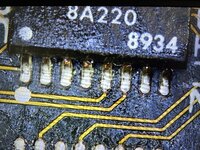
In your photos, it looks like maybe some soldering issue with chip UJ4? Can't quite make out whats happening. Like the pin is shorted to a neighboring trace?

I would go over the chips you replaced with a magnifying glass and check for and soldering bridges/etc. The battery leakage might have removed solder mask from traces causing potential shorts.

1744149065407.png
 
Since you get a "sad mac" chime, you could try using a null serial cable to run "TechStep" commands on the mac - it might shed some light what is wrong:

Here is info on another person's attempt to do so:


I was able to use "TechStep" commands on my SE/30 with broken video, using cable I made for using ADTPro on my IIGS.

I would be curious what error code TechStep reports.
I already heard about that. I need a serial to usb cable ?
Since a get a sad mac, it means that the cpu is reading the ROM content, right ?
But I don’t understand why I got the zebra pattern and not the simasimac or sad mac pattern.
For me the video circuitry is good.
 
In your photos, it looks like maybe some soldering issue with chip UJ4? Can't quite make out whats happening. Like the pin is shorted to a neighboring trace?

I would go over the chips you replaced with a magnifying glass and check for and soldering bridges/etc. The battery leakage might have removed solder mask from traces causing potential shorts.

View attachment 85297
Everything’s okay here, is just a little bodge since one pad was slightly broken. I already checked for shorts.
 
maybe the quarz crystal got damaged during the multiple ultrasonic cleanings, or was it removed before that..
 
I have an other battery bombed board, but in worse condition… However this one shows a simasimac pattern at startup, not the zebra pattern.
 

Attachments

  • image.jpg
    image.jpg
    2.4 MB · Views: 24
I already heard about that. I need a serial to usb cable ?

Yes, but it could tell you the error code that is happening that you cannot see on the CRT - could be useful. You can also run various tests.

One other thought I had. I noticed you had 3D printed clips to hold RAM into place. Are you sure ROM is making good contact? I forgot where, but I saw a video recently someone trying to repair an SE/30 and all it ended up being was poor contact with the stock ROM, because the logic board had developed a slight "bow" to it over decades. Putting those clips on the ROM helped.
 
Yes, but it could tell you the error code that is happening that you cannot see on the CRT - could be useful. You can also run various tests.

One other thought I had. I noticed you had 3D printed clips to hold RAM into place. Are you sure ROM is making good contact? I forgot where, but I saw a video recently someone trying to repair an SE/30 and all it ended up being was poor contact with the stock ROM, because the logic board had developed a slight "bow" to it over decades. Putting those clips on the ROM helped.
I figured out it's a problem with the RAM. Zebra pattern is normal, it's because I have TI chips at UC6 and UC7.
 
Since a get a sad mac, it means that the cpu is reading the ROM content, right ?

Yes.

The symptoms you’re having are indicative of a RAM access problem. That doesn’t necessarily mean the RAM is bad, although it could. But it might just as easily be an issue with the RAM circuitry.

But I don’t understand why I got the zebra pattern and not the simasimac or sad mac pattern.
For me the video circuitry is good.

The simasimac and zebra patterns mean the same thing, actually they are both referred to as simasimac patterns. The video circuitry is uninitialised, so the computer is displaying the factory default contents of VRAM. This default state varies by manufacturer; indeed one of your boards has NEC chips and the other has TI.

With a known-good ROM and RAM installed, the board immediately plays the death chime on startup and displays horizontal strips :

I have a parts board to interchange components.

What should I check next ? I just ordered an oscilloscope, it arrives tomorrow.
Apple revised the PCBs used in the SE/30 over its lifetime. I’ve worked on a few of them and the one you have here seems to be more susceptible than the others as regards trace rot.

I know this because I have a board just like yours, the dark green one with the slight stippled texture. I also had the same symptoms as you when I came to restoring it - simasimac and sad chimes.

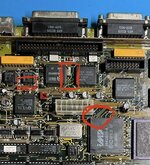
These were the problem areas I had, caused by capacitor leakage, with traces breaking right where they joined the pads. The breaks were practically invisible. The crucial ones for me were the ones I’ve circled by the Glue chip so definitely check continuity on all pins on that top edge.

IMG_3570.jpeg
 
Yes.

The symptoms you’re having are indicative of a RAM access problem. That doesn’t necessarily mean the RAM is bad, although it could. But it might just as easily be an issue with the RAM circuitry.


The simasimac and zebra patterns mean the same thing, actually they are both referred to as simasimac patterns. The video circuitry is uninitialised, so the computer is displaying the factory default contents of VRAM. This default state varies by manufacturer; indeed one of your boards has NEC chips and the other has TI.


Apple revised the PCBs used in the SE/30 over its lifetime. I’ve worked on a few of them and the one you have here seems to be more susceptible than the others as regards trace rot.

I know this because I have a board just like yours, the dark green one with the slight stippled texture. I also had the same symptoms as you when I came to restoring it - simasimac and sad chimes.

These were the problem areas I had, caused by capacitor leakage, with traces breaking right where they joined the pads. The breaks were practically invisible. The crucial ones for me were the ones I’ve circled by the Glue chip so definitely check continuity on all pins on that top edge.

View attachment 85336
I'll check that with the microscope, thanks !
 
Back
Top