Hey Folks!
I've noticed a lot of YouTubers and others have changed their main drive name to "Macintosh SD." I've done the same! To that end I thought it was time to make a SD card icon for System 7.
Disclaimer: I am not an artist. I took some inspiration from some other icons and some AI generations to try and make these.
I made a black and a blue version using Icongrapher 2.4 on MacOS 9.2.2. They contain versions from 32-bit down to 1-bit. Happy to provide the files on request if someone wants to change them.
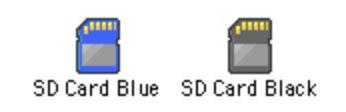
They are free to use, remix, and modify. Maybe you'll even make a better version than this, or maybe someone will do a cool one for System 8. Below are the previews and links:
I've noticed a lot of YouTubers and others have changed their main drive name to "Macintosh SD." I've done the same! To that end I thought it was time to make a SD card icon for System 7.
Disclaimer: I am not an artist. I took some inspiration from some other icons and some AI generations to try and make these.
I made a black and a blue version using Icongrapher 2.4 on MacOS 9.2.2. They contain versions from 32-bit down to 1-bit. Happy to provide the files on request if someone wants to change them.
They are free to use, remix, and modify. Maybe you'll even make a better version than this, or maybe someone will do a cool one for System 8. Below are the previews and links: