• Hello MLAers! We've re-enabled auto-approval for accounts. If you are still waiting on account approval, please check this thread for more information.

scsi2sd-util not finding my device

Hey guys, I could not find any official help page about this so I posted here because I am getting desperate.

I have a scsi2sd (v5 I believe, the short red one that uses microsd) that I have configured before, a long time ago, maybe 2017 or early 18.

I used to use it in my LC III, but then I configured and used it in my Apple IIGS. I want to use it in the LC III again. But the 30mb volume just ain't gonna cut it. I know it still works because I was able to initialize it from the disk tools startup disk.

I downloaded the latest scsi2sd-util:

http://www.codesrc.com/files/scsi2sd/latest/linux/

And I followed the user manual here:

http://www.codesrc.com/mediawiki/index.php/SCSI2SD_UserManual

But no matter what I did, it just keeps saying "searching for bootloader" forever. I even let it run overnight.

I have tried like four different usb cables, and I tried it in linux and windows. No go.

Am I missing a step or does the latest software just not support this model?

In the meantime I will try to dig up the old laptop that I used to configure it before...

 
You can download older versions of the utility ... might be worth trying one of them:

http://www.codesrc.com/files/scsi2sd/

Do you have another SCSI2SD device that you can verify that you are able to see ANY device through Windows or Linux?

I've had a lot of issues with my V5.0b (red) devices in the last few months.  But the Wiki does seem to indicate that the latest version you have works with all the versions except the v6. 

 
Next, I’d attempt a different USB cable. It’s known that they are finicky with which they will work with.

 
I finally got it. It was a magic combination: USB cable and version. I used the last one from 2015 and it worked like a charm.

Thanks for the suggestions.

 
I went mad testing every f'ing cable in my collection before I found one that would actually connect. I really thought I had zapped the SCSI2SD, because how can so many wretched cables not work?! In the end it was a good thing as our phones are all USB-C now, and thinning the herd  was a necessity.

 
I went mad testing every f'ing cable in my collection before I found one that would actually connect. I really thought I had zapped the SCSI2SD, because how can so many wretched cables not work?! In the end it was a good thing as our phones are all USB-C now, and thinning the herd  was a necessity.
yeah same here. I could have sworn that most of them were data cables. But maybe they were all power only. Also I ended up using my macbook that my work provided for me. Running scsi2sd-util in linux is a pain. If  you don't run a release that is current to the version of scsi2sd-util you are using, then you won't likely be able to install the libraries necessary to run it.

Not that you likely care about all of this. In addition to venting I am recording this for my future self. Whenever I am working on a problem that I know had solved before, I search this forum, and then realize, "Oh yeah, THAT'S how I figured that out!"

 
And I am here too (a few years later) and I know I'm not the only one, from back from when it was the only game in town (almost- remember the Aztec Monster-CF SCSI adapters?, I have some of those too!) and I need add a few notes that future agent_js03, myself and others, might find useful.

First, I'm still doing this on Intel on Monterey, though probably not for much longer.
Secondly, since the SCSI2SD card was the short, red one and was mounted in a drive carrier, and there was no indication on the top surface what version it was, and I didn't recall, it took a bit of poking around to find out, because everyone is busy cleansing the web these days. (people selling new versions of product, old web sites gone or repurposed, forum postings inadvertently lost... etc.)
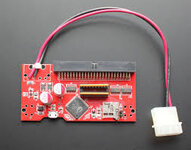
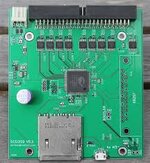
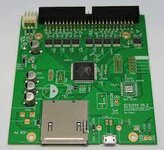
Here are a few, smaller images to assist with general identification:
SCSI2SD 5.0, SCSI2SD 5.1, SCSI2SD 5.2 (respectively)
SCSI2SD-5-0.jpegSCSI2SD-5-1.jpegSCSI2SD-5-2.jpeg
I have some other compact versions of the SCSI2SD that need to be documented if I get the chance, but here I'm going to focus on the one I worked on and the differences in firmware updates.

When I pulled the SCSI2SD out of the LCIII because it was only mounting one drive, I didn't really think it all the way through - the quick answer was that instead of the 16GB card that I thought I had in there with 4 drives, I had last placed a 256MB one in, which just had the first drive on it.

What led me here was that I couldn't get the SCSI2SD to communicate with the SCSI2SD-util on my laptop, but I didn't recall the issue with data vs power cables, until I read this and recalled that I originally had a couple older Motorola cables that I used almost exclusively for this type of transfer. I couldn't find them quickly, so I picked out two cables that were likely and it turns out that the one of those with the thicker end and a capital 'B' marked on it worked.

So here is what I have that worked.
SCSI2SD V 5.0
SCSI2SD-util ver 5.2
USB data cable for data as described above

The original firmware I was running was 4.7xx, so I looked around and really thought that I could do somewhere in the neighborhood of 5.xx (I think 5.2 is only for the ver 5.2 SCSI2SD board), but all I could find was 4.8.04.

After connecting up to the board (with no card installed in it) I downloaded and saved my settings, then updated the firmware.
I made a new card, from one of my backups and tested it out.

There used to be really great information on these - how to set them up, specify different size and types of drives and images that you could dd onto an SD card. Now it seems most of this information is either gone, or just difficult to find, I hope its the latter.
 
Here is an older thread that describes the installation of scsi2sd in detail:
 
Here is an older thread that describes the installation of scsi2sd in detail:
I was in that thread early on, and probably the only one that fully documented what every single page on my scsi2sd setting was (everyone else would show one, or two pages at most) - so I never found out how the ones that worked maybe differed in their ending blocks and I was very frustrated at the time, but shortly after that, I figured out how to get mine mostly working on my own and then moved on to other alternative solutions after that.

That thread eventually devolved into a lot of different use-cases that may/may not apply, speculated on what would be the best device to use and whether CF-card based devices would be a better alternative altogether. There is still not a real good, concise one stop shop for this information any more. I did manage to get mine configured (between information that I had and some that I found there) and got three out of four 2GB partitions (I have a version 5.0) recognized by the stock HD SC setup 1.7.3 and install 7.5.3 on a LC475. I used a CD of Legacy Recovery on SCSI 3 to install from (booted from it). SO I am going to forget about the fourth drive that is lost out there and be happy with the ones that are working. I found three other SCSI2SD devices that I had packed away, and now that I have know how to set them up, I can use them in one of my Macs that need a replacement HD.

I have used other options involving BasiliskII disks and copying directly to an SD card from the Mac command line, but this was fairly quick, and easy.
 
I owe a thanks to @dochilli for bringing this back and having me take another look.
I am going to forget about the fourth drive that is lost out there and be happy with the ones that are working.
...and it turns out I couldn't just let it go, and I really tried for a couple days, but that and the combination of taking another look at my settings, uncovered a couple of issues. I had taken a backup before installing the one and then applied the settings to one of the ones that I had gotten out of storage and when I checked the results, it appeared correct, except that the last drive's settings appeared to be unchanged from default (if the backup had this, then so did the installed one, which explains why I'm missing drive four - its not enabled and has the default SCSI2SD settings, which don't appear for the stock apple drive setup.
I know that I set it up correctly before saving the original file, so I tested out the behavior of the application and found that I was one off on the block size for a 2GB drive and because of that, it was not saving my settings for the final drive, although it appears to. Once I knew that, I went back and reset the size and other information on the save file, along with the other corrected settings, and read it back and forth few times to make sure that it was saved properly.

Using this final setup with the SCSI2SD and the SD card that I already wrote to, I had to boot off the CD, but once I skipped over the first drive (unmounted) and initialized the remaining drives, I rebooted into my original 7.5.3 install, which mounted this time and booted, with all 4 drives working.
 
Back
Top