• Hello MLAers! We've re-enabled auto-approval for accounts. If you are still waiting on account approval, please check this thread for more information.

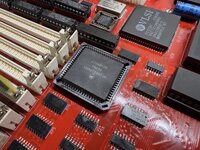
Schrockwell's S3/30 Reloaded build

Okay, so I'm an idiot. Turns out probe sensitivity matters a lot. Lesson learned.

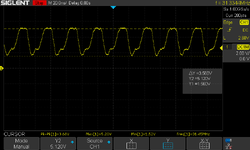
By switching from 1X to 10X, the picture becomes much clearer.

Y2 output:
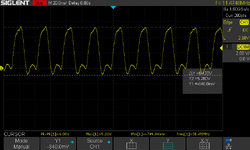
SDS00010.png

C32M:

SDS00009.png

So the replacement oscillator Y2 is indeed putting out a full 0-5V swing. It overshoots a bit, but that seems fine?

The real issue is C32M. It's not dropping below 1.5V. So that still points to UH7 as the culprit. Or UI6. Or the GLUE chip (unfortunately not socketed). Those are the only places I can find connected to C32M.

Will I need to source and program a new EEPLD?
 
Last edited:
Those logic devices are fused PAL's. I think the logic has been reverse engineered. Apple typically blew the security links, but it may be worth a shot at reading them out on a suitable programmer.
 
We're not out of the woods quite yet. Everything started going haywire about 90 seconds after a cold boot. I resoldered UI5 and things improved. It stayed stable for several minutes.

So I powered it off and plugged in a keyboard and mouse. Neither was responsive on boot, and soon it started glitching again. I encountered major issues the previous time I plugged in the mouse, so it must be related. I will have to check the ADB and surrounding chips. The mouse and keyboard are known-good; I tested them on my G3 PowerBook.

Now it barely boots at all. Also UI6 gets noticeably hot to the touch, which is not good.

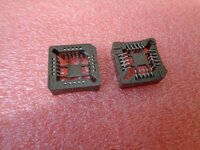
I ordered the hot plate and will attempt to completely redo UI5, but it's going to be tricky with the RAM slots in the way. (Edit: ordered PLCC68 sockets, will to be much easier.)
 
Last edited:
Ran some more testing. The system is stable for about 5 minutes (flashing the floppy disk with "?") after a cold boot. Then it freezes up and fails to reset until it's been off for a few minutes.

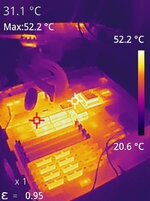
DIP components UE6, UE7, UG6, UG7, and UI6 all get really hot to the touch. So I think the lockup is related to the heat. But obviously they should not be getting hot in the first place. I'm not sure what the common thread is, but will keep starting at the schematic.
 
Check the connections to UH7 carefully. The footprint on the Reloaded board makes it difficult to solder as the pads are almost completely hidden by the chip, so poor connections are common. Check to make sure that adjacent pins aren’t bridged, too.
You’re oh so right. UH7 is a pain in the neck to solder. I wish I had soldered it at the very beginning of my project, when the board was still empty. Anyway, when I got at the end of the reload, I got horizontal bars. I had checked continuity 2 times on UH7 but there is so little space there that you get continuity only because the probes are too close to each other. So I checked in one last time and noticed 3 (yes three) suspect solder joints, which I carefully redid and…Bingo. The machine came to life.
 
You’re oh so right. UH7 is a pain in the neck to solder. I wish I had soldered it at the very beginning of my project, when the board was still empty. Anyway, when I got at the end of the reload, I got horizontal bars. I had checked continuity 2 times on UH7 but there is so little space there that you get continuity only because the probes are too close to each other. So I checked in one last time and noticed 3 (yes three) suspect solder joints, which I carefully redid and…Bingo. The machine came to life.

Socketing it should be standard procedure, really.
 
Thankfully not a QFP, they’re not much fun for the casual hobbyist. :p
I'll take a QFP over a PLCC any day of the week :p

On topic, the 5 DIP GALs/PALs in the video circuit are expected to be very hot. Too hot to touch. If you have used ATFs, they run cooler but there is otherwise no functional difference.
20240111053445-IR.jpg
 
Last edited:
UI5 was sort of crooked when I installed it, so I suspected there might be a bad connection or short somewhere in there (although I didn't detect one with a multimeter). It was impossible to determine because the RAM slots are right next to it. So I got a PLCC socket, removed the chip via heat gun, and installed the socket.

The first power-up was very promising. I got a chime, and the system was stable on the floppy icon for 10 minutes – the longest yet! There were some occasional video artifacts on just the left quarter of the screen, but they seemed to clear up over time.

And then after a power cycle, we're back to square one: intermittent failures that have no rhyme or reason, no cause and effect. Extremely frustrating.

At least it's not worse than before, but will have to keep throwing stuff at the wall until something sticks.

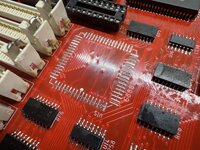
IMG_0499.jpegIMG_0500.jpeg
 
Okay folks, made great progress today. I was operating under the assumption that solder flux is non-conductive. It seems that this is not, in fact, the case.

Today I scrubbed all around the GLUE pins with 99% IPA and a toothbrush, trying to expel as much flux from underneath as I could. And you know what? It chimes 100% of the time now.

Then ADB wasn't working, so I scrubbed the ADB chip… and the mouse and keyboard came alive.

I was even able to fully boot into System 6 on BlueSCSI and win a round of Klondike. It's still intermittent, but overall the success rate is much higher.

Needless to say, on Friday I'm visiting a friend with a large ultrasonic bath. I am feeling good that this will fix the flakiness once and for all.

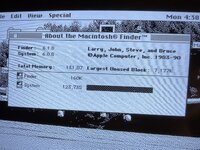
128 MB of RAM, you love to see it.

IMG_0510.jpeg
 
It was the flux all along! Who would have thought?

Impressive work! If I ever undertake something similar, I will definitely take your experiences to heart and use sockets on everything.
 
In my experience, flux itself tends to be non-conductive, but often ends up with conductive particles suspended in it.
 
Flux is non-conductive (or at least it should be), so I would be looking for another explanation here. It could be something like a stray solder blob in between two pins that you’ve now flushed out or at least dislodged.

impressive work! If I ever undertake something similar, I will definitely take your experiences to heart and use sockets on everything.
My first two Reloaded builds are socketed, and I’ve been using one of them for testing chips on subsequent builds. It’s been handy. That said, there are downsides - overall expense is higher, and you’re effectively doubling up the number of contact points that could fail.
 
Back
Top