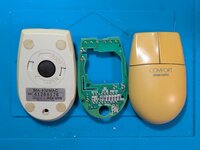
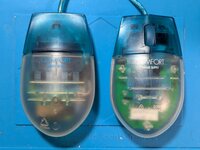
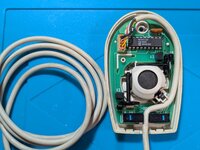
Recently, I encountered one of these Sanwa Supply 2-button ADB on an online marketplace.
I'd been looking for a nice 2-button ADB mouse for a while... so why not this one? It has a rather attractive look.
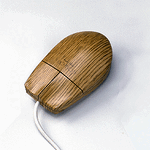
Yes, 2-button ADB mice do exist. The most common one is probably the NeXT ADB mouse:
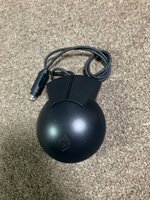
This implements the "standard" ADB secondary mouse button. Classic MacOS usually ignores the 2nd button signals, you need a 3rd party utility like TheMouse or Kensington MouseWorks to map it to something.
Beware, some 2button ADB mice do silly things... Like hardwire the 2nd button to a ClickLock function.
Apparently the Macally 2 button ADB mice use a proprietary protocol which needs it's own driver. Why? I dunno. Macally Moment!
Anyways, it arrived without issue
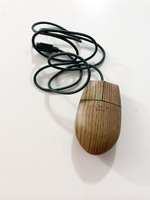
I plugged it into my SuperMac S900 and tried it out. Seemed to work fine without the 2nd button addons.
Installed TheMouse2B and rebooted... and Immediately started running into problems:
The context menu would open, but I couldn't close it. Neither button seemed to work.
Annoying. I disabled TheMouse and installed Kensington MouseWorks...
...Which caused the main mouse button to register as clicked.
If a dialog appeared at boot, the OK button would appear as held down. If it did make it to the desktop, the menus would be held down.
Concerning. This was only happening with the Sanwa mouse plugged in...
So, it's time to do some online research.
It seems that @Dandu has the same mouse. He has tested it out and provided this information:
Je parle français un petit peu.. by which I mean I usually run things through translating tools.
This tells us a few things:
Time to crack this silly thing open!
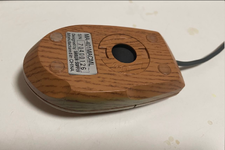
*You gotta peel the bottom sticker off. Use a plastic scraper or something idk. There's a single Phillips screw under the sticker
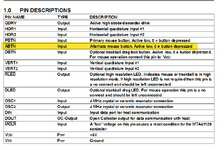
Inside, we find the ADB Mouse Controller IC
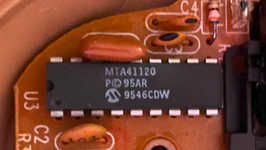
Conveniently, the datasheet is available online
Reading through the datasheet we find that the controller does support a 2nd (alternate) button, "ABTN".
It also has provision for a Drag Lock button which would act like a primary button held down.
Note that it specifies "For mouse operation connect this pin to V DD" by which it means "if you don't use it hook the pin to +5V"... this will be important later.
Flip the board upside down and we find this:
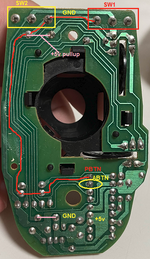
We can see two things:
The datasheet states:
So, if the ABTN pin is connected to nothing... it won't be pulled high.. the IC reads the ABTN pin as being low, and activates the 2nd button signal.
This mouse PCB is designed in a way that causes the mouse controller to continuously send "button 2 pressed" commands to the computer.
Without extra inits/cdevs it will work fine on a normal Mac, but if you install multi button support add-ons... they'll read the commands and make things unuseable.
This would likely make an ADB NeXT go nuts as well.
So to recap. This mouse is wired incorrectly for both single button and 2 button operation. Literally Defective By Design.
Time for surgery:
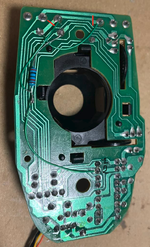
I made two incisions to separate the two buttons, patched the primary button to the +5v pullup/PBTN line.
Then I soldered the second button to a second +5V pullup (20K), and then jumpered that to the ABTN pin.
A bit messy. That's alright, it beeps out fine.
And sure enough... It works perfectly! No phantom presses, primary and secondary clicks work perfectly!
Cleaned up the solder job... And now we're done.
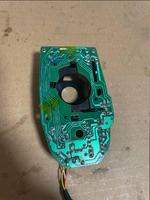
A perfectly working standard ADB 2-button mouse. Now I can open context menus with one hand! Excellent.
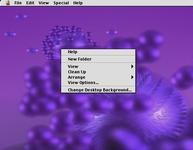
disclaimer: this is an artist's impression. the screenshot I took did not capture the context menu so I improvised.
To the Sanwa/Sanwa OEM designers. What's wrong with you? Why would you do this? I hope you stub your toe and crack the nail.
And if you have one of these silly things... Fix it!
Also if you have a 2button mouse where the 2nd button is hardcoded to drag lock.. You can probably fix that to work as a proper 2nd button.
Now I'm wondering if the single button Sanwa mice are also wired in this stupid way. Do you have one? Let me know in the comments below
Don't forgot to LIKE, COMMENT, AND FOLLOW for more EXCELLENT POSTS
simply hover over my username and click the FOLLOW button
I'd been looking for a nice 2-button ADB mouse for a while... so why not this one? It has a rather attractive look.
Yes, 2-button ADB mice do exist. The most common one is probably the NeXT ADB mouse:
This implements the "standard" ADB secondary mouse button. Classic MacOS usually ignores the 2nd button signals, you need a 3rd party utility like TheMouse or Kensington MouseWorks to map it to something.
Beware, some 2button ADB mice do silly things... Like hardwire the 2nd button to a ClickLock function.
Apparently the Macally 2 button ADB mice use a proprietary protocol which needs it's own driver. Why? I dunno. Macally Moment!
Anyways, it arrived without issue
I plugged it into my SuperMac S900 and tried it out. Seemed to work fine without the 2nd button addons.
Installed TheMouse2B and rebooted... and Immediately started running into problems:
The context menu would open, but I couldn't close it. Neither button seemed to work.
Annoying. I disabled TheMouse and installed Kensington MouseWorks...
...Which caused the main mouse button to register as clicked.
If a dialog appeared at boot, the OK button would appear as held down. If it did make it to the desktop, the menus would be held down.
Concerning. This was only happening with the Sanwa mouse plugged in...
So, it's time to do some online research.
It seems that @Dandu has the same mouse. He has tested it out and provided this information:
Je parle français un petit peu.. by which I mean I usually run things through translating tools.
On a modern Mac, it has a confusing behavior: it blocks other mice. The secondary click becomes impossible on other devices. I checked with software that can read HID commands, and there is nothing special. I assume that the mouse sends the command for the second button somehow and blocks it. Also, if it does have two buttons, the second one is useless. It does not activate a secondary click like the NeXT mouse or a forced primary click like most other mice. My test programs all indicate that the mouse just sends a primary click command with both buttons, which is completely useless.
This tells us a few things:
- The designer of this mouse is Brain Damaged. Why the hell would you sell a 2 button ADB mouse where both buttons are the primary mouse button? Even worse, Sanwa sold a single button version of this mouse!!! Why the hell did they make a 2button variant where both buttons are the 1st button? Are they stupid?
- Something is screwy with the way they wired things up
Time to crack this silly thing open!
*You gotta peel the bottom sticker off. Use a plastic scraper or something idk. There's a single Phillips screw under the sticker
Inside, we find the ADB Mouse Controller IC
Conveniently, the datasheet is available online
Reading through the datasheet we find that the controller does support a 2nd (alternate) button, "ABTN".
It also has provision for a Drag Lock button which would act like a primary button held down.
Note that it specifies "For mouse operation connect this pin to V DD" by which it means "if you don't use it hook the pin to +5V"... this will be important later.
Flip the board upside down and we find this:
We can see two things:
- Both buttons are wired together. Brilliant
- The ABTN is not connected to anything at all.
The datasheet states:
Code:
The MTA41120 push-button inputs are defined to be

active when the input pin is in the low state. The

appropriate message data bit will be set equal to one

when a low is sampled at a switch input. When a switch

input is sampled in the high state the appropriate

message data bit will be set equal to zero.
So, if the ABTN pin is connected to nothing... it won't be pulled high.. the IC reads the ABTN pin as being low, and activates the 2nd button signal.
This mouse PCB is designed in a way that causes the mouse controller to continuously send "button 2 pressed" commands to the computer.
Without extra inits/cdevs it will work fine on a normal Mac, but if you install multi button support add-ons... they'll read the commands and make things unuseable.
This would likely make an ADB NeXT go nuts as well.
So to recap. This mouse is wired incorrectly for both single button and 2 button operation. Literally Defective By Design.
Time for surgery:
I made two incisions to separate the two buttons, patched the primary button to the +5v pullup/PBTN line.
Then I soldered the second button to a second +5V pullup (20K), and then jumpered that to the ABTN pin.
A bit messy. That's alright, it beeps out fine.
And sure enough... It works perfectly! No phantom presses, primary and secondary clicks work perfectly!
Cleaned up the solder job... And now we're done.
A perfectly working standard ADB 2-button mouse. Now I can open context menus with one hand! Excellent.
disclaimer: this is an artist's impression. the screenshot I took did not capture the context menu so I improvised.
To the Sanwa/Sanwa OEM designers. What's wrong with you? Why would you do this? I hope you stub your toe and crack the nail.
And if you have one of these silly things... Fix it!
Also if you have a 2button mouse where the 2nd button is hardcoded to drag lock.. You can probably fix that to work as a proper 2nd button.
Now I'm wondering if the single button Sanwa mice are also wired in this stupid way. Do you have one? Let me know in the comments below
Don't forgot to LIKE, COMMENT, AND FOLLOW for more EXCELLENT POSTS
simply hover over my username and click the FOLLOW button
Last edited: