• Hello MLAers! We've re-enabled auto-approval for accounts. If you are still waiting on account approval, please check this thread for more information.

Refurbished PowerMac 6500 Acting Up. Did I do it?

xx.gif

USB Drivers for a PCI Card

« on: Yesterday at 10:59:58 PM »


Good afternoon all, I hope you can help me. I recently purchased a 6500/300 at VCF Southwest. The Monday after, I got called into HR and was told I'm being laid off. The PowerMac runs very well but is hard to get files in and out of it. I do have an external BlueSCSI that I can use to move files but I'm still learning so I struggle a bit. Anyway, I spent some money to bring RAM up to 128 MBs, added a 10/100 PCI ethernet card and found the driver for it on line. I also bought a OS9 CD (But it's 9.2.1 so it won't work with my Mac) and a Power Macintosh 6500 Series Macintosh Restore CD. I also just received a GODSHARK Internal USB 2.0 PCI Card from Amazon.
In the Amazon page some buyers indicate they used the Godshark Internal USB 2.0 PCI Card (What a name!) on older classic Macs without issue. Also, there is high praise for it using the NEC chipset. So, now that I have it, I've been trying to find an OS9.1 driver but haven't had had any luck. I ran the 6500 restore disk on my PowerMac but it kept failing with every attempt at installation. I finally reinstalled the Hard Drive drivers and now, I've lost access to my Macintosh HD boot drive. Also, I don't have the 8.1 installation CD (even though OS9.1 is installed and I'm not really sure where to go from here). I do have installation images from BlueSCSI for OS 8.0 to 8.5 but since I've already blown up my first IDE partition, I need to figure out what to do before I do anything else.
So I hope I can be pointed in the right direction to repair my boot HD partition and install a driver for the internal USB card. I should also mention I made a CD-ROM of the universal OS 9.2.2 install disk but, again, the 6500 complains this OS is not for my machine.
I'm feeling a little frustrated but I'm sure somebody can help me fix it. Just to give you some background about me, I own a couple of Apple IIGSes, my first Mac was a G5 iMac, my wife hijacked my early 2013 MBP, I'm writing this on my M1 MBP, I own and repaired my beautiful SE/30, my iMac G3 is dead, I have a couple of LC475s but I've never had such a thing as a PowerMac.

Thank you for your time, assistance and patience,
Gerry
 
Standard 9.2.2 will not work on a 6500. You need the OldWorld version: https://www.macintoshrepository.org/52635-mac-os-9-2-2-for-pre-g3-power-macintoshes

As for rescuing your disk, I would just boot from an 8.6 or 9.1 CD, delete the system folder, and start a new installation. Also, zapping your PRAM might be a good idea before doing anything else in case there’s some setting that’s causing an issue.

In terms of USB support, I never found a card that worked with that board. I think your only safe bet is the Sonnet Tango/Trio, but those are pretty hard to find. Some other cards maighy work, but it’s a long shot. USB drivers were kind of crap before Mac OS X. 9.2.2 may support some cards that previous versions didn’t. I believe the Gazelle boards were particularly crippled and required some firmware updates to work correctly with certain USB cards.
 
Here's what I figured out today. My main issue is the 6500 has limited I/O options with modern Macs. The internal Zip drive is useless if it's the only one. I do own a USB 250 MB Zip drive but the 100 MB Zip can't read it's media. Floppy is out unless I want to move files less than 1.44 MBs in size between it and a PC. The boot drive is an IDE so unless I can put more than one IDE drive on on its buss, I can't boot the 6500. The 6500 does have an ethernet connection that works, but I haven't gotten FTP working yet. Finally, can I boot a 6500 from the external SCSI buss using a BlueSCSI? So, I need to build a boot image, like a OS 8 boot CD-ROM drive for the 6500, perhaps from the restore CD to see if it will boot from the SCSI image.

In an effort to figure out how the 6500 is built, I tore it apart today. Got all the plastic panels off and removed the Zip drive, floppy, CD-ROM and the IDE drive. I had found and old IDE drive yesterday and used it to rebuild a new boot drive without doing any further damage to the original drive. I ended up using an IDE to CF adapter and then a CF to SD converter along with a 128 GB SD card to build a solid state drive and it all worked. And it boots much faster than with a spinning drive. I've ordered a PATA extension cable with two female and one male IDE connectors. I'm going to see if I can add a second IDE slave drive to the IDE bus so I can boot from the SD card master and repair the damaged OS 9.1 boot drive set to slave. I should know by the end of the week. Also, after I built a bootable SD card with the restore CD-ROM, I plugged it into my M1 MBP to see if it could read the partitions. No, that didn't work. Also, I ordered a couple of IDE to SATA adapters as I have a bunch of SATA SSDs and would like to try getting that going too.

I'll keep at it and thanks for the help,
Gerry
 
To update this, I downloaded some 9.1 images but they unzipped to .toast files and simply don't work with BlueSCSI v2 even though the internet says it should. But here's where it got weird. I restored the PM6500 using a restore CD but it comes with 8.1. So I booted off of that and was able to bypass but mount the original IDE drive. I was able to copy everything off of the original 9.1 drive to a 2 GB blank partition in small groups of files and today, to my complete surprise, the PM6500 successfully booted from that blank drive. So, I've been trying to fix the original IDE drive but nothing works. Since my original OS9.1 is now booting from a new partition, I can delete the partitioning and restore the original drive. It will be a little work but nothing too bad. Yeah!

Now, what OS9.1 image should I download to make a new 9.1 boot drive? So far, what I've downloaded from Macintosh Garden doesn't work with the V2 BlueSCSI. Now, I did try to change the .toast files to .iso but that made no difference, so I'm assuming I've got to download a PowerMac (PM) 9.1 installation image to build a new, bootable image. This is CYA on my part in case I'm put into this situation again. So, if you can point me in the right direction, I would appreciate it and thank you for the help.

Still a lot to figure out but it's getting there.

Thank you for your time and help,
Gerry
 
For the sake of testing I burned to a CD the first retail image on the MG 9.1 page and am currently installing on a 6500 from the CD to a CF card. MacOS91CD. I ran md5sum to verify that the zip file was intact, then after extracting I changed the extension from .toast to .iso and burned it with Xfburn on a Fedora 42 machine without mounting or doing anything that might potentially modify it.
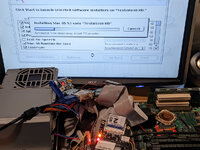
There is a BlueSCSI on the SCSI bus, but without a card installed, this is because apparently today my 6500 has decided it doesn't like the term power jumper on the CD 300i Plus which is sitting under the PSU in the attached picture.

As far as moving files around between new and old systems I have taken to Hotline and have the server program Mobius installed on my NAS. I also have a copy on my main desktop that I can temporarily run on-demand when the NAS is off. Of course that only works for systems which are new enough to run a Hotline Client in the first place, and either come with stuffit expander, or can receive it from a CD or disk image/etc. It works for me with most of the Macs and PCs I tend to use, but certainly does not fit all use-cases. I seem to recall I used to use Pitbull Pro when I was running Windows, if that is useful information to anyone.

PXL_20250724_012308718.jpg
 
I recently restored one of these guys. USB is still a work in progress for me, good luck with your card. The V2 would have scared me away. I used 9.2 to get the extensions I needed, there are a handful of them in the extensions folder all staring with 'USB'. While you are doing it you might as well get the extensions for firewire, same folder starting with 'firewire' and 'quicktime firewire'. I am lucky, had a machine running 9.2 with a CD burner. USB puzzle showing on boot so now I just need the right usb card. Got a G3 waiting for one too. Partitioned the hard drive and am running 8.6 (updated) and 7.6.
 
Okay, an update. I received a copy of the full OS 9.1 installation CD today. I've been waiting for it as I've been having issues with the original 9.1 installation. As I copied files from one drive to others organizing the 6500/300 it would freeze and crash. I originally purchased a 6500 restore disk but the OS was 8.0 and I understood 9.1 was the maximum OS I could install and use on this hardware.

Also, as I've mentioned before, I've added an ethernet and USB PCI cards to access my local network and give me access to a more modern I/F. Installed the ethernet driver so that card is available. In my research of the USB PCI card, I had read that the USB driver was in the OS installation so I needed the hardware installed before installing the OS.

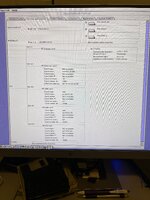
So, my question is, the USB PCI card installed in OS 9.1? I've included a picture of the Apple System Profiler devices and volumes. I see a USB card in slot b1 but a USB mouse doesn't work, and I plugged in some Thumbdrives and I checked Drive Setup but the USB Thumb drives are not listed. How do I read and format a Thumbdrive?

Thank you,
Gerry
 

Attachments

  • IMG_3550.jpeg
    IMG_3550.jpeg
    1.7 MB · Views: 13
Also, this reinstalling the OS has brought up another issue. I have connected an internal BlueSCSI in place of the 100 MB Zip and installed OS 9.1 on an SD card using an IDE to SD card adapter (no spinning rust). My question here is who has boot priority within the 6500? When a valid OS is in the BlueSCSI and have the new OS install connected to the IDE, the 6500 boots the SCSI image first. But, if I leave the SCSI SD card out, eventually the IDE OS boots and if I catch it just right, I can also mount the SCSI drive images after it starts booting from IDE. Wait too long and SCSI images don't mount. Plug-in the SCSI image too early in the boot cycle and the SCSI drive will boot first.

How does the hardware prioritize boot drives between the SCSI and IDE busses?

Thank you,
Gerry
 
Here's what I found but I don't know if it's right......

Setting boot priority on a PowerMac 6500/300 with IDE and SCSI drives

Unlike modern PCs with a BIOS, Power Macs (like your 6500/300) utilize the Open Firmware, which doesn't have a traditional BIOS menu for setting boot device order. The boot priority is determined by the order in which the Mac recognizes devices on the busses, with a "blessed" System Folder determining the default boot disk.
Here's a breakdown of how it works and how you can influence the boot priority:
1. Initial boot scan
  • The Mac's ROM scans the local busses for devices, including floppy, SCSI, and IDE.
  • It then searches for a "blessed" System Folder on any detected bootable volume (hard drive or partition).
  • If only one System Folder is found, it's automatically blessed.
  • If multiple System Folders exist, the last one accessed becomes the blessed (bootable) System Folder.
2. Setting boot order with the Startup Disk control panel (Mac OS 9 and earlier)
  • You can set the default boot disk by navigating to the Startup Disk control panel within Mac OS 9 (or earlier versions).
  • Select the desired System Folder on the IDE or SCSI drive as the startup disk.
  • Click Restart to apply the change.
3. Temporary boot selection with the Option key
  • If you have bootable System Folders on both your IDE and SCSI drives, you can temporarily override the default by holding down the Option (⌥) key immediately after the startup chime sounds.
  • This brings up the Startup Manager, displaying icons for all detected bootable volumes.
  • Select the desired boot drive (IDE or SCSI) and press Return.
 
You can also force it to boot from a specific SCSI ID by holding down command + option + shift + backspace + [id] at startup, this was really useful for me when I copied the wrong OS on the IDE drive. It would detect the valid OS and boot from the IDE drive, but then it would just give a warning that the OS was too old and ask me to restart - even though there were valid SCSI options, it would always go to the IDE drive.
 
Hi, you all, I've got a bit to report. After figuring out the boot sequence on the PM6500, I started working on installing 9.2.2 over 9.1. OS 9.1 has some very specific issues with Keychain. As background, I moved the LC475 and SE/30 over to ethernet. The LC475 has a card installed and the SE/30 is connected to an Asante EN/SE and connected to its external SCSI bus. Much faster than using a bridge/serial port solution.

My problem is if I have already booted the SE/30 and LC475 first, when the PW6500 boots and requests login for file sharing, it complains that my password is wrong (it's not) and the LC475 and SE/30 try about 20 times to log into the PW6500 unsuccessfully before skipping the login and finishing its boot. When I get to the decktop, I am logged into the Keychain and I can complete the login for file sharing on the SE/30 and LC475.

If I boot the PW6500 completely first, I log into Keychain without issue and then boot up the LC475 and SE/30 and they both login in without any issues. That's fine but if I need to reboot the PW6500, I'm back in the first scenario with Keychain acting weird. The PW6500 is running 9.1, and both the LC475 and SE/30 are running OS 7.6.1.

So, I got OS9 Helper to update 9.2.1 but when I tried to run it, it stops the installation with a 'system error "Installer Engine" error type 10' and my only choice is to restart. So, I can't update as it fails even though the PW6500 is identified as yes, it can be upgraded. Today, I found the reference to "52635-mac-os-9-2-2-for-pre-g3-power-macintoshes" above from ObeyDaleks and I've downloaded the new System file. We will see.

As a side note, my SIIG USB 1.1 PCI adapter that I bought off eBay works fine with 9.1 in the PW6500. There are a list of 9.1 USB drivers that are installed if a USB PCI card is plugged in when installing 9.1. I have a USB Mouse and a 64GB thumbdrive plugged in and the OS sees it. The problem now is the Mac-formatted thumbdrive can't be read by my M1 MBP. Oh for crying out loud, what do I do now? Run it through Basilisk? I'm going to use FTP.

Gerry
 
Back
Top