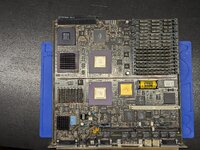
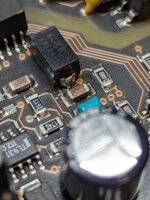
I need your experienced advice.
Some background: I have recapped about half a dozen Macintosh logic boards, never with a single issue. I don't have a desoldering gun, but I will typically just use flux and solder wick to draw out the solder from under the SMD electrolytics. Always has been fine.
I started working on my NeXT Cube that I have had for 30+ years. Although I don't see any sign of leakage from the SMD caps, I figured it is time to replace with tantalum. I set my iron to 330C added a little flux gel, grabbed the wick, and added heat. As I did these alternately to each side, the traces and pads around the capacitor lifted right from the board.
I used silver conductive paste to glue the pads and a tantalum cap to the pcb as well as hold the traces down. The board is working fine and I tested everything around that cap, but I stopped there. I don't want to go through this with every cap.
Any suggestions on how to do the rest of the caps? I have never seen traces (let alone pads) just separate from the board like that. I know a pad could separate with force, but this was not (IMO) excessive heat. A heat gun would probably be worse since you can't concentrate on one spot, I would think many more traces will lift off (also, some of the caps are in REALLY tight spaces with chips and traces all around them).
Anyone have experience with NeXT boards? Is there something about their manufacture that traces act like stickers on the PCB?
Thanks!
Some background: I have recapped about half a dozen Macintosh logic boards, never with a single issue. I don't have a desoldering gun, but I will typically just use flux and solder wick to draw out the solder from under the SMD electrolytics. Always has been fine.
I started working on my NeXT Cube that I have had for 30+ years. Although I don't see any sign of leakage from the SMD caps, I figured it is time to replace with tantalum. I set my iron to 330C added a little flux gel, grabbed the wick, and added heat. As I did these alternately to each side, the traces and pads around the capacitor lifted right from the board.
I used silver conductive paste to glue the pads and a tantalum cap to the pcb as well as hold the traces down. The board is working fine and I tested everything around that cap, but I stopped there. I don't want to go through this with every cap.
Any suggestions on how to do the rest of the caps? I have never seen traces (let alone pads) just separate from the board like that. I know a pad could separate with force, but this was not (IMO) excessive heat. A heat gun would probably be worse since you can't concentrate on one spot, I would think many more traces will lift off (also, some of the caps are in REALLY tight spaces with chips and traces all around them).
Anyone have experience with NeXT boards? Is there something about their manufacture that traces act like stickers on the PCB?
Thanks!