



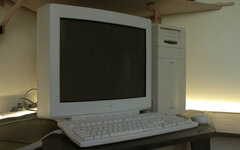
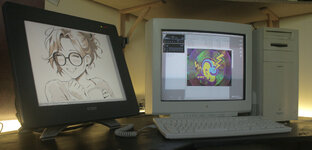
Back in 1999, I bought a second hand Power Mac 9500 from a graphics designer, in order to start learning graphics design myself. This computer came with 2 graphics cards and 2 displays; an Apple Multiple Scan 14" with integrated speakers and a beautiful Apple Multiple Scan 20".
I loved this setup so much, I tried my best to keep it since all those years. It has not always been easy. The 20" display is so heavy and the plastic becoming brittle, pieces have been broken several times while moving it. Room was missing and it has been difficult to find a safe and dry place to store it. The result is that the state of that monitor kept degrading until one point were I tried to convince myself to bring it to recycling.
This display has a strong sentimental value to me, it was a dream comes true when I got it, so I kept it anyway. Now with some inspiration from @jmacz 's amazing repairs, along with some great help from @TekTherapy , I decided to give it a try at fixing it. I also made some room on my desk for it to go back next to the 9500.
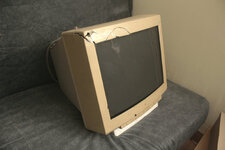
Here is the display after taking it out of my garage:
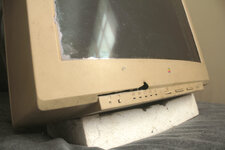
The first task was to fix that front bezel. The back cover is actually intact.
I have disassembled the plastics and give them a good clean under the sun of my garden.
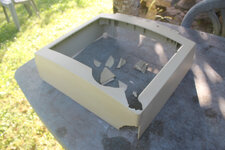
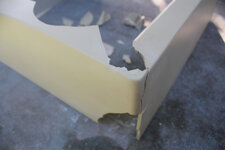
I kept the big broken plastics pieces together with some tape in the hope of gluing them back together one day. Some were broken since 2 decades.
The second step was to glue everything back together. I used some regular super-glue for that matter and it did the trick.
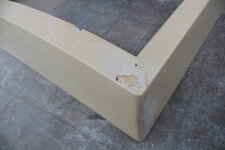
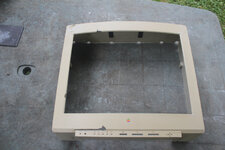
The bezel was already looking a lot better! Even the sun made it look clearer, but that doesn't matter because I planned to paint it.
Next, I applied some filler, which is actually made for car body. It worked well and was easy to sand.
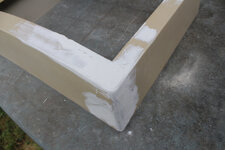
Next. I sanded everything, then re-applied some filler where it was not perfect, then, re-sanding again. This took me several passes.
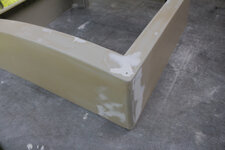
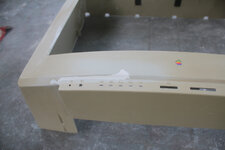
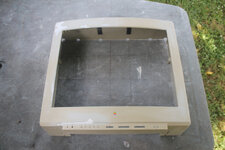
At this stage, the bezel was feeling very smooth when touching with the hand so I thought it was a good time to paint it.
For the paint, I went o my local DIY shop and was lucky enough to find some paint with a color that is very close to the original Platinum gray color. I use the metal cover of my 9500 as a reference. This cover was painted and the color has not yellowed with time.
Here is the final result:
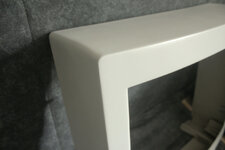
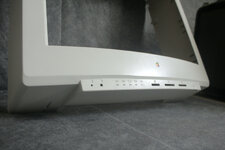
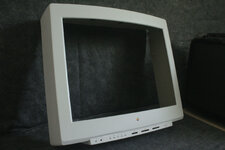
There are still a few glitches and it was pretty difficult to get the original grain on the sanded parts but I got quite close and I am pretty happy with the look and feel.
The bottom part is not perfect either and I guess this is because I was worried to damage the small engraved icons under the broken area. Therefore, I didn't apply the filler very low and it's not completely aligned. That said, It is not too visible and I am so happy with the result!
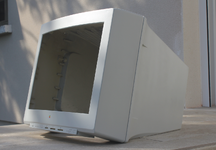
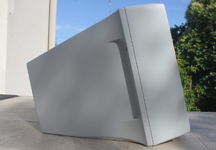
Next will be about painting the back cover. It was clearer than the front bezel at first but now it is a lot more yellow!
I loved this setup so much, I tried my best to keep it since all those years. It has not always been easy. The 20" display is so heavy and the plastic becoming brittle, pieces have been broken several times while moving it. Room was missing and it has been difficult to find a safe and dry place to store it. The result is that the state of that monitor kept degrading until one point were I tried to convince myself to bring it to recycling.
This display has a strong sentimental value to me, it was a dream comes true when I got it, so I kept it anyway. Now with some inspiration from @jmacz 's amazing repairs, along with some great help from @TekTherapy , I decided to give it a try at fixing it. I also made some room on my desk for it to go back next to the 9500.
Here is the display after taking it out of my garage:
The first task was to fix that front bezel. The back cover is actually intact.
I have disassembled the plastics and give them a good clean under the sun of my garden.
I kept the big broken plastics pieces together with some tape in the hope of gluing them back together one day. Some were broken since 2 decades.
The second step was to glue everything back together. I used some regular super-glue for that matter and it did the trick.
The bezel was already looking a lot better! Even the sun made it look clearer, but that doesn't matter because I planned to paint it.
Next, I applied some filler, which is actually made for car body. It worked well and was easy to sand.
Next. I sanded everything, then re-applied some filler where it was not perfect, then, re-sanding again. This took me several passes.
At this stage, the bezel was feeling very smooth when touching with the hand so I thought it was a good time to paint it.
For the paint, I went o my local DIY shop and was lucky enough to find some paint with a color that is very close to the original Platinum gray color. I use the metal cover of my 9500 as a reference. This cover was painted and the color has not yellowed with time.
Here is the final result:
There are still a few glitches and it was pretty difficult to get the original grain on the sanded parts but I got quite close and I am pretty happy with the look and feel.
The bottom part is not perfect either and I guess this is because I was worried to damage the small engraved icons under the broken area. Therefore, I didn't apply the filler very low and it's not completely aligned. That said, It is not too visible and I am so happy with the result!
Next will be about painting the back cover. It was clearer than the front bezel at first but now it is a lot more yellow!




 Awesome result!!


 , but it is a lot harder to find.


