• Hello MLAers! We've re-enabled auto-approval for accounts. If you are still waiting on account approval, please check this thread for more information.

RasterOps Colorboard 264/SE30

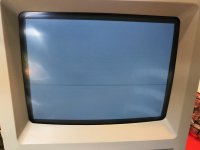
Wow, there's 3 ROMs out there spanning 2 years! Thanks for offering to build a schematic, that'd be much appreciated. Before you do that tho, I did plug it in and fire it up today and got this blank image - no mouse cursor, and squared edges. Basically #9 on this list: http://www.biwa.ne.jp/~shamada/fullmac/repairEng.html 

The SE/30 I use is fine and works with other cards, so I'm not sure if I just have a dead board, no drivers, or something else. I booted without any particular software (just a 7.1 copy via dougg3/bbraun's rom). Obviously I couldn't boot into TattleTech to see if its there. Any ideas?

 
Nickpunt, fixed your link for you http://www.biwa.ne.jp/~shamada/fullmac/repairEng.html#NoPointer

(forgot to add this earlier):

Blank screen, no mouse cursor, and rounded edges (on the internal CRT) means that it thinks you have a second monitor attached to the card and it thinks that is your primary monitor. Based on that, I think your next troubleshooting step should be to build an adaptor.

 
Last edited by a moderator:
Weird, for some reason it attached an extra character when I pasted the link. Thanks for fixing.

The issue I'm having is that the edges are square, not rounded. Attached is photo. 

I don't have a working IIsi to try this on unfortunately. I think the issue might be that some traces on the board are scratched. 

IMG_7219.jpg

 
I was never trying to suggest that your corners were rounded, I was simply stating that if you have the symptoms I stated above, it is treating your SE/30 internal CRT as a second monitor.  However, since your edges are squared, you have a serious problem. If you feel like you want someone to TattleTech your video card, I could pop it into my SE/30.

 
Last edited by a moderator:
Ah thanks a lot for the offer! Its not that big of a deal to me at the moment, probably something to address again when Trash finishes his awesome adapter or I get a bit more free time. Good to know there's more info about this board though!

 
jt,

Can you look into your manual on how to change PZE functions? I found an old System 6 compatible version of the RasterOps software, as that's all I can boot right now. TattleTech says the CDEV is loaded, however there is nothing visible in the Control Panels window. Is there a special key combination I have to press for the settings to pop up? Thanks!

Wow, used up my 100th post on this!

 
Last edited by a moderator:
to access the pze settings:

1 choose the control panel desk accessory from the apple menu

2 click once on the monitors cdev. the monitors control panel appears.

3 to bring up the pan/zoom window, do either of the two following a) click the "options" button in the monitors control panel. b/ double click the gray rectangle that corresponds to the CB364 card and monitor.

Can't do any more tonight, my eyes are no longer tracking together. :blink:

 
Last edited by a moderator:
Thanks! :b&w: I tried those steps first before posting, tried them again after you posted. It opens up the extra settings menu, and shows the title of the card, as well as the RasterOps logo too, but no PZE options. 

I hate it when one eye is out of focus with the other, makes it impossible to see.

 
Last edited by a moderator:
The title of the card and the RasterOps logo come from DeclROM. I don't know why it isn't working, but I'm not too interested in putting more effort into making it work with System 6. I'm more interested in putting effort to get System 7 to boot. So far no version of 7 has been able to boot on this-- I blame bad caps, and the board needing a washing too. We will see...

 
Last edited by a moderator:
Revision A of the pinout schematic is now available! Now, I think there are probably some minor details to work out, so a revision B will probably be issued soon, but this should build you a workable adaptor! Hopefully this helps everyone. Thanks!

Rops-264SE30-pinout-revA.pdf

It is also available from my website as well: http://themarshallk.com/rops-264SE30-pinout.pdf


Attachments

Last edited by a moderator:
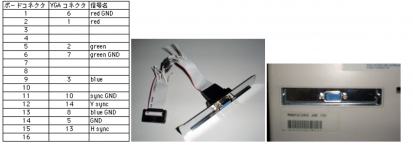
Small update on this from my notes that I just discovered. There was a japanese site that detailed making a connector for the Interware Vimage SE/30 video card using a typical VGA cable adapter from a PC. Attached is what I saved. The site is now offline and not on internet archive.

Thought this might be useful for some future persons interest. The columns read 'Board connector', 'VGA connector' and 'Signal Name' (信号名).

Screen Shot 2017-03-29 at 4.08.21 PM.png

 
Last edited by a moderator:
Thank you for making this avaliable! We need to save all the pinouts we can, they will be useful for someone in the future...

 
Interesting, it looks like it replaces the AUI port(?) with a DA-15 connector for a monitor! Based on looking at the diagram, it looks like it could be used with other video cards too.

 
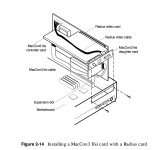
I have this setup in my IIsi using the SuperMac Spectrum and FriendlyNet IIsi option as described on page 2-14. Side note, you MUST use the FriendlyNet transceiver. Apple or Farallon transceivers will not work.

 
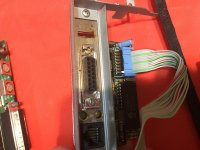
Oblique view of setup:

953c72c38d3a8ca3254fa44fc0348860.jpg

The AUI section is easily removed and the ribbon cable then is moved to the DIP header interboard connection. Dunno if you think of it as an AUI card with a 10BASE2/10bT transceiver daughtercard for the ThickNet section or a ThickNet passthru board option for the transceiver board, but it works wonderfully.

If you're building your own cable, implement the VGA conversion in the cable. If you want the option to change settings you can build it straight through for use with an adapter. Depending on clearances for individual VGA adapters and configuration of the VGA end of the adapter, you could mount the converter to the backside of the plate to house it inside the case as a space saving feature.

There are two types of Asante NICs. The newer version has 10BASE2 BNC connector/10bT RJ-45 connector combo board shown with removable 10BASE5 DA-15 connector section. The older version has only BNC and DA-15 connectors integrated in a much larger single PCB. If you use a ThinNet transceiver on the BNC connector with that version it's also possible to do this with some reversible hacking if you're not averse to desoldering the ThickNet connector for storage.

I've got connectors figured out for building cables for the shrouded header equipped Radius cards, just need the pinouts for the 12 pin Grayscale Pivot and the 10 pin FPDSE30 cables before I do a writeup.

edit: the connector and cable actually route underneath the NIC, Asante showed it running over the top for "clarity."

 
Last edited by a moderator:
Just checked last night and there's a third type of the Asante NIC with 10bT and a soldered-on 10BASE5 DA-15 (unfortunately). 

Agree that ideally these have VGA out instead of dealing with DB15. Or better yet, drop a VGA-HDMI converter inside :D  

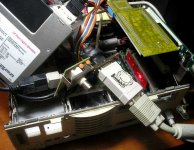
IMG_7479.JPG

IMG_7480.JPG

 
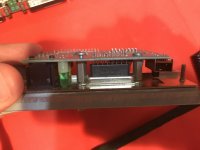
Same setup, that's a very deep soldertail DA-15 connector. If it's desoldered and removed from that cubic there are several DA-15 connector options available to use within that vacated space to hook up an external VGA adapter.

Using a PC backplane plate donor, it should be easy enough to just drill the third hole and trim to fit as a DA-15->HD-15 adapter plate for the larger DA-15 opening in the Asante breakout card's sheet metal. Wiring directly to any of the same connector types in HD-15 will let you do your VGA conversion "in house." HD-15 soldertail connectors are very easily sourced

 
Last edited by a moderator:
Back
Top