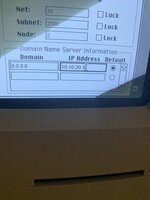
I'm lost on setting up my RaSCSI. I have the daynaport software installed, but I can't figure out how to set up the connection in MacTCP control panel. Does anyone know how to do this?
This threw me for a loop when I first tried to set it up also! The instructions I wound up following are as follows:
On the Mac side, in the TCP/IP or MacTCP control panel choose Manual and input:
IP address 10.10.20.2
Network mask 255.255.255.0
Router 10.10.20.1
Name server can be any DNS server; Google's Public DNS servers work well for this purpose
I'm at work right now, so I can't check easily, but as I recall, I think I put 8.8.8.8 in the IP address field for the DNS, and left the domain blank. I believe this tells MacTCP to use 8.8.8.8 for all DNS lookups. I could be wrong though? Any MacTCP experts want to chime in here?
I'm at work right now, so I can't check easily, but as I recall, I think I put 8.8.8.8 in the IP address field for the DNS, and left the domain blank. I believe this tells MacTCP to use 8.8.8.8 for all DNS lookups. I could be wrong though? Any MacTCP experts want to chime in here?
This site uses cookies to help personalise content, tailor your experience and to keep you logged in if you register.
By continuing to use this site, you are consenting to our use of cookies.