• Hello MLAers! We've re-enabled auto-approval for accounts. If you are still waiting on account approval, please check this thread for more information.

raging curiosity with PSX/powermac 6400 memory (and struggle with tracking down DIMMs)

hello, i'm rather curious about your all's experience with 168pin EDO DIMMs, and what upgrades people have made to the RAM in the powermac 6400. i would love to get 264MB of RAM (2x 128MB plus the 8mb onboard). apparently the 6400 supports 1k or 2k refresh, and the service manual specifically says not to use 4k refresh. now i'm curious about what the PSX memory controller is *really* capable of, especially considering i found a post on applefritter that had a reply of someone saying they had 264 in both their 6400 and 6500 (256). (https://www.applefritter.com/comment/29251)

you'll see a 'macg4' has two of these machines with more than the maximum amount of RAM thats widely documented. also, the page for the performa 6360, for whatever reason, mentions having a max capacity of 264MB (and the 6360 is the same as the 6400, technically). yes, i shouldn't believe everything i see on the internet, but it got me thinking about pushing the limits of these nifty systems. we already got the bus overclocked in a stable fashion and such, which is amazing... what really interests me is how far we can go. has anyone ever bothered testing 128MB EDO DIMMs in these systems? and i did see people on tinkerdifferent found 3.3v DIMMs that were also 5V tolerant, which interests me. mainly the reason why i made this thread is because i have been doom-scrolling eBay for a better deal on the best memory for my 6400, especially considering the systems memory at the moment is having corruption issues.
 
Recalling trying a single 128MB stick in a 5400 and also TAM, didn't like it, 2 x 64MB was the max
 
I put a pair of these in my 5400: https://www.ebay.com/itm/174327966152

Kinda boring, I guess, but they just work.
submitted a $20 each offer for two DIMMs (total $40 before tax) and now i await the response. not the prices i wish for but better than $60 or something. i need new RAM in this machine.
Recalling trying a single 128MB stick in a 5400 and also TAM, didn't like it, 2 x 64MB was the max
do you have the exact model number of the stick used? couldve been 4k/8k refresh but i'm not so sure 128MB DIMMs exist with 2K refresh.
 
As far as I can tell, the Power Mac 6500 limit is 160 MiB, according to the DingusPPC emulator.
The PSX has 5 mapping registers x 8 maps per register x 4 MiB per map = 160 MiB

Each map can point to 1 of 5 banks but I think only 4 banks are wired on a real Power Mac 6500 which would limit the RAM to 128 MiB.

I guess a 64 MiB DIMM counts as two banks.

Would be interesting to see what banks are wired. Someone with a Power Mac 6500 could go into Open Firmware and dump the PSX registers to find out.
Code:
f8000000 100 dump
 
ahhh, i see. yes that would make more sense. and there is of course the onboard memory on the 6400, which is only 8MB. now i am curious about upgrading that to something larger... hehe
 
Would be interesting to see what banks are wired. Someone with a Power Mac 6500 could go into Open Firmware and dump the PSX registers to find out.
Code:
f8000000 100 dump
Code:
3 > f8000000 100 dump
F8000000: 10 00 00 00 4B FF FD FD 10 00 00 00 4B FF FD FD :....K.......K...:
F8000010: 04 10 13 33 4B FF FD FD 00 00 03 45 4B FF FD FD :...3K......EK...:
F8000020: 00 91 42 22 4B FF FD FD 00 1F 03 00 4B FF FD FD :..B"K.......K...:
F8000030: 00 00 00 46 4B FF FD FD 00 00 00 00 4B FF FD FD :...FK.......K...:
F8000040: 11 11 11 00 4B FF FD FD 22 22 22 11 4B FF FD FD :....K...""".K...:
F8000050: 33 33 33 22 4B FF FD FD 44 44 44 33 4B FF FD FD :333"K...DDD3K...:
F8000060: 00 00 00 44 4B FF FD FD 00 00 00 FF 4B FF FD FD :...DK.......K...:
F8000070: 00 00 00 3F 4B FF FD FD 00 00 00 00 4B FF FD FD :...?K.......K...:
F8000080: 10 00 00 00 4B FF FD FD 10 00 00 00 4B FF FD FD :....K.......K...:
F8000090: 04 10 13 33 4B FF FD FD 00 00 03 45 4B FF FD FD :...3K......EK...:
F80000A0: 00 91 42 22 4B FF FD FD 00 1F 03 00 4B FF FD FD :..B"K.......K...:
F80000B0: 00 00 00 46 4B FF FD FD 00 00 00 00 4B FF FD FD :...FK.......K...:
F80000C0: 11 11 11 00 4B FF FD FD 22 22 22 11 4B FF FD FD :....K...""".K...:
F80000D0: 33 33 33 22 4B FF FD FD 44 44 44 33 4B FF FD FD :333"K...DDD3K...:
F80000E0: 00 00 00 44 4B FF FD FD 00 00 00 FF 4B FF FD FD :...DK.......K...:
F80000F0: 00 00 00 3F 4B FF FD FD 00 00 00 00 4B FF FD FD :...?K.......K...: ok
3 >

This is pulled from my 6500/225 which these days runs with a pair of 64MB sticks and 8MB soldered to the underside of the board.
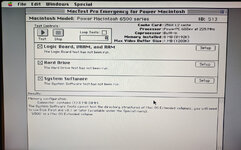
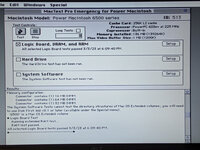
Interestingly, once the 8MB was soldered it can't detect the correct quantities in each slot anymore, but does count the total correctly and will boot off the onboard 8MB alone if you have a very very stripped down boot disk. Though none of that is likely related to what you were looking for.

If you need any more info let me know, but no promises as my setup is very finnicky about going into OF. Probably something to do with the Wombat? IDK, I don't have an Apple keyboard anymore and it's always a hassle.
 
Code:
3 > f8000000 100 dump
F8000000: 10 00 00 00 4B FF FD FD 10 00 00 00 4B FF FD FD :....K.......K...:
F8000010: 04 10 13 33 4B FF FD FD 00 00 03 45 4B FF FD FD :...3K......EK...:
F8000020: 00 91 42 22 4B FF FD FD 00 1F 03 00 4B FF FD FD :..B"K.......K...:
F8000030: 00 00 00 46 4B FF FD FD 00 00 00 00 4B FF FD FD :...FK.......K...:
F8000040: 11 11 11 00 4B FF FD FD 22 22 22 11 4B FF FD FD :....K...""".K...:
F8000050: 33 33 33 22 4B FF FD FD 44 44 44 33 4B FF FD FD :333"K...DDD3K...:
F8000060: 00 00 00 44 4B FF FD FD 00 00 00 FF 4B FF FD FD :...DK.......K...:
F8000070: 00 00 00 3F 4B FF FD FD 00 00 00 00 4B FF FD FD :...?K.......K...:
F8000080: 10 00 00 00 4B FF FD FD 10 00 00 00 4B FF FD FD :....K.......K...:
F8000090: 04 10 13 33 4B FF FD FD 00 00 03 45 4B FF FD FD :...3K......EK...:
F80000A0: 00 91 42 22 4B FF FD FD 00 1F 03 00 4B FF FD FD :..B"K.......K...:
F80000B0: 00 00 00 46 4B FF FD FD 00 00 00 00 4B FF FD FD :...FK.......K...:
F80000C0: 11 11 11 00 4B FF FD FD 22 22 22 11 4B FF FD FD :....K...""".K...:
F80000D0: 33 33 33 22 4B FF FD FD 44 44 44 33 4B FF FD FD :333"K...DDD3K...:
F80000E0: 00 00 00 44 4B FF FD FD 00 00 00 FF 4B FF FD FD :...DK.......K...:
F80000F0: 00 00 00 3F 4B FF FD FD 00 00 00 00 4B FF FD FD :...?K.......K...: ok
3 >

This is pulled from my 6500/225 which these days runs with a pair of 64MB sticks and 8MB soldered to the underside of the board.
Interestingly, once the 8MB was soldered it can't detect the correct quantities in each slot anymore, but does count the total correctly and will boot off the onboard 8MB alone if you have a very very stripped down boot disk. Though none of that is likely related to what you were looking for.

If you need any more info let me know, but no promises as my setup is very finnicky about going into OF. Probably something to do with the Wombat? IDK, I don't have an Apple keyboard anymore and it's always a hassle.

Ok, looks like 16 registers, repeating, 32 bits each, 8 byte aligned.
Code:
F8000000: 10 00 00 00 Sys_Id         
F8000008: 10 00 00 00 Revision       
F8000010: 04 10 13 33 Sys_Config     
F8000018: 00 00 03 45 ROM_Config     
F8000020: 00 91 42 22 DRAM_Config    
F8000028: 00 1F 03 00 DRAM_Refresh   
F8000030: 00 00 00 46 Flash_Config   
F8000038: 00 00 00 00 
F8000040: 11 11 11 00 Page_Mappings_1
F8000048: 22 22 22 11 Page_Mappings_2
F8000050: 33 33 33 22 Page_Mappings_3
F8000058: 44 44 44 33 Page_Mappings_4
F8000060: 00 00 00 44 Page_Mappings_5
F8000068: 00 00 00 FF Bus_Timeout    
F8000070: 00 00 00 3F 
F8000078: 00 00 00 00

The mappings (one 4 bit bank number per 4 MiB page) look like this:
08 MiB from bank 0. (F8000040)
32 MiB from bank 1. (F8000040 .. F8000048)
32 MiB from bank 2. (F8000048 .. F8000050)
32 MiB from bank 3. (F8000050 .. F8000058)
32 MiB from bank 4. (F8000058 .. F8000060)

bank 0 is probably the soldered RAM. If you had different sized DIMMs or removed one, then we could maybe tell which banks (1,2,3,4) are for which DIMM slot.

I think the PSX startup code writes 8 for unused mappings but it looks like the 4th bit of each map always reads as 0. (F8000060)

The DingusPPC emulator allows bank 0 to be a full 32 MiB to get 160 MiB total:
Code:
F8000040: 00 00 00 00 Page_Mappings_1
F8000048: 11 11 11 11 Page_Mappings_2
F8000050: 22 22 22 22 Page_Mappings_3
F8000058: 33 33 33 33 Page_Mappings_4
F8000060: 44 44 44 44 Page_Mappings_5

This is pulled from my 6500/225 which these days runs with a pair of 64MB sticks and 8MB soldered to the underside of the board.
Is the 8MiB factory soldered RAM? Or was it added afterward?

Interestingly, once the 8MB was soldered it can't detect the correct quantities in each slot anymore, but does count the total correctly and will boot off the onboard 8MB alone if you have a very very stripped down boot disk. Though none of that is likely related to what you were looking for.
I think that's exactly what I was looking for. What do you mean by "it can't detect"? Do you mean System Profiler in Mac OS 9 or something else? What does it detect for each slot?

If you need any more info let me know, but no promises as my setup is very finnicky about going into OF. Probably something to do with the Wombat? IDK, I don't have an Apple keyboard anymore and it's always a hassle.
What happens if you do this:
Code:
F8000060 88888888 !
F8000060 @ 8 u.r
F8000060 88888844 !
F8000060 @ 8 u.r

The Wombat doesn't always allow Command-Option-O-F to work?
You can do this to automatically enter Open Firmware each boot:
setenv auto-boot? false
 
Is the 8MiB factory soldered RAM? Or was it added afterward?
I think that's exactly what I was looking for. What do you mean by "it can't detect"? Do you mean System Profiler in Mac OS 9 or something else? What does it detect for each slot?
I soldered it. I was chatting about it with someone elsewhere, and they got the part number of the chips from their 6400 board and found an ebay auction for some memory sticks for me to buy and lift the chips from. So I bought a couple sticks and moved the chips onto my 6500.
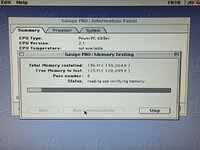
It *should* detect the memory as 8/64/64, but it tends toward other numbers 16/64/32 as seen in the attached picture. Apple System Profiler does the same sort of thing. I forget what other programs I have checked and if their reported numbers vary at all. It has been a while and this 6500 has been packed away. I also don't remember what it shows when I use smaller sticks in the slots.

With one 64MB stick removed from slot 2(beside the Video In slot):
Code:
0 > f8000000 100 dump
F8000000: 10 00 00 00 4B 00 FD FD 10 00 00 00 4B FF 00 FD :....K.......K...:
F8000010: 04 10 13 33 4B 00 FD FD 00 00 03 45 4B FF 00 FD :...3K......EK...:
F8000020: 00 91 42 22 4B 00 FD FD 00 07 03 00 4B FF 00 FD :..B"K.......K...:
F8000030: 00 00 00 46 4B 00 FD FD 00 00 00 00 4B FF 00 FD :...FK.......K...:
F8000040: 11 11 11 00 4B 00 FD FD 22 22 22 11 4B FF 00 FD :....K...""".K...:
F8000050: 00 00 00 22 4B 00 FD FD 00 00 00 00 4B FF 00 FD :..."K.......K...:
F8000060: 00 00 00 00 4B 00 FD FD 00 00 00 FF 4B FF 00 FD :....K.......K...:
F8000070: 00 00 00 3F 4B 00 FD FD 00 00 00 00 4B FF 00 FD :...?K.......K...:
F8000080: 10 00 00 00 4B 00 FD FD 10 00 00 00 4B FF 00 FD :....K.......K...:
F8000090: 04 10 13 33 4B 00 FD FD 00 00 03 45 4B FF 00 FD :...3K......EK...:
F80000A0: 00 91 42 22 4B 00 FD FD 00 07 03 00 4B FF 00 FD :..B"K.......K...:
F80000B0: 00 00 00 46 4B 00 FD FD 00 00 00 00 4B 00 00 FD :...FK.......K...:
F80000C0: 11 11 11 00 4B 00 FD FD 22 22 22 11 4B FF 00 FD :....K...""".K...:
F80000D0: 00 00 00 22 4B 00 FD FD 00 00 00 00 4B FF 00 FD :..."K.......K...:
F80000E0: 00 00 00 00 4B 00 FD FD 00 00 00 FF 4B FF 00 FD :....K.......K...:
F80000F0: 00 00 00 3F 4B 00 FD FD 00 00 00 00 4B FF 00 FD :...?K.......K...: ok
0 >


What happens if you do this:
Code:
F8000060 88888888 !
F8000060 @ 8 u.r
F8000060 88888844 !
F8000060 @ 8 u.r
Code:
Open Firmware, 2.0.3
To continue booting the MacOS type:
BYE<return>
To continue booting from the default boot device type:
BOOT<return>
 ok
0 > F8000060 88888888 ! DEFAULT CATCH!, code=FFF00300 at   %SRR0: FF80ADEC   %SRR1: 0000B070
 ok
0 > F8000060 @ 8 u.r 00000000 ok
0 > F8000060 88888844 ! DEFAULT CATCH!, code=FFF00300 at   %SRR0: FF80ADEC   %SRR1: 00009070
 ok
0 > F8000060 @ 8 u.r 00000000 ok
0 >


The Wombat doesn't always allow Command-Option-O-F to work?
You can do this to automatically enter Open Firmware each boot:
setenv auto-boot? false
Thanks, I'll try that. I don't actually know how this all works but it is the same deal as with cmd+opt+p+r so I wonder if there is something to do with the timings of things? That, or I suppose my 6500 might just be a heap of junk, it has had a rough life. I could probably also see if there is any new firmware available for the Wombat, perhaps this is just a bug that is already fixed like the 1.44MB disk handling of the floppy emu around the time I got mine.

PXL_20230303_144417837.NIGHT.2.jpgPXL_20230303_181728471.MP.2.jpgPXL_20230303_175433531.MP.2.jpgPXL_20230303_181025434.MP.jpgPXL_20230303_191948809.MP.jpg
 
I soldered it. I was chatting about it with someone elsewhere, and they got the part number of the chips from their 6400 board and found an ebay auction for some memory sticks for me to buy and lift the chips from. So I bought a couple sticks and moved the chips onto my 6500.
If you can solder on 8 MiB, then what's to stop getting a full bank of 32MiB from being soldered on? I suppose that would require a DIMM slot implementation to provide for extra chips (if you need more chips to do 32MiB compared to 8 MiB)? Basically, you would need half the chips of one of your 64 MiB DIMMs.

It *should* detect the memory as 8/64/64, but it tends toward other numbers 16/64/32 as seen in the attached picture. Apple System Profiler does the same sort of thing. I forget what other programs I have checked and if their reported numbers vary at all.
I wonder what method is used to detect memory sizes? I don't know of an API that has that info. Nor is that info in Open Firmware. By reading the PSX registers directly, we can determine the total RAM and which banks the RAM is installed in and we can determine from that the total size of a DIMM for each slot.

With one 64MB stick removed from slot 2(beside the Video In slot):
Code:
0 > f8000000 100 dump
F8000000: 10 00 00 00 4B 00 FD FD 10 00 00 00 4B FF 00 FD :....K.......K...:
F8000010: 04 10 13 33 4B 00 FD FD 00 00 03 45 4B FF 00 FD :...3K......EK...:
F8000020: 00 91 42 22 4B 00 FD FD 00 07 03 00 4B FF 00 FD :..B"K.......K...:
F8000030: 00 00 00 46 4B 00 FD FD 00 00 00 00 4B FF 00 FD :...FK.......K...:
F8000040: 11 11 11 00 4B 00 FD FD 22 22 22 11 4B FF 00 FD :....K...""".K...:
F8000050: 00 00 00 22 4B 00 FD FD 00 00 00 00 4B FF 00 FD :..."K.......K...:
F8000060: 00 00 00 00 4B 00 FD FD 00 00 00 FF 4B FF 00 FD :....K.......K...:
F8000070: 00 00 00 3F 4B 00 FD FD 00 00 00 00 4B FF 00 FD :...?K.......K...:
F8000080: 10 00 00 00 4B 00 FD FD 10 00 00 00 4B FF 00 FD :....K.......K...:
F8000090: 04 10 13 33 4B 00 FD FD 00 00 03 45 4B FF 00 FD :...3K......EK...:
F80000A0: 00 91 42 22 4B 00 FD FD 00 07 03 00 4B FF 00 FD :..B"K.......K...:
F80000B0: 00 00 00 46 4B 00 FD FD 00 00 00 00 4B 00 00 FD :...FK.......K...:
F80000C0: 11 11 11 00 4B 00 FD FD 22 22 22 11 4B FF 00 FD :....K...""".K...:
F80000D0: 00 00 00 22 4B 00 FD FD 00 00 00 00 4B FF 00 FD :..."K.......K...:
F80000E0: 00 00 00 00 4B 00 FD FD 00 00 00 FF 4B FF 00 FD :....K.......K...:
F80000F0: 00 00 00 3F 4B 00 FD FD 00 00 00 00 4B FF 00 FD :...?K.......K...: ok
0 >
This shows that slot 2 (beside the Video In slot) fills bank 1 and 2. I wonder if there are DIMMs that fill only 1 bank? I suppose a 4 MiB DIMM can only be a single bank because 4MiB is the smallest page map unit. Do 8, 16, 32 MiB DIMMs use one or two banks or can they use either? 64 MiB DIMMs must use 2 banks according to ServiceSource.

Code:
Open Firmware, 2.0.3
To continue booting the MacOS type:
BYE<return>
To continue booting from the default boot device type:
BOOT<return>
 ok
0 > F8000060 88888888 ! DEFAULT CATCH!, code=FFF00300 at   %SRR0: FF80ADEC   %SRR1: 0000B070
 ok
0 > F8000060 @ 8 u.r 00000000 ok
0 > F8000060 88888844 ! DEFAULT CATCH!, code=FFF00300 at   %SRR0: FF80ADEC   %SRR1: 00009070
 ok
0 > F8000060 @ 8 u.r 00000000 ok
0 >

I should have tested the commands first. I think they should be this (address is at the top of the stack for both @ and !):
Code:
88888888 F8000060 !
F8000060 @ 8 u.r
88888844 F8000060 !
F8000060 @ 8 u.r
 
The G3/Kanga is an example of a PSX-based machine capable of using the full 160MB, since it has 32MB soldered, right?
Maybe. Kanga uses a special RAM card, not normal DIMMs, so I guess it's harder to upgrade. I suppose the RAM card could contain 4 banks of RAM, 32 MiB per bank, 128 MiB total.

@imactheknife has a 160 MB Kanga.
https://68kmla.org/bb/index.php?threads/kanga-showed-up.47129/
@LightBulbFun has? a 96 MB Kanga.
https://forums.macrumors.com/threads/the-worlds-fastest-laptop-circa-1997.2102506/post-25739536
 
Here is 8MB onboard and 32MB Kingston KTA603/32 in slot 1, slot 2 is empty. Apple System Profiler says there is 40MB built-in and shows a single 16MB DIMM with no location.
Code:
0 > f8000000 100 dump
F8000000: 10 00 00 00 4B 00 FD FD 10 00 00 00 4B FF 00 FD :....K.......K...:
F8000010: 04 10 13 33 4B 00 FD FD 00 00 03 45 4B FF 00 FD :...3K......EK...:
F8000020: 00 91 42 22 4B 00 FD FD 00 03 03 00 4B FF 00 FD :..B"K.......K...:
F8000030: 00 00 00 46 4B 00 FD FD 00 00 00 00 4B FF 00 FD :...FK.......K...:
F8000040: 11 11 11 00 4B 00 FD FD 00 00 00 11 4B FF 00 FD :....K.......K...:
F8000050: 00 00 00 00 4B 00 FD FD 00 00 00 00 4B FF 00 FD :....K.......K...:
F8000060: 00 00 00 00 4B 00 FD FD 00 00 00 FF 4B FF 00 FD :....K.......K...:
F8000070: 00 00 00 3F 4B 00 FD FD 00 00 00 00 4B FF 00 FD :...?K.......K...:
F8000080: 10 00 00 00 4B 00 FD FD 10 00 00 00 4B FF 00 FD :....K.......K...:
F8000090: 04 10 13 33 4B 00 FD FD 00 00 03 45 4B FF 00 FD :...3K......EK...:
F80000A0: 00 91 42 22 4B 00 FD FD 00 03 03 00 4B FF 00 FD :..B"K.......K...:
F80000B0: 00 00 00 46 4B 00 FD FD 00 00 00 00 4B FF 00 FD :...FK.......K...:
F80000C0: 11 11 11 00 4B 00 FD FD 00 00 00 11 4B FF 00 FD :....K.......K...:
F80000D0: 00 00 00 00 4B 00 FD FD 00 00 00 00 4B FF 00 FD :....K.......K...:
F80000E0: 00 00 00 00 4B 00 FD FD 00 00 00 FF 4B FF 00 FD :....K.......K...:
F80000F0: 00 00 00 3F 4B 00 FD FD 00 00 00 00 4B FF 00 FD :...?K.......K...: ok
0 >

And this is a different 32MB stick in slot 2, slot 1 is empty. This time Apple System Profiler lists 8MB with no location, and 32MB in location: DRAM 2. This is correct.
Code:
0 > f8000000 100 dump
F8000000: 10 00 00 00 4B 00 FD FD 10 00 00 00 4B FF 00 FD :....K.......K...:
F8000010: 04 10 13 33 4B 00 FD FD 00 00 03 45 4B FF 00 FD :...3K......EK...:
F8000020: 00 91 42 22 4B 00 FD FD 00 09 03 00 4B FF 00 FD :..B"K.......K...:
F8000030: 00 00 00 46 4B 00 FD FD 00 00 00 00 4B FF 00 FD :...FK.......K...:
F8000040: 33 33 33 00 4B 00 FD FD 00 00 00 33 4B FF 00 FD :333.K......3K...:
F8000050: 00 00 00 00 4B 00 FD FD 00 00 00 00 4B FF 00 FD :....K.......K...:
F8000060: 00 00 00 00 4B 00 FD FD 00 00 00 FF 4B FF 00 FD :....K.......K...:
F8000070: 00 00 00 3F 4B 00 FD FD 00 00 00 00 4B FF 00 FD :...?K.......K...:
F8000080: 10 00 00 00 4B 00 FD FD 10 00 00 00 4B FF 00 FD :....K.......K...:
F8000090: 04 10 13 33 4B 00 FD FD 00 00 03 45 4B FF 00 FD :...3K......EK...:
F80000A0: 00 91 42 22 4B 00 FD FD 00 09 03 00 4B FF 00 FD :..B"K.......K...:
F80000B0: 00 00 00 46 4B 00 FD FD 00 00 00 00 4B FF 00 FD :...FK.......K...:
F80000C0: 33 33 33 00 4B 00 FD FD 00 00 00 33 4B FF 00 FD :333.K......3K...:
F80000D0: 00 00 00 00 4B 00 FD FD 00 00 00 00 4B FF 00 FD :....K.......K...:
F80000E0: 00 00 00 00 4B 00 FD FD 00 00 00 FF 4B FF 00 FD :....K.......K...:
F80000F0: 00 00 00 3F 4B 00 FD FD 00 00 00 00 4B FF 00 FD :...?K.......K...: ok
0 >
As an additional note, when presented with a 64MB stick in slot 2 and slot 1 empty, Apple System Profiler will correctly list 8MB with no location and 64MB in DRAM 2. So it must just be an issue with counting the onboard and slot 1 at the same time.


Code:
0 > 88888888 F8000060 !  ok
0 > F8000060 @ 8 u.r 00000000 ok
0 > 88888844 F8000060 !  ok
0 > F8000060 @ 8 u.r 00000044 ok
0 >
What are these supposed to be doing? Is this the expected output?
 
Here is 8MB onboard and 32MB Kingston KTA603/32 in slot 1, slot 2 is empty. Apple System Profiler says there is 40MB built-in and shows a single 16MB DIMM with no location.
Code:
F8000040: 11 11 11 00 Page_Mappings_1
F8000048: 00 00 00 11 Page_Mappings_2
F8000050: 00 00 00 00 Page_Mappings_3
F8000058: 00 00 00 00 Page_Mappings_4
F8000060: 00 00 00 00 Page_Mappings_5
Yup, I see 8 MB bank 0 and 32 MB bank 1. But we said slot 2 (beside the Video In slot) was bank 1/2? Actually, I misread what you previously wrote. You said slot 2 was empty but I thought you said slot 2 was filled. Ok, so now we know slot 1 is bank 1/2. And that 32 MiB DIMMs can be single bank (probably cheaper than making a DIMM with dual banks of 16 MiB each?).

And this is a different 32MB stick in slot 2, slot 1 is empty. This time Apple System Profiler lists 8MB with no location, and 32MB in location: DRAM 2. This is correct.
Code:
F8000040: 33 33 33 00 Page_Mappings_1
F8000048: 00 00 00 33 Page_Mappings_2
F8000050: 00 00 00 00 Page_Mappings_3
F8000058: 00 00 00 00 Page_Mappings_4
F8000060: 00 00 00 00 Page_Mappings_5
This shows 8 MB bank 0 and 32 MB bank 3, as expected. Slot 2 must be bank 3/4.

As an additional note, when presented with a 64MB stick in slot 2 and slot 1 empty, Apple System Profiler will correctly list 8MB with no location and 64MB in DRAM 2. So it must just be an issue with counting the onboard and slot 1 at the same time.
Interesting.

Code:
0 > 88888888 F8000060 !  ok
0 > F8000060 @ 8 u.r 00000000 ok
0 > 88888844 F8000060 !  ok
0 > F8000060 @ 8 u.r 00000044 ok
0 >
What are these supposed to be doing? Is this the expected output?
Yes, that is expected output (at least it matches all the dumps you've given so far). I just wanted to make sure that writing bank 8 reads as 0.
 
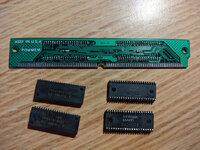
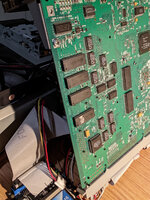
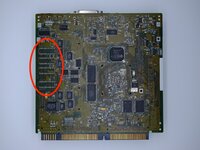
Does anyone know if RAM chips with memory density higher then 2MB were made in the "form factor" that would work with the 6500's four unused on-board memory pads?

PM6500-LB-back.jpg
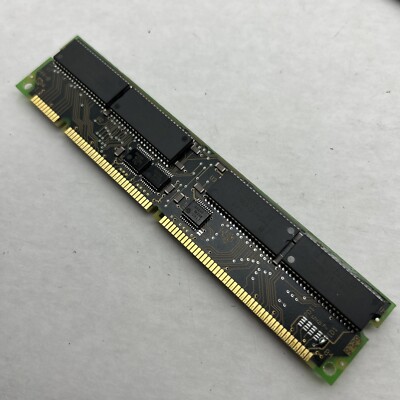
These somewhat larger than typical RAM IC have 42 pins, you can find DIMMs on eBay that look like they would fit but they all seem to be composed of 2MB chips, 4 chips = 8MB DIMM and 8 chips (aka "double sided") = 16MB DIMM.

Example 16MB DIMM with 8 x 2MB RAM ICs:

Would be cool to be able to add more than 8MB to the logic board.
 
Last edited:
Does anyone know if RAM chips with memory density higher then 2MB were made in the "form factor" that would work with the 6500's four unused on-board memory pads?

View attachment 81783
These somewhat larger than typical RAM IC have 42 pins, you can find DIMMs on eBay that look like they would fit but they all seem to be composed of 2MB chips, 4 chips = 8MB DIMM and 8 chips (aka "double sided") = 16MB DIMM.

Example 16MB DIMM with 8 x 2MB RAM ICs:

Would be cool to be able to add more than 8MB to the logic board.

Thought to look at what my Umax SuperMac c500 has on its logic board as I remembered it is based on Apple's Alchemy (6360/5400/6400) design and has 16MB on-board but it uses the more typical 28 pin RAM ICs.
 
so far i havent found anything about other chip sizes. theoretically it may be possible to get the pinout of these chips and make an interposer for other chips that can be adapted, so long as it is able to have the same amount of addresses... which i am not too sure about. i know you can't go over that, at least without the schematics.
 
I know it's an older thread, but original schematics for the 6500 are available. And I'm actually very interested in this topic
 
Does anyone know if RAM chips with memory density higher then 2MB were made in the "form factor" that would work with the 6500's four unused on-board memory pads?
You could probably piggy-back extra chips and use flying wires to connect the RAS lines up to the unused pins on the PSX
 
Back
Top