• Hello MLAers! We've re-enabled auto-approval for accounts. If you are still waiting on account approval, please check this thread for more information.

Radius SE Accelerator Card

Hello. I'm new to this site. I've had a Mac SE in storage for years. Only recently have I again started playing with it. I was happy to see that someone had previously upgraded the floppy to a SuperDrive. My SCSI hard drive was dead, but I was able to install a SCSI2SD card, which works great. I'm looking forward to playing some vintage Infocom games like Suspended.

I also bought a Radius SE accelerator card years ago, but never used it. It looks pristine to me, but I'm no expert. I've been looking online for any documentation that might exist for these. I've found a few mentions of the cards on various sites, including this one, but no documentation. I've seen pictures of the cards, and some drivers. Would anyone know if these are plug 'n play, or what might be required to make them work?

Thanks in advance.

 
I want to see it required drivers installed first, but I cannot recall for sure. Either way, it’s good measure to install anything on the system before trying regardless. 

 
It definitely requires a driver and the docs don't say which for what, but my Docs are from '87 fr the Accelerator 16. Older ROMs are limited to System 6 and the upgraded ROMs, when installed on the Accelerator 16 support Systems 7-7.1

Maybe info and the proper drivers for yours are here: http://macintoshgarden.org/apps/radiusware-1990-displays-41-accelerator-29-radiusmath-15

The Radius Technical Hotline Q&A is back up online again: http://radius.vintagebox.de/RadiusQA/accelerators.html

Haven't looked any further than that, I haven't even got mine up and running yet, too much else to do.

 
I have a Radius 16 running in a Mac Plus and it's awesome - which accelerator do you have?  The link TRS80 posted above are the drivers I uploaded recently from the original floppy I have. But from what I can tell, at least on a Plus you actually don't need the drivers to make the board work (you do though, I think, to get accelerated math from the 68881/2 if you have one installed) -- you can just plug it in and turn it on.  Maybe different on an SE.

If you have a Radius 16 and don't have the installation docs, I can take photos of mine this weekend and share them somehow, but they are for the Plus version so might not be useful.  But it occurs to me you might have the Radius 25 for the SE in any event, which I'm sure is excellent.

 
Last edited by a moderator:
Interesting, if that's the case, the "driver" may only be the control panel that allows the user to turn the accelerator on and off for compatibility's sake as needed. traildog, has yours got the optional Math CoPro on board?

 
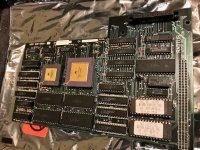
I don't know how to tell if the card is the 16 or 25. Can you tell from the photo? It does appear to have a co-processor.

IMG_0159.jpeg

 
IIRC the 25MHz version has a significantly larger PCB with a different outline, but the picture I recall may have been of the Plus sand SE versions.

 
Last edited by a moderator:
I appreciate the responses. If anyone does have an image of the 16's documentation, I'd appreciate that too. 

Thank you.

 
I'll see what I can do about scanning my pages, someone else will need to build a PDF out of them. Let me know size/res/etc for the PDF.

 
I just checked and have the following:

* Radius Accelerator 16 installation guide for the Macintosh Plus -- definitely not useful to you (the Plus board installation is a bit of a pain, damn grounding screws, I'm guessing yours is much easier on the SE)

* RadiusWare manual for the Macintosh SE - odd that it came packaged with my board since mine wouldn't work on an SE.  Anyway this only describes how to use the RadiusWare control panel, which is actually pretty self explanatory so probably isn't super useful to you.  However I'll try to upload it somewhere when I get time (and will try harder if you think you actually need it! - let me know).

 
Hi Crutch,

I appreciate your offer. I’m going to install the card and see what happens. Perhaps I won’t need the software to make it work. 

 
Back
Top