



Hi everyone,
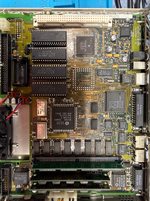
I have an LC II, apparently in good shape — no battery damage, it was stored in a warm, dry place, and there’s no visible corrosion.
The absence of the J9 IC seems to be normal in these boards.
Pin 117 of the CPU is bent, but there is continuity.
However, the capacitors near the EGRET and sound section had leaked slightly.
I removed all of them and cleaned the board in the dishwasher (without soap).
After that, I dipped that corner of the logic board in an ultrasonic cleaner — which, in hindsight, was probably not a good idea.
I then replaced all capacitors, checking continuity on every solder joint, pad, via, and trace.
I also cleaned and rinsed the board again thoroughly with isopropyl alcohol.
The PSU has been recapped; voltage rails are stable and verified on another working LC.
A new PRAM battery was installed — and at this point, it should have been an easy success story
But at boot: no sound, no chime, no video.
Same behaviour with or without RAM. I didn’t bother checking VRAM because the startup chime should sound regardless.
The CPU gets warm, but all other ICs remain cold.
On the first couple of power-ups, the speaker produced some crackling noises, then went completely silent.
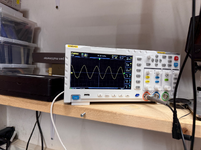
Using an oscilloscope, I probed Y1 near the EGRET and saw a 32 kHz sine wave, which seems correct — though I’m new to oscilloscopes, so I might be my clumsiness.
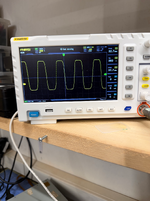
At the CPU’s CLK pin, I see a 15 MHz signal, but it looks sinusoidal instead of square. The probe and scope are both set to 10×, and the ground is connected to the chassis — but again, it might just be me. I don't understand the voltage reading; it seems too high to me.
At this point, I’m not sure how to proceed.
I could try replacing the EGRET or the DFAC blindly (assuming I can find the replacements), attempt serial debugging as shown by Adrian, or accept that this logic board may be a dead end.

I have an LC II, apparently in good shape — no battery damage, it was stored in a warm, dry place, and there’s no visible corrosion.
The absence of the J9 IC seems to be normal in these boards.
Pin 117 of the CPU is bent, but there is continuity.
However, the capacitors near the EGRET and sound section had leaked slightly.
I removed all of them and cleaned the board in the dishwasher (without soap).
After that, I dipped that corner of the logic board in an ultrasonic cleaner — which, in hindsight, was probably not a good idea.
I then replaced all capacitors, checking continuity on every solder joint, pad, via, and trace.
I also cleaned and rinsed the board again thoroughly with isopropyl alcohol.
The PSU has been recapped; voltage rails are stable and verified on another working LC.
A new PRAM battery was installed — and at this point, it should have been an easy success story
But at boot: no sound, no chime, no video.
Same behaviour with or without RAM. I didn’t bother checking VRAM because the startup chime should sound regardless.
The CPU gets warm, but all other ICs remain cold.
On the first couple of power-ups, the speaker produced some crackling noises, then went completely silent.
Using an oscilloscope, I probed Y1 near the EGRET and saw a 32 kHz sine wave, which seems correct — though I’m new to oscilloscopes, so I might be my clumsiness.
At the CPU’s CLK pin, I see a 15 MHz signal, but it looks sinusoidal instead of square. The probe and scope are both set to 10×, and the ground is connected to the chassis — but again, it might just be me. I don't understand the voltage reading; it seems too high to me.
At this point, I’m not sure how to proceed.
I could try replacing the EGRET or the DFAC blindly (assuming I can find the replacements), attempt serial debugging as shown by Adrian, or accept that this logic board may be a dead end.
 I believe my issue is more on the hardware side, but I'll check on the other side


