Follow along with the video below to see how to install our site as a web app on your home screen.
Note: This feature may not be available in some browsers.
Hello MLAers! We've re-enabled auto-approval for accounts. If you are still waiting on account approval, please check this thread for more information.
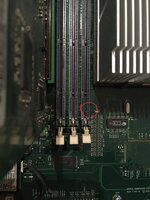
My new-to-me 2002 QuickSilver is not seeing all its RAM. I've moved the sticks around and it appears that the slot nearest to the processor isn't seeing any RAM. Does this picture look normal? Are those two metal prongs suppose to be there in a QuickSilver?
To me, it looks like somehow the two legs of those sockets got pushed inside, and are being squashed by the RAM sticks. They are then not contacting the traces on the side of the stick. Those will either somehow have to be placed back upright (possibly VERY carefully), or the slot replaced. I'd venture to do the first option to start!
Thank you for your quick reply, @LaPorta! That was great guidance; I agree that that seems to be the problem. To build up the image of what's happened, those legs have been bent about 90*?
How would you suggest bending them back up? Gently prying them back up and inline with the others?
That’s what I’d suggest. A wooden toothpick or small plastic pick of some sort would be good. If they’ve bent that far they could be a little weak, so be gentle.
looking at it again, it could be a little tricky. I think the top of the pin is supposed to fit in the channel at the back (you can see the ends of the other pins inside the little square holes). Bending and straightening the pin could be a little tough.
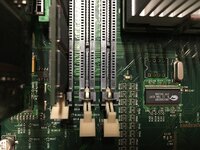
Success! Yet somehow I feel uneasy about it. Its reporting 1.5GB but as you mentioned, @mdeverhart, the errant pins aren't properly in the channels as the other are from above. I took the picture before trying to get the pins in a little more.
The bent pins are not at the same height as the others. There's clearly enough of a connection to be seen and if this were a PowerBook, I'd be uneasy about the lack of 100% contact. Should I be worried in this application?
To do a proper fix I'd have to remove the connector, but I have no idea how to do that. Thoughts?
If it’s working, I’d say leave it. The RAM clips should hold the module in place well enough to get decent contact. Worst case, an intermittent connection could cause a crash, or maybe damage the RAM if it was a power pin. Trying to bend the pin further is just risking breaking it off, and then you’re out of luck until you can replace the connector.
I definitely agree with the above. If it works, and you don't mind it being like that, leave it alone. Trying to solder in a new one of those sockets would be a BIG job.
This site uses cookies to help personalise content, tailor your experience and to keep you logged in if you register.
By continuing to use this site, you are consenting to our use of cookies.