• Hello MLAers! We've re-enabled auto-approval for accounts. If you are still waiting on account approval, please check this thread for more information.

QuickDraw acceleration on Radius PrecisionColor 8-24X

luRaichu

6502
I've had this NuBus card in my Macintosh IIcx for a while now. After installing the RadiusWare utilities set, all video modes are accessible and switchable on-the-fly. But when opening the QuickColor control panel it lists no Radius accelerators present and there's just two radio buttons to switch acceleration on and off. I tried flipping that switch and running QuickDraw benchmarks and I'm not sure if that even makes a difference.

How do I know if my QuickDraw is being quickened or not?
 
turn off acceleration, set the card to a high resolution, set the card to 24 bit mode.
open a folder with a lot of icons, maybe the control panels folder.
make a note of how long it takes to draw the window/icons/text

then turn acceleration on and do the same. it should draw the folder quicker.
 
A key to @finkmac 's instructions is the recommendation to try it in 24-bit mode. Very few cards accelerate all video modes. For example, I found an "accelerated" card that only accelerated copybits and scroll, and only in 24-bit mode.

So, it is worth trying millions of colors, if you haven't already, to see if that is accelerated.
 
Well, I also don't have a good frame of reference for how slow unaccelerated 24-bit graphics are on the IIcx. This card could be accelerating everything reguardless of the QuickColor control panel and I'd have no way of telling the difference
 
It should NOT be accelerating with QuickDraw acceleration turned off. You can just use a benchmark software like Speedometer, MacBench, Norton System Info, etc. The key, like others have said, is to set your color depth to 24 bit color. Then turn QuickDraw acceleration off, run the benchmark, then turn the acceleration on, and run the benchmark. Then compare the graphics performance results. Difference should be notable, but only in higher color modes. They may be identical in black and white or 8 bit color.
 
But when opening the QuickColor control panel it lists no Radius accelerators present

What version ROM on the card, and what version of QuickColor are you using? I know if you have an earlier version ROM and later version QuickColor, the card won't show up in the QuickColor panel. Not sure if it impacts acceleration, but something to look at.
 
My card has ROM V1.2.1 and I'm probably using the youngest release of RadiusWare. Will definitely have to unleash the IIcx and see now
 
I had the same issue with my Radius PrecisionColor 8XJ. It works, but it wasn't any faster then the built in video on the IIci in benchmarks and toggling accelerate settings didn't do anything. My ROM is version 1.5

I'll dig it out in the next couple days and experiment with different RadiusWare drivers and see if that does anything.
 
Installed RadiusWare 2.2.1, was previously using 3.4.1. The video card is identified correctly by the QuickColor 2.5 control panel and you can toggle acceleration.
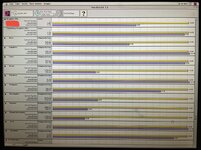
I benchmarked accelerated vs. non-accelerated graphics using 24-bit color at 1152x870. As you can see, QuickDraw acceleration yields a 38% increase in graphics performance
 

Attachments

  • 50726265-6B24-435A-A5C9-29E50C1704F4.jpeg
    50726265-6B24-435A-A5C9-29E50C1704F4.jpeg
    1.2 MB · Views: 21
Back
Top